
Private wishlists shared with family members

The obvious choice isn’t always the simplest: a retailer wishlist can keep gifts in one place, but it may not suit a family sharing ideas across different shops. Some wishlist services let you set a list to private or unlisted, then share its link with family. A private wishlist for family only depends on who can access that link and how the list’s privacy settings work.
It’s easy to see why families rely on group chats. Everyone already uses them, but gift ideas can get buried under updates and details may need repeating. A shared list keeps current gift information together, while a retailer list may be tied to one store.
This guide explains how private family sharing works, what to check about link access and privacy, and how wishlist tools compare with chats and retailer lists. You’ll be better placed to choose a setup that fits your family’s gifting habits, whether you’re coordinating across cities or keeping everyone’s gift ideas in one place.
Table of Contents
Which services provide private wishlist sharing with family members?
Wishlist services can bring gift ideas from different shops into one list, then share it with selected relatives. The useful distinction is how each service handles privacy, updates and gift claims.
Sharing With Immediate and Extended Family
A shared wishlist gives immediate and extended family one place to view current gift ideas. The organiser can add or remove items, then send relatives the list link by email or family chat. Grandma can check the same list as a cousin elsewhere, instead of relying on an old screenshot.
Check who can open a list and whether relatives need accounts. Some services let anyone with the link view it, while others restrict access to invited members. Guest access makes things easier for relatives who want to browse or claim a gift without signing up. Claim options vary, so check whether the service updates an item’s status and hides the claimant’s name.
Adding gift ideas may be quicker if a service supports phone sharing or a browser extension. A family member, for example, might use a phone’s share menu to send a toy or book listing to the wishlist. On a computer, an extension may let them save an item while browsing. Consider how your relatives shop and which tools they’re comfortable using.
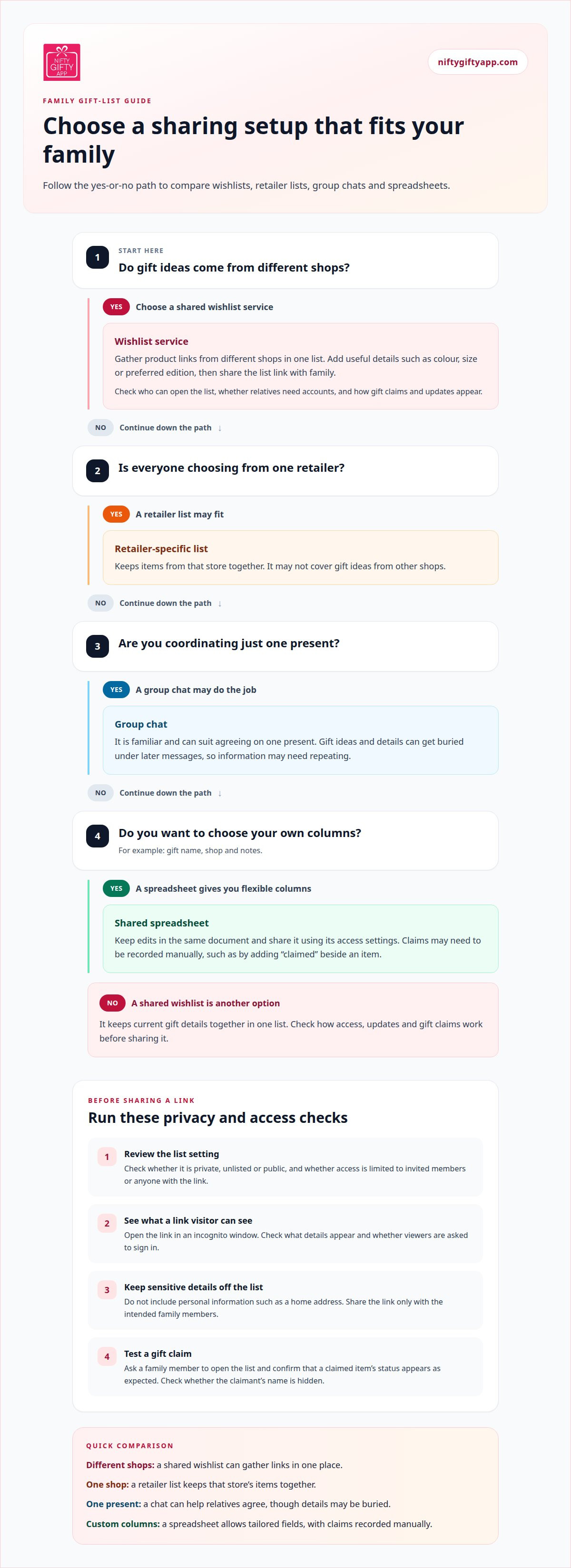
A spreadsheet can suit families who want to choose their own columns, such as gift name, shop and notes. Share the file with relatives using its access settings, then keep edits in the same document. Unlike a wishlist service, a spreadsheet may require people to record claims manually. Agree on a simple process, such as adding “claimed” beside an item, to keep the list useful.
Privacy and Security Checks
Before sharing, check whether the wishlist is private, unlisted or public. A forum participant cautioned that privacy settings may default to public, potentially exposing personal information. Review the list’s settings before sending the link, and check what details appear alongside gift ideas.
Test access by opening the link in an incognito window. This shows what someone without your account can see. If viewers are asked to sign in, consider how easily invited relatives can access the list. Share the link only with the intended family members, and don’t put sensitive details, such as a home address, in the list.
Check what happens when someone claims an item. A service that updates the list helps relatives see what’s still available, while a spreadsheet relies on people recording changes. Before sharing the list with everyone, ask a family member to open it and confirm that claimed items appear as expected.
How a Wishlist Service Helps Build a Shareable Family Christmas Wishlist
A wishlist service can gather gift ideas from different Australian stores by saving product links in one list. Depending on the service, relatives can add an item using a phone’s share option, a browser extension or a pasted link.
For a family Christmas list, use clear item names and useful details, such as colour, size or preferred edition. One relative could add a particular book’s product page, while another saves the requested kitchen appliance. Everyone has a shared reference instead of separate screenshots or forwarded messages.
Gift claims can help prevent duplicate presents by showing that someone has selected an item. Some family gift registries let relatives claim gifts anonymously, so other shoppers can see what’s claimed without seeing who claimed it. That can keep the gift a surprise for the person named on the list. Check whether claims update for everyone viewing it.
Updates matter. One family reported that a wishlist platform didn’t sync after a sister purchased a gift, leaving the same item available to others. If a claim doesn’t appear, relatives may need to coordinate directly before purchasing. A quick message to the organiser can clarify whether an item is still available, particularly when several people shop separately.
Some services let organisers hide claimed or purchased gifts from the list creator. This keeps the present a surprise while helping other shoppers avoid selecting it. The details vary: a service may conceal the item, mark it as claimed, or show a status without revealing the claimant. Check what the recipient can see, especially if they also manage the list.
For a more expensive Christmas gift, relatives may want to contribute together rather than choose separate presents. If a service supports group gifts, the organiser can list the shared present and coordinate contributions. Check how the service records contributions and whether relatives arrange payments separately. The list should make the agreed gift clear, without implying that a contribution has been paid when it hasn’t.
Use a clear process for each item: add the product link, include important details, then let relatives claim or coordinate before purchasing. This keeps wishlists useful across different stores and helps the family focus on gifts the recipient actually wants.
Wishlist apps versus group chats and retailer-specific lists
Each option organises family gift ideas differently. Compare how relatives share updates, keep lists current and manage separate occasions.
Choosing Between Apps, Chats and Retailer Lists
A wishlist service can gather gift ideas from different shops, with updates visible in one place. A group chat is familiar, but an idea shared on Monday can be buried under later messages by Friday. A retailer list keeps items from that store together, which may suit a family choosing from one shop but not cover everyone’s preferences.
Start with the task. If everyone needs current product details, a shared wishlist avoids sending a new screenshot after every change. If relatives only need to agree on one present, a chat may be enough. A retailer registry can suit a list focused on one store; check whether it accepts items from elsewhere.
Consider how the service handles claims. A button or status can show that someone has selected an item, while a chat may rely on a relative posting an update. If claims don’t sync, shoppers may need to message one another before purchasing to avoid choosing the same present.
Family Groups and Individual Wishlists
Some wishlist services support separate lists for individuals, while others may let members share within a family group. That distinction matters when one organiser coordinates gifts for children, parents and grandparents. Look for a setup that keeps each person’s gift ideas distinct, while making the right list easy for relatives to find.
For example, a family might share one person’s birthday list and another person’s holiday list. If the service supports multiple groups, the organiser can separate relatives by household or occasion. Check who can view each list and whether family members see all lists or only those shared with them.
An individual wishlist can suit someone sharing preferences with selected friends and relatives. A shared family group can work better when everyone is coordinating gifts for several people. The practical choice depends on who needs access, how often lists change and whether claims are visible to the relevant shoppers.
Before choosing, map out a real gifting situation. Decide whether cousins should see a grandparent’s list, whether siblings need separate access and how updates will reach everyone. This simple test can show whether a chat, retailer list or wishlist service will keep sharing organised without adding steps.
A shared wishlist can be updated in one place, so shoppers see current product details without needing a new text or screenshot. That makes it easier to keep a gift idea useful as plans change, while a chat remains handy for quick discussion. Consider whether relatives will check a list regularly or rely on messages. If they need an easy way to confirm the latest details, make that your deciding test. If conversation matters more, keep the chat involved and share list changes there.
Comparisons of wishlist services
Wishlist services differ in how they handle access, gift claims, shopping links and cost. For an Australian family, compare those features with the way relatives actually share gift ideas, rather than choosing by appearance alone.
There’s no single fee for private family wishlists in Australia. Services set their own access and subscription terms, so check whether features require payment, whether a subscription renews and what happens if it ends. Review these details before sharing a list that relatives will rely on for an occasion.
Start with access. One service may let anyone with a link view a list, while another may require invited members or an account. A private setting can limit who sees the recipient’s gift ideas, but controls vary. Check whether the organiser can change access later and whether guests can view or claim gifts without creating an account.
Next, check what a list can include. A retailer registry may focus on that retailer’s products, while a general wishlist service may gather links from different shops. This matters when a recipient has gift ideas from several places. Compare how each service displays product details and whether viewers see changes to an item’s link or description.
Gift claims are another useful point of comparison. Check whether claiming marks a gift as taken for other shoppers and whether the list creator can see the claim. Some families want the recipient to keep the surprise; others need the organiser to track what’s been selected. The right setting depends on who manages the list and who should see each update.
Imagine relatives organising a shared present while other family members choose individual gifts. A service with individual claims and a group-gift option may suit this arrangement. If it tracks contributions, check whether it shows a running total or processes payments. These are different functions: a contribution tracker doesn’t necessarily handle the money.
Finally, compare the everyday steps. Can family members add ideas while shopping on a phone? Can someone using a computer open the shared list? Does the service explain its privacy settings before you share? Comparing these tasks can show whether the list suits relatives with different devices and habits.
Choose based on the recipient, your family’s sharing needs and how much of a surprise you want to keep. Clear access settings, easy sharing and visible claim statuses matter more than features the family won’t use.
Wishlist account and link access
An organiser’s account and a shared gift link serve different purposes. The account holds the list, while relatives use the link to view gift ideas. For separate Christmas and birthday lists, keeping each occasion under the organiser’s account can make changes easier to track.
Can a private wishlist link expose personal details such as a name, address or email? It may show information displayed by the service or added by the organiser, so don’t use a wishlist to share private contact or delivery details. A list title can also identify the recipient, such as “Ava’s birthday ideas”.
Can family members purchase gifts from Australian retailers through wishlist links? Yes. Relatives can follow an item link to an Australian retailer and shop there. The wishlist doesn’t place the order; the retailer’s product page and checkout provide the purchase details.
Keep the gift list separate from the delivery plan. Relatives can use a product link to choose a present, then arrange delivery directly with the retailer. Don’t put a recipient’s street address or email in item notes, even if a relative will need those details later. Share delivery information separately with the family member arranging the parcel.
Retailer pages can change after an item is added. A product may become unavailable, be renamed or appear in a different colour when a relative opens the link. Include a useful description, such as the requested size or edition, so family members can recognise the intended gift if the page changes.
Account access matters when several people help organise lists. Keep the organiser’s login off shared household devices, and sign out after managing a list on a family computer. If a partner helps, agree who will update the list instead of sharing one person’s password.
For relatives who prefer not to create accounts, a list that opens in a browser makes viewing and claiming easier. That can help when an aunt uses a phone and a grandparent prefers a computer. If the recipient also organises gifts, use a different account or device from the one used to check their surprise, where possible.
Before adding notes, consider who will see them and whether they belong on the list. “Blue, size medium” helps a relative choose correctly; a home address or personal email adds information the gift list doesn’t need. Keep the list focused on the present and handle sensitive arrangements directly with the relevant family member.
Before sharing, check whether the list is private or unlisted, then test the link in an incognito window to confirm what relatives can access.
Nifty Gifty App
Nifty Gifty App helps families organise gift lists and coordinate claims across occasions. Organisers use the mobile app on iOS or Android, then share gifts with family through a secure link or QR code. Relatives can claim gifts without downloading the app or creating an account, and claims update in real time.
For a group present, contributors can chip in while the app tracks contributions with a live running total. Payments are arranged separately, directly between contributors and the organiser. The recipient receives the gift; they don’t claim it. This suits family organisers who want gift ideas and claims in one place rather than scattered across separate chats.
Ready to organise your family’s next occasion? Contact Nifty Gifty App.
Make your next family occasion easier to organise
A useful family wishlist starts with a shared understanding of who it’s for, which relatives should see it and how gift choices will be handled. Set expectations before the next occasion so family members can share ideas without turning every update into another conversation. A private wishlist for family only keeps gift planning focused on the people you’ve chosen to include.
Think about what would make gifting feel more considered for your family. Perhaps relatives live in different cities, or one person usually keeps track of everyone’s ideas. A dedicated place to organise those details can help that person bring the group together while keeping attention on the celebration, not the admin.
If you’d like a practical way to organise family gifting across occasions, explore Nifty Gifty App. Choose a setup that suits your relatives, then look forward to sharing the occasion together.
Frequently Asked Questions
What is it?
A private family wishlist is intended for a defined audience, rather than being shared publicly. The organiser gathers gift preferences for a person or occasion, such as a child’s birthday or a household’s Christmas ideas. Relatives use those preferences to choose suitable presents. The key is choosing an audience and sharing settings that suit the group and the organiser’s comfort with the information shown.
What Australian wishlist services let families share a private list with invited relatives only?
Look for services that clearly state whether access is limited to invited people, rather than assuming a list is private because it’s difficult to find. These are different access models. Nifty Gifty App lets organisers share a list through a secure link or QR code, and relatives can access it in a browser without downloading the app or creating an account. If invitation-only access is essential, choose a service that explicitly describes that model, not simply as private or unlisted.
How does a wishlist service set a list to private or invite-only?
The organiser generally selects an audience when creating or managing a list, but available controls vary by service. Some tools distinguish between a list hidden from public browsing and one that requires approval to view. Read the service’s explanation of each setting before relying on it. Also consider what should happen after the occasion, such as whether the list should remain useful or be closed.



Comments