
Gift Tracking App: Avoid Duplicate Presents and See Who's Buying What, in Real Time

What if one shared gift list could save you from checking three family chats before choosing a present? A gift tracking app can bring ideas, occasion details and budgets together, while helping your group avoid duplicate gifts. A thoughtful present is lovely. Wondering whether someone else has already claimed the same idea is less so.
If you’re the person everyone relies on to organise family gifts, plans can quickly spread across notes, messages and memory. It can be hard to see who’s claiming what or keep group contributions in view. A useful tool should make coordination clearer for organisers and guests, without adding another chore.
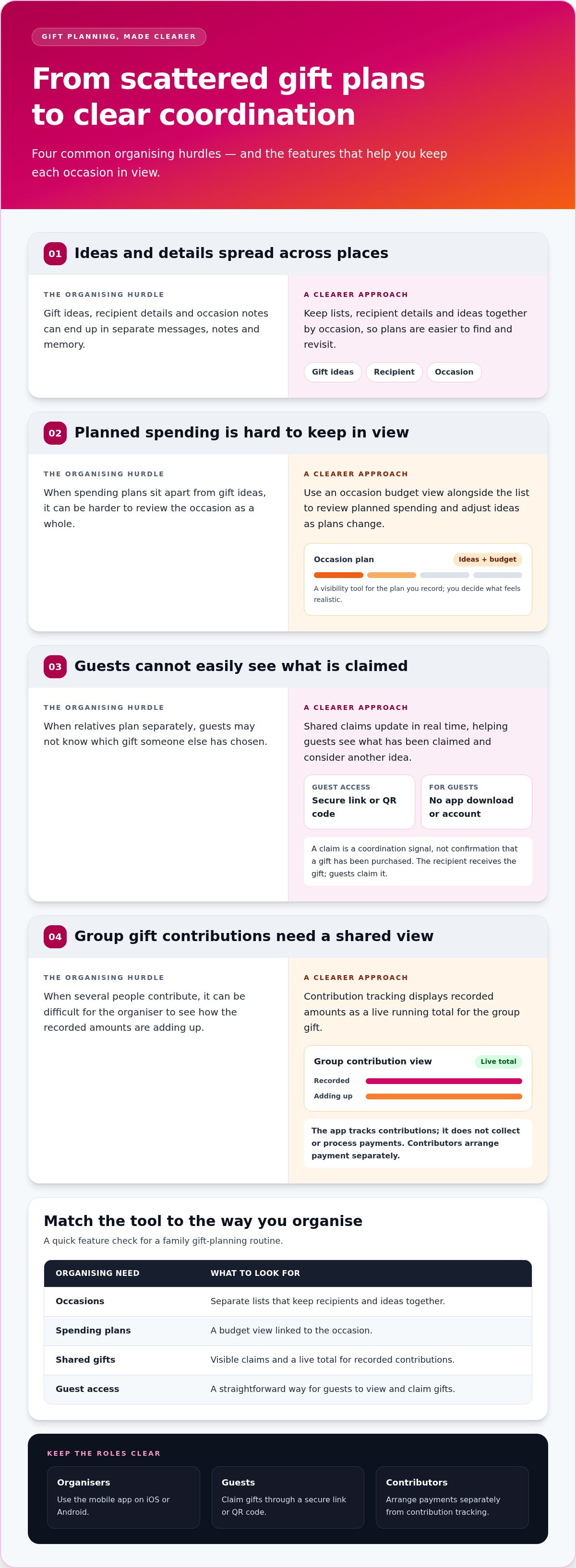
Here, you’ll find the features worth comparing, how gift claiming and group contribution tracking work, and what to consider when choosing an app for your family. Nifty Gifty App brings lists, occasion budgets and real-time claims together. Organisers use its iOS or Android app; guests claim through a secure link or QR code without downloading an app or creating an account. Group contributions show as a live total, while contributors arrange payments separately.
Table of Contents
What a gift tracking app helps you keep organised
A gift tracking app keeps occasion lists, recipient details, gift ideas and spending plans together, so you can see what’s planned in one place. Instead of relying on a phone note, a message thread and a good memory, you have one place to return to as plans take shape.
A shared view won’t make every decision for you, but it can make details easier to find and help you spot gaps. For example, you might see that one occasion has no gift ideas yet, or that a group present still needs someone to coordinate it.
The core jobs are distinct. A useful gift tracking routine can help you:
Capture ideas: Save a present idea when someone mentions a favourite book, hobby or item they need.
Organise recipients: Keep each idea beside the person and occasion it’s intended for.
Monitor budgets: View planned spending for an occasion instead of piecing it together from separate notes.
Coordinate shared gifts: Track a group present and the contributions people intend to make.
Which parts of gift giving can an app track?
Lists connect the details: who the gift is for, which occasion it belongs to and what ideas you’re considering. Budget tracking adds another view, helping you review planned spending by occasion and adjust the list if priorities change. For a shared gift, contribution tracking can show recorded amounts and a running total. Recording contributions is different from collecting or processing payments, so contributors arrange payment separately.
Why tracking gifts across occasions matters
Gift plans often stretch across the year. A birthday may call for a personal idea, while Christmas can involve several recipients. A wedding gift might be organised with other guests, while a baby shower present may need to suit a particular stage or practical need. Keeping each occasion’s notes distinct makes it easier to pick up the right plan without mixing one person’s ideas with another’s.
A repeatable routine is especially useful when you’re coordinating for family members who live in different places or when several people are contributing. Add details as they come up, then revisit the relevant occasion when it’s time to act. The traditions and relationships behind giving are varied, as the psychology of gift-giving helps illustrate, but your organising can follow a steady pattern.
Building a year-round habit means you’re not starting from scattered notes each time a date approaches. For more ideas on planning across the calendar, explore this gift planner app guide.
Gift tracking app features: lists, budgets and shared claiming
Useful features support three everyday jobs: keeping each occasion’s plans clear, seeing what you’ve set aside to spend and coordinating gifts with other people. A list gives you a place to record ideas. A budget view keeps planned spending in sight. Shared claiming lets guests see which gifts someone has already claimed. Each feature answers a different organising question, so consider how the parts work together rather than simply counting them.
Gift lists and occasion budgets
Separate lists make it easier to scan plans for each occasion without mixing up recipients or ideas. Add a gift to the relevant list, then return to it when you’re ready to decide what to purchase. A budget view gives the list context: you can review planned spending for that occasion and decide whether the ideas still fit your plans. For practical ways to keep spending in view occasion by occasion, explore this gift budget tracker guide.
Budget tracking is a visibility tool, not financial advice. It shows the plan you’ve recorded, while you decide what feels realistic for your household and update it as plans change. Reviewing the list and budget together can make it easier to consider your options before you purchase a present.
Shared claims and group gift contributions
On a shared list, a claim marks a gift as claimed so other guests can see that someone has chosen it. With Nifty Gifty App, claims update in real time. Guests can use a secure link or QR code without downloading the app or creating an account. A claim is a coordination signal, not confirmation that the gift has been purchased. The recipient receives the gift; they aren’t the person who claims it.
This helps when relatives are planning separately. If one guest claims a particular item, others can check the remaining options and choose something different. Everyone can coordinate while arranging their own gift.
Group gifts need a different kind of visibility. Nifty Gifty App tracks contributions in a live running total, so the organiser can see how the recorded amount is adding up. Contribution tracking records the group’s running total; it doesn’t collect or process payments. Contributors arrange their payments separately. The app helps keep coordination clear without handling money.
Together, lists, budgets, claims and contribution totals give organisers a clearer view of an occasion, from planning through to coordination. To see how those jobs come together in Nifty Gifty App, explore the app’s gift tracking features.
How to compare gift tracking apps for your family
A gift tracking app should fit the way you organise, whether you’re keeping a short list for one person or coordinating presents across a family group. Compare the jobs you need help with rather than the number of features on a screen. Occasion coverage, budget tracking, sharing and guest access are useful starting points.
Use these prompts to weigh up what matters for your family:
Occasion coverage: Can you organise birthdays, Christmas and other events in separate lists, or is the tool centred on one seasonal event? Choose an approach that suits how often you plan gifts throughout the year.
Budget tracking: Can you see planned spending by occasion? This helps a solo organiser keep gift plans in view, especially when several recipients are involved.
Sharing and claims: Can other guests see which gifts are claimed? If you coordinate shared presents, consider whether contribution totals are visible too. Remember that tracking contributions is different from handling payments.
Guest access: What must a guest do to view a list and claim a gift? A short, clear process can make it easier to include relatives who don’t want another app or account.
Privacy and access: Consider who can view a shared list, what information guests can see and how access is provided. Read the tool’s explanations rather than assuming every app handles access in the same way.
Match features to the way you organise gifts
If you’re the sole organiser, quick list management and occasion budgets may matter most. If several relatives help, shared claiming can show everyone which presents are spoken for, while contribution tracking can make a group gift easier to coordinate. If you organise gifts throughout the year, look for support for different event types rather than a tool centred on one seasonal occasion.
Check who needs to download or sign up
Keep the organiser’s experience separate from the guest’s. An organiser may use an app to create and manage lists, while guests might claim through a shared link. That distinction matters when you’re coordinating with family members who have different phones, preferences or levels of comfort with apps.
Organiser: Is list creation and occasion planning done in a mobile app, or can the organiser use a web browser?
Guest access: Is an app download or account required to view and claim a gift?
With Nifty Gifty App, organisers use the iOS or Android mobile app, not a desktop or web app. Guests claim gifts through a secure link or QR code without downloading the app or creating an account, and claims update in real time. That split keeps the organising tools with the person coordinating and gives guests a direct way to claim. As you compare options, consider which setup feels straightforward for both the organiser and the people joining in.
Set up a gift tracking routine that is easy to keep using
A routine is easier to keep when it follows the way you already plan. Start with the occasion and the people involved, then set a realistic spending limit before adding gift ideas. This gives every note a place and keeps the list useful as plans develop.
A repeatable routine for each occasion
Use the same steps for a birthday, family celebration or group gift. A gift tracking app can hold the details together, while your routine keeps the process practical.
Name the occasion. Create a separate list for the event and add the date or other details you’ll want to refer to.
Add the recipients. Include the people you’re organising for. If it’s a shared present, note who is coordinating it.
Set your spending limit. Choose an amount that suits your plans for this occasion. Treat it as a guide for reviewing your ideas, not a rule about what you should spend.
Capture gift ideas. Add ideas under the right recipient once the occasion, people and budget are clear. Note useful details, such as a preferred colour or hobby, so you can pick up the plan later.
Share and review. Send the relevant list when others need to coordinate. As the occasion approaches, review claims and planned spending, then update the details if plans change.
Keep the list current as decisions are made. If a present has been purchased, update its status if the tool allows it. For shared plans, look at the list before suggesting another gift. This small habit helps avoid duplicates and gives everyone a clearer picture of what still needs attention. For more ways to record gifts that have been purchased, see this guide to tracking purchased gifts.
Keep the routine light for family and friends
Share only the list people need for that occasion. A relative helping with one group present doesn’t necessarily need every family plan. Keep your message simple: explain who the gift is for, how to view the list and what to do if they want to claim an item.
Not everyone uses the same phone or wants another account. Choose a setup that makes the organiser’s steps clear and guest participation straightforward. With Nifty Gifty App, guests can claim through a secure link or QR code without downloading the app or creating an account. Claims update in real time, so the shared list reflects what’s been claimed.
Build your next occasion list with this routine, then repeat the steps when another date comes around. To see how Nifty Gifty App brings occasion planning and gift coordination together, explore Nifty Gifty App.
How Nifty Gifty App brings gift tracking into one place
Once you know which jobs matter, it’s easier to decide whether a tool suits your routine. Nifty Gifty App brings occasion lists, budget monitoring and shared gift coordination together for the organiser. It’s designed for birthdays, Christmas, weddings, baby showers and other occasions throughout the year, rather than just one seasonal event.
What organisers and guests do in Nifty Gifty App
Organisers create and manage gift lists in the Nifty Gifty App mobile app, available on iOS and Android. There’s no desktop or web app for organisers, so list-making and occasion planning happen on a mobile device. Organisers can keep gift plans and occasion budgets in view, then share the relevant list with guests.
Guests have a separate, straightforward role. They open a secure link or scan a QR code to view and claim a gift. They don’t need to download the app or create an account, and claims update in real time. A claim shows that a guest has chosen an item; the recipient is the person who receives the gift.
This setup can suit family groups with different preferences and devices. The organiser manages the occasion in the mobile app, while guests take part through the link or QR code. For a birthday, that could mean sharing one person’s list with relatives. For a wedding or baby shower, guests can check which gifts have been claimed before choosing what to give.
Occasion lists: Keep gift ideas and recipient details grouped by event.
Budget monitoring: View planned spending for an occasion as you organise its list.
Shared claiming: Let guests claim gifts through a secure link or QR code, with claims reflected in real time.
Group contributions: Track contributions with a live running total, while payment arrangements happen separately.
Together, these tools give the organiser a practical view of the plans and keep guest participation simple. Nifty Gifty App focuses on organising gift lists, tracking occasion budgets and helping people coordinate. It doesn’t sell gifts or handle delivery. If you’re looking for a gift tracking app that supports multiple occasions and makes guest claiming accessible, consider whether this mobile-first setup fits how your family shares the organising.
Nifty Gifty App has a 14-day free trial, then $7.99 a year. Explore Nifty Gifty App to see whether it suits the way you plan gifts.
Make room for the joy of giving
The most helpful gift tracking app is one that makes it easier to focus on the person, not the admin around their present. For your next occasion, start small: choose the people you’re celebrating, note what matters to them and give your plans a place to grow. You don’t need every detail sorted at once. A few useful notes now can make it easier to pick up where you left off later.
Then make the routine your own. Keep gift planning simple enough to return to, whether you’re organising for one person or bringing family together around a shared present. The aim isn’t to turn giving into a checklist. It’s to spend less time piecing plans together and more time choosing something thoughtful.
Ready to put that approach into practice? Organise your next occasion with Nifty Gifty App. Here’s to more thoughtful presents and a little more breathing room for the person who makes them happen.
Frequently Asked Questions
Is a gift tracking app useful outside Christmas?
Yes. A gift tracking app can support plans throughout the year, not just festive-season lists. For a simple start, note the next occasion on your calendar and decide which details you’ll want handy, such as the recipient’s interests or a present idea they mentioned. Build a routine around the occasions your family celebrates, rather than preparing a full year of plans at once.
Can family members in different countries use a shared gift list?
Yes. Nifty Gifty App is available globally, which can suit families coordinating across countries. Before sharing a list, agree on who’s organising and how relatives can let that person know if their plans change. This helps everyone coordinate across time zones, especially when family members check the list at different times. Keep occasion-specific plans clear so everyone knows which event the shared list relates to.
Does Nifty Gifty App sell gifts or gift cards?
No. Nifty Gifty App doesn’t sell gifts or gift cards. It helps you organise gift plans, so you can choose and purchase a present through your usual channels. For instance, record the item you have in mind, then make the purchase separately. This keeps planning notes together while leaving the choice of gift and where to purchase it with you and the other gift-givers.
Does Nifty Gifty App collect group gift payments?
No. Nifty Gifty App doesn’t collect or process group gift payments. Before inviting people to contribute, agree as a group on how to arrange payment and who will coordinate the purchase. The live total helps the organiser track contributions that have been logged, while contributors handle the transfer separately. Setting expectations at the start can make it easier for everyone to take part comfortably.
Can a gift recipient claim a gift on the list?
No. A recipient receives the present; a guest or contributor claims an item. If you’re organising a gift for someone, keep the recipient’s role separate from the people choosing presents. For a shared gift, decide who’ll coordinate with contributors and who’ll make the purchase. Clear roles help keep the list useful and avoid asking the person being celebrated to manage their own gifts.
Can organisers use Nifty Gifty App on a computer?
No. Organisers use Nifty Gifty App on an iOS or Android mobile device, rather than a computer. If you’re comparing tools, consider where you usually note ideas and whether managing lists on your phone fits your routine. Guests have a separate way to participate, so the organiser’s device choice doesn’t determine how guests access a shared list.
How long is the Nifty Gifty App trial?
Nifty Gifty App has a 14-day free trial, then $7.99 a year. You could use the trial period to organise an upcoming event and see whether the app fits your planning habits. Consider how often you expect to revisit gift lists and whether the mobile format works for you. Those practical points can help you decide if the annual subscription suits your routine.



Comments