
Gift Planner App: What to Look For Across Every Occasion
What if a gift planner app could keep the lists, budgets and group plans for every occasion in one place? When gift ideas sit in messages, purchase details live in notes and contributions need chasing, even a thoughtful present takes organising.
Choosing an app shouldn’t mean decoding a long list of features. Look for tools that fit your routine: organising gift ideas, tracking occasion budgets and spending, helping avoid duplicate presents, and making it easier for family and friends to coordinate. This guide compares the practical features to consider when planning birthdays, Christmas, weddings and baby showers.
Nifty Gifty App brings wishlists, occasion budgets and spending records together for organisers using the mobile app. Guests can claim gifts through a secure link or QR code, with no app download or account needed, and claims update in real time. For group gifts, contributors can chip in while Nifty Gifty App tracks a live running total. It doesn’t process payments. All your gifting, beautifully organised.
Table of Contents
What should a gift planner app organise across every occasion?
A gift planner app helps you keep gift ideas, upcoming occasions and useful planning details together. Depending on the app, you might be able to record who a gift is for, what has been purchased, spending notes or a shared list. Features vary, so look beyond the name and check what the app can actually organise.
Planning is different from purchasing. A planner helps you remember ideas, connect them to an occasion and keep track of decisions. A marketplace or shopping service, by contrast, focuses on browsing or purchasing items. As an overview of the concept of a gift shows, gift-giving spans different occasions and customs. A planning tool helps with the practical details around those moments without needing to sell or deliver gifts.
How is a gift planner app different from a basic gift list?
A basic list can hold names and ideas. A dedicated planning tool may connect those ideas to dates, budgets and spending records, so you can see what needs attention across occasions. Not every app includes the same features. Check whether you can sort ideas by recipient or occasion, and whether you can record what has been purchased.
Imagine preparing for a parent’s birthday, a friend’s wedding and a baby shower over the coming months. A note on your phone might capture a book idea, but not show which occasion it belongs to or what else is planned. With suitable planning features, you can keep each occasion’s details distinct and return to them when it’s time to act. Christmas can sit in the same year-round routine rather than becoming the only event on your list.
Who benefits from a dedicated gift planning tool?
A dedicated tool can help the person who remembers everyone’s dates, gathers family ideas or coordinates a shared present. Busy parents may be keeping track of children’s birthdays, family celebrations and school-related gifting. Group gift coordinators may need to bring people and gift ideas together while keeping contributions in view. The more occasions you organise, the more useful it can be to have one place for the details.
Family organisers can keep plans for different relatives and occasions separate.
Busy parents can record ideas when they come up, instead of relying on memory later.
Group coordinators can share gift details and track claims and contributions.
A dedicated app isn’t essential for every person or household. If you plan for a small number of people and a simple list does the job, that may be enough. Consider a fuller planning tool when recurring occasions leave you juggling dates, ideas and spending notes in different places. The point is to make your gifting routine easier to follow, not to add another tool without a clear purpose.
Which gift planner app features should you compare?
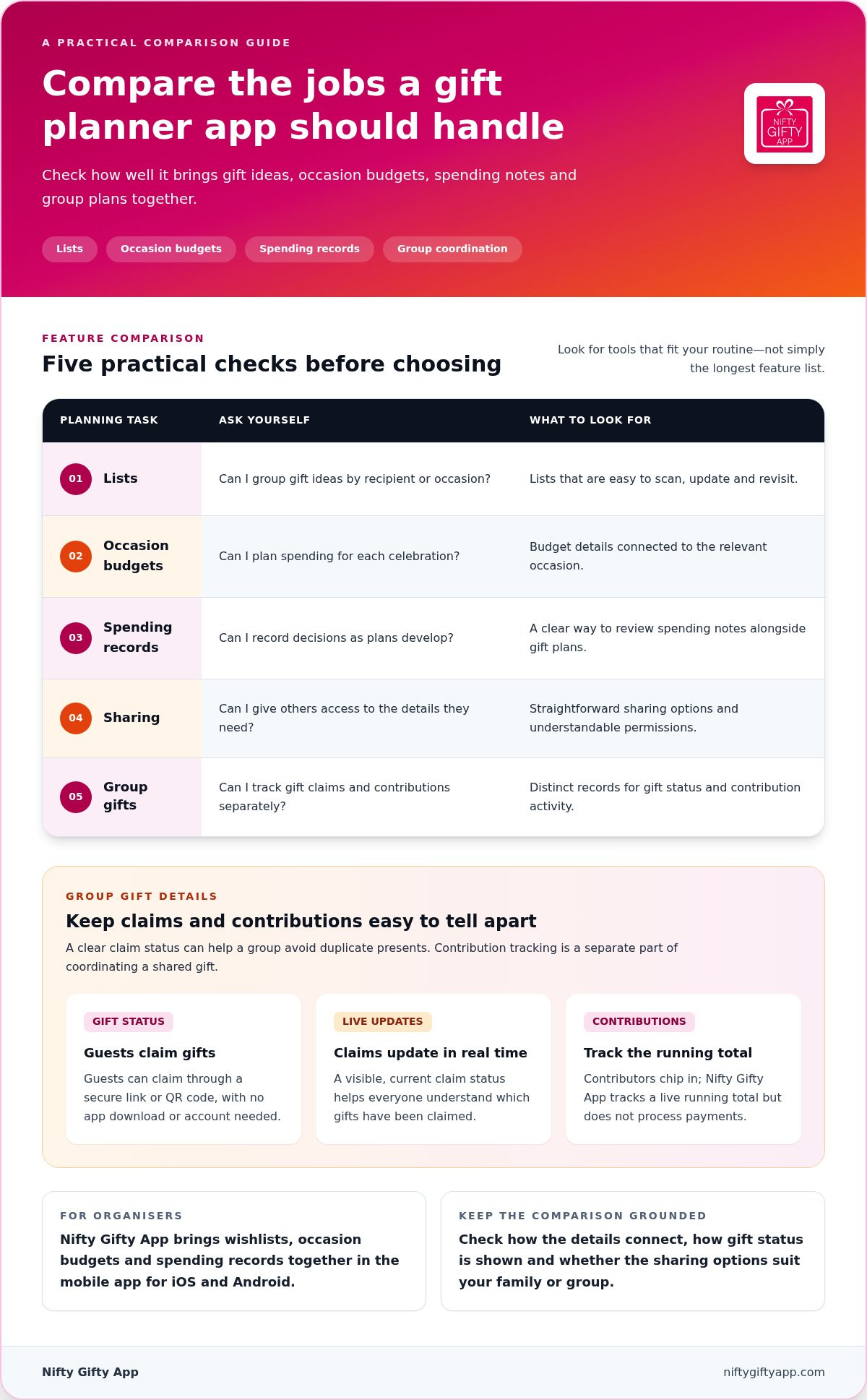
Start by listing the jobs you want the app to handle. Can you organise ideas, plan an occasion budget, record spending and share useful details with others? Compare those tasks before weighing up optional extras. A feature is useful when it helps you find or act on information you need, not simply because it appears on a long list.
Use this checklist to focus your comparison:
Which tools help organisers keep lists and budgets together?
Check whether you can sort ideas by recipient, occasion or both. Then see how budgets and spending records fit into the same planning flow. Keeping these details together makes it easier to review plans without searching through separate notes. An occasion budget can help you keep spending plans in view, but it doesn’t guarantee a particular spending outcome.
How should you compare sharing and group gift features?
Think about what guests need to do and what you need to manage as organiser. Check whether sharing is straightforward for your family and whether an item’s status is clear after a guest claims it. A visible claim status can help the group avoid duplicate presents. For group gifts, look for contribution records that show activity clearly, and distinguish tracking contributions from collecting or transferring money.
Also consider how the records relate to each other. If a present is part of a group gift, can you see its claim status without confusing it with contributions? If plans change, can you update the relevant details? Clear, separate information helps everyone understand what still needs attention.
Use the checklist to choose features that suit your routine, rather than looking for an app with every possible tool. If you want to organise lists, occasion budgets and spending records together, explore Nifty Gifty App’s gift planning features.
Gift planner app, wishlist or registry: which approach fits?
These tools can all help with gifting, but they solve different problems. A planner centres on the organiser’s tasks across occasions. A wishlist tells others what someone would like. A store-linked registry gathers selected items for a retailer or event, while a shopping marketplace focuses on browsing and purchasing gifts. A list tool can organise gift details without selling or delivering anything.
Use the comparison as a starting point. Features differ, so focus on what each tool actually helps you do.
When does a dedicated gift planner make sense?
A dedicated planner may suit you when dates, recipients and gift ideas are spread across notes and conversations, or when you’re coordinating a group gift alongside other occasions. It can also help when you want contribution records alongside your plans. Balance that convenience against setting up and maintaining another app. Choose features that solve a task you actually have, rather than adding tools for their own sake.
A basic list may be perfectly practical if you’re planning for a small number of occasions and only need to note a few gift ideas. There’s no need to add a new tool just because it has extra features. Consider whether you regularly revisit the same information, need to share it or want a clearer view of plans across the year. If not, a simple list may be enough.
When might a wishlist or registry be a better fit?
Choose a wishlist when the main goal is letting someone share their preferences. A store-linked registry may suit an occasion that calls for a list connected to a particular retailer or event. Neither replaces a broader planning tool in every routine, and a planner may not be necessary if your priority is simply telling friends what you’d like.
Start with the job to be done. If you’re sharing preferences, a wishlist can keep that message clear. If you’re organising plans for different people and occasions, look for a tool built around those details. If you’re coordinating a group present, check whether the tool supports the records and sharing your group needs. The right approach fits your routine without asking you to manage features you won’t use.
How can you match a gift planner app to your gifting routine?
Choose around the jobs you already do, not the features that look impressive in a list. A quick review of your occasions, organising tasks and guest access can show whether an app fits your household or group.
Map the occasions. Note the birthdays, Christmas celebrations, weddings, baby showers and other events you help organise across the year.
List the tasks. Do you need to collect gift ideas, track what’s been purchased, note spending, share a list or coordinate a group gift?
Match features to those tasks. Look for tools that address your actual needs, such as lists by recipient or occasion, occasion budgets and contribution records.
Check access. Consider how you’ll use the app as organiser and how guests or contributors can take part. Extra downloads or account creation may add friction for some groups.
Keep the checklist short. If a feature doesn’t support a task you handle, it doesn’t need to shape your decision. If spending is your main concern, use a gift budget tracker guide to identify which records would help you plan.
Which features suit family organisers and busy parents?
Recurring family occasions call for a clear way to sort plans by person or event. A parent might keep separate ideas for each child’s birthday while noting gifts for relatives and family celebrations elsewhere. Keeping ideas together makes it easier to plan ahead and return to a note when the next occasion approaches. A guide to keeping track of gift ideas all year round can help you decide what information to save.
Then consider how much detail your routine needs. If you only track a couple of occasions, a simple list might do. If dates, ideas and spending notes need regular attention, a dedicated app may make those jobs easier to revisit.
What should group gift coordinators look for?
For a shared present, focus on two separate tasks: tracking gift claims and recording what contributors chip in. Clear claim status can help the group avoid duplicate presents. A live running total makes contributions easier to follow, but it’s a record, not a payment service. Check how contributors can view the list and claim an item, especially if the group includes relatives who prefer a simple link over another app.
If the main concern is keeping track of what’s already been purchased, an article comparing options for tracking purchased gifts can help clarify which details matter to your routine.
For organisers who want lists, occasion budgets and spending together on mobile, Nifty Gifty App supports planning across occasions on iOS and Android. Explore Nifty Gifty App for your gifting routine.
How Nifty Gifty App supports gift planning across occasions
Nifty Gifty App gives organisers a mobile place to plan gift giving for celebrations throughout the year. Build a routine around the occasions you help organise, from birthdays and Christmas to weddings and baby showers. Organisers use the app on iOS and Android.
How organisers use Nifty Gifty App
Use wishlists to collect present ideas, then keep the relevant occasion budget and spending details alongside your plans. That gives you a practical reference when you return to an event later. For example, review the notes for a birthday as it approaches, then use the same planning habit for Christmas, a wedding or a baby shower.
Keeping the organiser’s routine on mobile is handy when an idea comes to mind away from home. Add it to the relevant list, then revisit it when you’re ready to decide what suits the recipient and occasion. Nifty Gifty App supports the organisation; the choice of present remains yours.
How guests claim gifts and contributors chip in
For shared gifting, each person has a clear role. The organiser creates and shares the list, guests claim gifts through a secure link or QR code, and contributors chip in towards a group gift. Guests don’t need to download the app or create an account to claim an item. Claims update in real time, helping everyone see what has been selected.
For group gifts, Nifty Gifty App tracks contributions with a live running total. Contributors arrange their payments separately, as the app doesn’t collect or process them. Keeping gift claims and contribution tracking distinct helps the group follow both parts of the plan.
What Nifty Gifty App does and does not handle
Nifty Gifty App is designed to organise gifting, not to choose a present for you. Bring your ideas, preferences and context, then use the app to arrange the planning details around them. That leaves room for the personal thought that makes a gift feel right for its recipient.
Nifty Gifty App isn’t a gift shop or delivery service. Once you’ve settled on a present, arrange its purchase separately. The app focuses on organising gift lists, occasions, budgets, spending and group contributions, while you choose and purchase the gift through your usual approach.
Nifty Gifty App has a 14-day free trial, then costs $7.99 a year.
Make your next occasion easier to plan
Your next occasion is a good chance to shape a gifting routine that feels manageable. Start by gathering the ideas you already have, noting what you still need to decide and choosing a place to keep those details. A gift planner app should fit around the way you organise, not ask you to rethink every part of it.
Keep your approach simple. Add features as real needs arise, whether that’s planning for another family celebration or bringing others into a shared gift. The goal isn’t to track every detail for its own sake. It’s to spend less time searching for notes and more time enjoying the thought behind each present.
Nifty Gifty App gives organisers a place to build that routine across occasions. Guests can claim gifts through a secure link or QR code, and group contributions are tracked with a live running total. One app. Unlimited occasions. Every gift tracked.
Explore Nifty Gifty App and organise your next occasion. A little planning can leave more room for the fun part: celebrating together.
Frequently Asked Questions
Is a gift planner app useful if I only organise a few occasions?
It can be useful if those occasions involve several people or decisions you need to revisit. Notice how often you search for an idea or forget what you planned. If that happens regularly, a gift planner app may be worth adding to your routine. If a calendar reminder and a short note cover everything, stick with the simpler option.
Can I use one gift planner app for birthdays, Christmas and family events?
Yes, if the app lets you keep plans for different events distinct. Give each list a clear title, such as “Dad’s birthday” or “Christmas gifts”, and add the relevant year if you’ll reuse the list. That way, an old idea is less likely to be mistaken for a current plan, and you can think ahead without losing track of past notes.
What information should I add to a gift list?
Include the recipient, the occasion and the idea itself. Add details that will help you assess it later, such as a preferred colour, size, favourite author or a link to the item. You can also note why it caught your attention. Keep each entry brief and specific enough that you’ll recognise it months later, even if the original conversation has slipped your mind.
How do I move existing gift ideas into a gift planner app?
Gather ideas from your notes, saved messages and paper lists, then review them before transferring anything. Remove suggestions that no longer suit the recipient, and group the remaining ideas by person or event. Add a short note to explain an idea that needs context. Start with the next occasion, then bring across older plans if they’re still useful. There’s no need to move every note at once.
Can a gift planner app help me keep track of gifts purchased?
It can, if the tool lets you mark an idea as purchased or otherwise record its status. Add a brief note with the recipient and occasion, especially if you’re purchasing gifts for several people at once. Before making another decision, review the relevant record. This habit can help you spot what’s already arranged and avoid choosing the same present twice.
What should I consider before sharing a gift list with family?
Review the list first. Remove private notes, clarify who each gift idea is for and make sure suggestions are still current. If several relatives are choosing presents, agree on how they’ll let one another know what they’ve selected. For a shared gift, name who is coordinating and how the group will keep decisions clear. A quick check before sharing helps everyone use the list as intended.