
App for Remembering Gift Ideas: Which Lists and Planning Tools Fit

A birthday reminder app may not help you remember what someone actually wants. An app for remembering gift ideas all year should let you save ideas for each person and find them when an occasion comes around. That’s different from a reminder that simply tells you a date is approaching.
It’s easy to have a good idea in the moment, then lose it in a message, a note or a mental list. A simple system keeps the person and the idea together, ready for their next occasion.
This guide compares phone notes, birthday reminders and dedicated gift trackers to help you choose a system that suits the way you organise. You’ll also find practical ways to capture gift hints, save useful details with each idea and decide whether you need lists, reminders or group-gifting tools. Spend less time trying to remember later and more time choosing something thoughtful.
Table of Contents
Birthday reminders versus gift planning
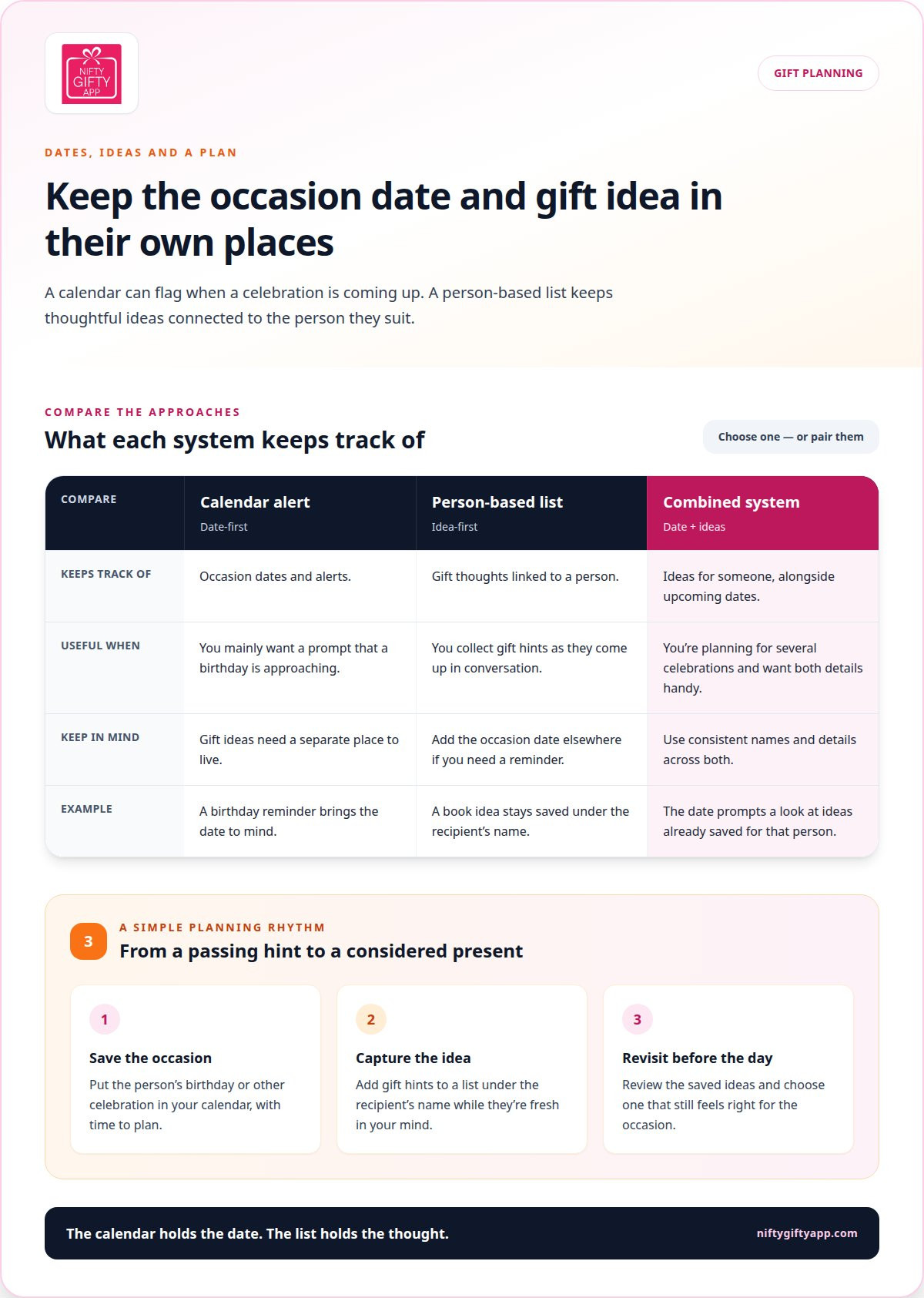
A birthday reminder and a gift plan solve different problems. A reminder tells you when an occasion is approaching; a gift plan keeps ideas connected to the person they suit. If your phone calendar flags Aunty Jo’s birthday but your thought about her favourite gardening book is buried in an old message, you’ve remembered the date but lost the idea.
For year-round planning, organise ideas by person rather than occasion. Jo might mention a gardening book in winter, months before her birthday. A running list under her name keeps the thought handy, even when no celebration is coming up. Add the occasion date separately, so the reminder and the gift idea each have a clear purpose.
Choose a system based on what you need to remember. A calendar entry suits you if you mainly forget dates. A phone note or gift tracker works better if you collect ideas as you hear hints. If you’re planning for birthdays, Christmas and family celebrations, pair date reminders with a list organised by person.
Use a calendar for date prompts, a list for gift ideas, or both when you want each reminder to lead to a useful plan.
Christmas is a good reason to plan ahead. Gift decisions often bunch up in the weeks before the day, when delivery can be less reliable. Saved ideas help you think about what suits each person before the busy stretch, instead of starting from scratch. Keep the date, recipient’s name and gift idea distinct so none gets buried in the others.
Try this simple setup with a birthday coming up:
Add the person’s birthday to your calendar and set a reminder that gives you time to plan.
Start a list under their name, then add ideas whenever a conversation gives you a clue.
Before the occasion, revisit the list and choose an idea that still feels right.
A reminder answers, “When is the birthday?” A gift plan answers, “What might make Jo smile?” Keep both answers easy to find, and a passing thought can become a considered present for the next occasion.
Comparing gift-tracking apps with notes apps
Phone notes can store gift ideas, but dedicated trackers may organise them in different ways. Compare how each option handles lists by person, dates, device access and saved details.
Gift-tracking apps
A gift-tracking app is built around recording ideas and keeping them linked to recipients. Depending on the app, you may be able to sort ideas by person, occasion or status. Australian users can find options for iPhone, Android or both, but availability and paid plans vary. Check the app’s listing for device compatibility and its own details about retailer links and privacy.
Gift idea apps may charge for additional features or subscriptions. Paid-plan costs vary, so compare the price and billing period shown for the specific app in Australia before choosing. A gift tracker differs from a birthday alert: it stores gift details, rather than only flagging a date.
Wish-list and product-browsing apps
A wishlist app usually collects items someone wants, while a product-browsing app may focus on browsing products or saving purchases. That can suit a recipient who shares a list, but it’s less useful for quietly recording your own ideas for different people. A gift tracker centres on your planning; a product-browsing or wishlist app centres on products or the list owner.
Phone notes are a flexible alternative. Create a note for each person, add ideas as they come up and use tick boxes to track what you’ve purchased. Notes apps may also let you lock notes, but you’ll need to add dates, categories and status labels yourself. An export option can help if you later move your lists to a dedicated app.
For iPhone, Apple Notes is a familiar place to keep a simple list; Android users can use Google Keep. Dedicated gift apps are also available for iPhone and Android in Australia, although the supported devices differ by app. Check the app’s Australian store listing to see whether it runs on your phone.
For Australian retailers and local shops, a basic note can hold a shop name, product link and price in A$. Some wish-list or product-browsing apps focus on selected retailers, so local-store support and currency display depend on the app. A plain-text note gives you room to record those details yourself.
Privacy features vary. Gift notes may include names, birthdays and personal preferences, so review an app’s privacy information and permissions before adding those details. A locked note may suit a private list; shared wish lists make sense when the recipient needs to see or update them.
Dedicated gift trackers for lists, budgets and statuses
A dedicated gift tracker can bring each person’s ideas, spending plans and progress together. Look for lists organised by recipient, with notes that help you decide what to purchase as an occasion approaches.
Shared and collaborative lists
A shared list lets family members coordinate ideas for a recipient instead of keeping separate notes. For example, siblings planning a present for Dad can add suggestions and see which idea the group is considering. That differs from a private tracker, where one organiser manages the list alone. Before sharing, decide who can view or edit it, and whether the recipient should see the suggestions.
Shared planning helps when relatives live far apart or others need to contribute ideas. Keep one list for Dad and add a short note beside each suggestion, such as “mentioned during Sunday dinner”. That gives family members context instead of leaving them to guess. If the list is private, share only the details needed for the gifting plan.
Reminders, lists and notes
Useful gift-planning features include person-based lists, date reminders, notes and clear status labels. Together, they help you save an idea, remember when it matters and see whether it’s still under consideration, selected or purchased. A reminder can prompt a review as the occasion draws near, while a note records details such as a preferred colour or size.
Choose features that fit your routine. If you mainly forget birthdays, date alerts matter most. If you spot ideas throughout the year, make it easy to add them to a person’s running list. A status label such as “considering” or “purchased” helps distinguish a fresh thought from a gift that’s already sorted.
Budgets and statuses work best as practical prompts, not extra admin. Add a spending guide to the recipient’s list if you’re coordinating with family, then record who is handling each step. For a group gift, track contributions and progress. The list should make the next action clear, whether that’s choosing an idea or waiting for others to weigh in. Nifty Gifty App tracks contributions and shows a live running total without handling payments.
To keep lists useful, use the same simple pattern for each person:
Add ideas as running entries under the recipient’s name.
Attach a short note explaining the hint or preference.
Use a status to show what still needs attention.
Set a reminder to review the list before the occasion arrives.
When sharing family plans, agree on who will coordinate and keep updates beside the relevant idea. That way, everyone can see whether a suggestion is still open, someone is following it up or the gift has been purchased. A tracker earns its place when its lists, notes and reminders make the next decision easier.
Keeping wishlists for different occasions
A useful wishlist keeps an idea available until the right occasion arrives. Organise it so you can tell who the gift suits and when to revisit it.
Ideas saved for later occasions
Save each idea under the person’s name, even if their next occasion is months away. If your sister mentions a novel she’d like, record the title and her comment beside her name. That keeps the hint connected to its source instead of lost in a general list of birthday, Christmas and celebration gifts.
Capture an idea while it’s fresh: write it down soon after hearing the hint, attach it to the person and review it before their occasion. A short note can preserve why it appealed, such as “mentioned wanting this for the garden”. Add ideas even when someone has no upcoming event, so your options aren’t limited to the next occasion on the calendar.
Review each entry before choosing. Interests change, and the person may already have received something similar. Mark an idea as still relevant, set it aside or remove it if it no longer fits. A saved hint is a starting point, not an instruction to buy the item later.
Tools matched to occasions
Choose a tool based on what the occasion requires. A private list can hold personal ideas for one recipient, while a shared list suits relatives coordinating a present. For a birthday, a date reminder can prompt you to revisit the person’s ideas. For a group gift, shared notes can keep suggestions and decisions together.
For Christmas, organise lists by recipient before the busy period, then review each person’s ideas as plans take shape. For a family celebration with several recipients, separate lists make it easier to scan each person’s options. A simple note may suit a small plan; a tracker can help when you’re managing several people, occasions and gift statuses.
Choose a tool based on the job it needs to do:
One recipient: keep a private wishlist with ideas and brief context.
Several occasions: group each person’s ideas separately, then review before each date.
A shared present: use a list the coordinating family members can access.
Ideas gathered over time: add each hint promptly and keep it attached to its recipient.
Before an occasion, compare the saved idea with the person’s current preferences and your plans. A wishlist is a memory aid, not a promise that every suggestion will still suit. Keep details short and clear so you can make a fresh choice when the occasion arrives.
Browsing gift ideas and saving them to a list
An app for remembering gift ideas all year is useful when it turns small clues into ideas you can find again. Browse with a person in mind, then record what caught your attention before the detail slips away.
Browsing gift ideas
Good ideas often start in everyday conversations, not product searches. Notice what someone complains about, what they talk about enthusiastically and the hints they drop about things they’d enjoy. A friend mentioning cold feet on evening walks has given you a practical clue. A relative sharing books by a favourite author has offered another.
Past successes can help you find a thoughtful next step. If your nephew loved a set of art materials, consider a related creative activity instead of repeating the present. Treat each clue as a starting point, not a final decision. Interests change, and a passing comment may suit one occasion but not another.
Browse with a recipient in mind. When you spot something that could suit them, save it instead of leaving it in a browser tab or group chat. Add a short note about the clue behind the idea. That context helps when you’re collecting suggestions for several people or coordinating with family.
Saving ideas to a list
Save each idea under the intended recipient and add enough detail to recognise it later. A photo can show the style, a store link can lead back to the item, and a price note can help you compare options. Add a sentence about why it suits them, such as “likes native plants and spends weekends gardening”.
Keep each entry useful without turning it into a research project. For a local shop find, note the shop name and location beside the photo or link. If another family member is helping, make the recipient clear so they know who the suggestion is for. An app for remembering gift ideas all year should make these details easy to retrieve when plans take shape.
Use a simple entry for each thought:
Person: who the idea is for.
Gift: the item, activity or experience you noticed.
Details: a photo, store link, price and short note, where available.
Reason: the interest or hint that made you save it.
Add ideas even when someone has no upcoming event. Before choosing, review the list to see whether each suggestion still fits their interests and your plans. A saved idea is a prompt, not an instruction to buy. Capture the clue, keep useful details with it, then make a fresh choice for the next occasion.
Nifty Gifty App
Nifty Gifty App helps organisers manage gift lists and group gifting for upcoming occasions. Organisers use the mobile app on iOS and Android to build lists, set budgets and track gift status. Share a secure link or QR code so family and friends can view the plan without another note buried in a message thread.
For a group gift, guests can claim gifts through a secure link or QR code, with no app download or account needed. Claims update in real time. Contributors chip in, and the app tracks contributions with a live running total, but doesn’t collect or process payments. Recipients receive the gifts; they don’t claim them.
If you’re coordinating gifts across family or friends, Nifty Gifty App can help keep the plan in view while everyone contributes. Contact Nifty Gifty App to learn more.
Make your next gifting moment easier
The useful next step isn’t to collect more ideas. It’s to review saved thoughts before an occasion gets close. Build a small routine that fits your week: look through a person’s list, decide whether an idea still feels right and remove details that no longer help. That keeps an old hint from becoming an automatic purchase.
Choosing an app for remembering gift ideas all year is about making that pause easy to keep. Pick a tool that suits how you capture thoughts, then use it to make choices with the person in mind. You might also set a simple family habit: share suggestions early, agree who is coordinating and leave room for everyone to contribute an idea.
For a dedicated place to coordinate gifting, see how Nifty Gifty App fits your plans. Start with the next occasion on your calendar and make space for a more considered choice. A small moment of planning can help make the celebration feel personal.
Frequently Asked Questions
Which One Should You Pick?
Use a notes app for a few private ideas and a dedicated tracker if you’re organising several people or occasions. If you mainly forget dates, pair a calendar reminder with your list. A busy parent coordinating birthdays and a family group gift, for example, may value shared planning more than product browsing. Choose the simplest tool that supports how you capture ideas and make decisions.
Can gift planning apps share lists with family or friends?
Yes, some gift-planning apps let you share a list so relatives can coordinate. For a family present, agree who will organise the list and make the final choice. Nifty Gifty App lets organisers share a secure link or QR code, so guests can view and claim gifts without downloading the app. Keep private notes separate from details intended for everyone involved.
How can I set up recurring reminders for birthdays and special occasions in a gift app?
Set a yearly recurring birthday event in your phone calendar, then keep gift notes under that person’s name in your planning app. Add a reminder early enough to review ideas and arrange the present. For occasions that move, such as an annual family gathering, create a date reminder once plans are set. Check an app’s settings before relying on it to repeat reminders automatically.
Can I save gift ideas from websites and social media into a gift planning app?
You can record ideas you spot online, but direct importing depends on the app. A practical approach is to copy the product name or page link, then add it to the recipient’s list with a note about why it suits them. For a social media post, save enough detail to recognise the item later. Nifty Gifty App supports saving and tracking gift ideas; avoid assuming links import automatically.
Are there free gift idea apps, and what do paid plans cost in Australia?
Some gift trackers have no-cost versions, and the featured gift-list apps are mostly free or cost less than a dollar. Paid-plan costs vary, so check the specific app’s Australian listing for its price and billing period.



Comments