
How to Track Christmas Spending Without the Spreadsheet Nobody Else Maintains

What if the hardest part of Christmas spending isn’t choosing the gifts, but remembering what you’ve already planned and purchased? If you’re wondering how to track Christmas spending, keep a running gift record alongside your bank balance. A bank balance shows what has gone out, but not what you’ve committed to or still need to organise.
It’s easy to lose a receipt, forget a gift you’ve committed to or lose sight of how a shared present is adding up. A simple routine brings those details together without asking the whole family to maintain a spreadsheet.
This guide walks you through a repeatable checklist for recording planned, committed and completed gift spending, then identifying what still needs an update. You’ll also see how to keep gifts for individual recipients separate from shared contributions, so it’s clear what’s organised and what’s still in progress.
Nifty Gifty App gives organisers an occasion list to manage gift plans, budgets and spending. Gift claims update in real time, and group contributions show a live running total. Keep Christmas coordination in hand, with more room to enjoy the giving.
Table of Contents
Why track Christmas spending before the festive rush builds?
Christmas gift plans tend to arrive in bits. A family message suggests a shared present, someone spots a gift idea, and a receipt lands in a pocket or inbox. When details sit in different places, it’s hard to tell what’s still an idea, what you’ve committed to and what’s already been purchased.
A Christmas spending tracker is a current record of gift plans, commitments, purchases and contributions. It helps you see what’s accounted for and what still needs attention. If you’re working out how to track christmas spending, record each change as it happens instead of relying on memory at the end of the season.
What counts as Christmas spending?
For this gift-focused guide, include presents for individual recipients and shared gifts. Keep their stages distinct: a planned amount is an estimate, a purchase is money spent, and a contribution is money logged towards a shared gift. These details shouldn’t blur into one total. A gift may be planned but not purchased; a group present may be underway while contributions are still coming in.
Christmas has a wider economic impact, but this tracker is deliberately narrower. It covers gift spending, not a full record of festive costs such as food and travel.
Why track gift spending as you go?
Small updates take less effort than piecing together a month of purchases from bank transactions, receipts and family messages. After purchasing a gift, mark it in the record. When someone chips in for a shared present, log the contribution. This quick habit keeps your list closer to what’s actually happening.
A visible record also helps you spot purchases that haven’t been added yet. Perhaps you picked up a present while out and forgot to note it, or a relative purchased something after mentioning it in a message. Keeping gifts and commitments together makes those gaps easier to notice while there’s still time to update the list.
The benefit isn’t just a clearer total. You can see which gifts still need a decision, which purchases are complete and where a shared present stands. That means fewer reminders to carry around and more room to enjoy choosing and giving. Keep the record simple enough to update, and it can support the occasion without becoming another task to manage.
What to record when tracking Christmas gift spending
Make each entry easy to scan. Create one for each recipient or shared gift, then keep the planned amount separate from what you actually spend. An idea on your list hasn’t affected your spending yet, so don’t count it as a purchase.
Planned spending is an estimate; actual spending is money you’ve spent on a purchased gift. Use that distinction each time you update a record. It keeps a gift you’re considering from being counted as if it’s already been purchased.
A simple Christmas spending record
Start with four fields: recipient, gift idea, planned amount and status. Add the actual amount after purchase, and note where you’ve kept the receipt, such as in an email, folder or paper wallet. If you’re deciding how to track christmas spending, these fields provide a useful overview without a long list of details.
Recipient: who the gift is for.
Gift: the item or idea you have in mind.
Planned amount: what you expect to spend, in A$.
Status: still considering, planned or purchased.
Actual amount and receipt: add these once it’s purchased.
Use the same status labels throughout so you can scan the list quickly. If plans change, update the existing entry instead of adding a second version. For example, if you replace one gift idea with another, change the description and planned amount. Leave actual spending blank until you purchase the gift.
How to record shared gifts and contributions
Give a shared present its own entry, separate from individual gifts. Record the gift idea, intended recipient, planned amount and purchase status. Then log each contribution as it comes in. Keep the contributor total separate from the amount paid for the gift: one shows what people have chipped in, while the other shows what the present cost.
This distinction makes it easier to see whether contributions are still coming in and what the shared gift cost once purchased. Nifty Gifty App tracks group contributions with a live running total, but it doesn’t collect or process payments. For an occasion list that keeps gift details together, explore occasion gift lists in Nifty Gifty App.
Choose a Christmas spending tracker you will actually update
The right tracker is one you can reach when a gift plan changes or a purchase is made. A paper list is quick to jot down, but only if it’s close by. A spreadsheet gives you room to organise details, but someone still needs to update each entry. A dedicated gift-organising app can bring gift lists and spending records together in the place you use to coordinate.
As you consider how to track christmas spending, focus on three things: how quickly you can update the record, how clearly it separates planned from purchased gifts, and whether it helps coordinate shared presents with family.
Paper, spreadsheet or dedicated gift tracker?
Each method can work. The difference is how much effort it takes to keep the information current. Think about where you’ll be when you need to make an update, and whether the tracker shows recipients, gift status and group contributions clearly.
Nifty Gifty App gives organisers an occasion list for gift plans, budgets and spending in its iOS and Android mobile app. Guests can claim gifts through a secure link or QR code, without downloading the app or creating an account. Claims update in real time, helping organisers see what’s being taken care of and helping avoid duplicate purchases.
Questions to ask before settling on a method
Choose a tracker that fits your real routine, not an ideal one. Before settling on a method, ask:
Can you see planned amounts separately from spending on gifts already purchased?
Can family members check gift claims without a long run of messages?
Can you update recipient details, purchase status and shared contributions in one place?
Does it fit the way you normally use your phone to organise family plans?
If it takes too many steps to record a purchase, the list can fall behind. Choose a method that’s simple to update while you’re out or between family plans. The easier it is to maintain, the more useful it’ll be as Christmas gift details add up.
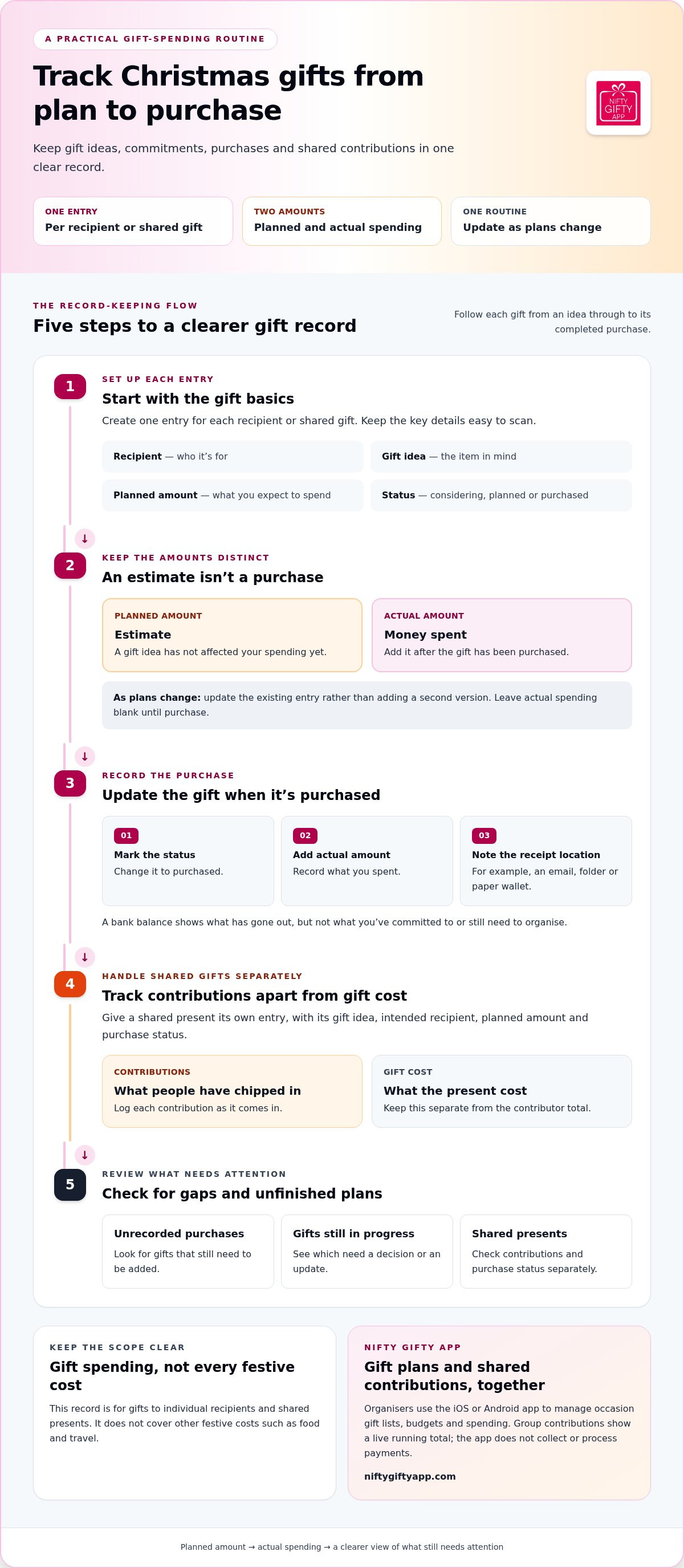
A repeatable checklist for tracking Christmas spending
A tracker only helps if it stays current. Keep each update small and choose a check-in rhythm that suits your plans, such as updating the list when you add a gift or setting aside time to organise Christmas. The aim isn’t to create another big task. It’s to keep the record close to what’s actually happening.
Update the record whenever a gift’s status changes. Use this checklist to keep the steps clear: set up, record, update, review and close out.
Set up the record and add gift plans
Start with a Christmas occasion record. Add each recipient and shared gift as its own entry, then note gift ideas and planned amounts where you know them. Keep these as plans, not completed spending. If you haven’t settled on a gift or amount, label it “to decide” or “amount unknown” so a placeholder can’t be mistaken for a final figure.
Set up: create the occasion record.
Record: add recipients, shared gifts, ideas and known planned amounts.
Mark gaps: label undecided gifts or amounts clearly.
Update purchases, contributions and the final record
When you purchase a gift, change its status and enter the actual amount. Keep the planned amount visible if it helps you compare what you expected to spend with what you did spend. For shared gifts, update the contribution record as each person chips in, keeping the contribution total separate from the purchase amount. A contribution record shows what’s been logged, not a payment processed by a tracking app.
Choose a regular review point that works for you. Check for gifts still marked as planned, missing amounts and contributions that need an update. Compare completed purchases with receipts you can access, such as emailed receipts or paper copies. Add any overlooked purchase and note where its receipt is kept.
Update: mark purchases and record actual amounts; log contributions as they come in.
Review: check unfinished entries and look for missing details or purchases.
Close out: confirm the record reflects completed gifts and known spending, and keep receipt details with the relevant entries.
That’s a practical way to track christmas spending without relying on a spreadsheet everyone has to remember to maintain. Nifty Gifty App lets organisers manage gift lists, occasion budgets and spending in its iOS or Android mobile app. Organise your Christmas gift list with Nifty Gifty App.
Make Christmas spending easier to coordinate with Nifty Gifty App
A checklist is easier to follow when gift plans and spending details are simple to update together. Nifty Gifty App helps organisers manage an occasion gift list, budget and spending from its mobile app for iOS and Android. Add recipients and gift ideas, then update the list as plans develop and gifts are purchased.
Keep gift lists and spending in view
A dedicated occasion list gives you one place to check what’s planned and what’s already accounted for. As you work out how to track christmas spending, use the list to keep each recipient and gift visible alongside your occasion budget and spending. It’s a practical way to follow your checklist without relying on separate notes for every update.
For family coordination, guests can claim listed gifts using a secure link or QR code. They don’t need to download the app or create an account, and claims update in real time. You can see which gifts are spoken for and help avoid duplicate purchases, including when family members are organising from different places.
For more on organising gift lists, read the Gift List Organiser App guide.
Coordinate contributions without payment confusion
Shared gifts need a clear record of both the present and the contributions towards it. Nifty Gifty App tracks group contributions with a live running total, so the organiser can see what contributors have chipped in. Keep that total separate from the gift’s purchase amount. They’re related, but they show different things.
Contributors arrange payment separately. Nifty Gifty App records contributions but doesn’t collect or process payments. This makes the app’s role clear: it helps the group see what’s been contributed while you coordinate the gift itself.
Bring gift plans, occasion budgets and spending records together for Christmas and every occasion with Nifty Gifty App. Keep the coordination in view, then make more room for the joy of giving.
Keep Christmas gifting organised from plan to purchase
A clear record makes it easier to see what’s planned, committed and already purchased. Keep one entry for each recipient or shared gift, update its status as plans change, and review the details regularly so unfinished items stay visible.
That’s a practical approach to how to track christmas spending without relying on memory or a spreadsheet everyone has to maintain. With Nifty Gifty App, organisers can manage occasion budgets and spending in the iOS or Android mobile app. Guests can claim listed gifts through a secure link or QR code without downloading the app.
Organise your Christmas gift lists and spending with Nifty Gifty App, and keep the coordination in view while you enjoy choosing and giving. A few simple updates can make room for more of what Christmas is really about: thoughtful gifts and time together.
Frequently Asked Questions
How do I track Christmas spending?
Start with one list of recipients and shared gifts, then add the gift idea, planned amount and status for each entry. Once you purchase a gift, update its status and record the actual amount. Keep contributions for group gifts separate from the purchase amount. Review the list regularly so estimates aren’t counted as completed spending. This simple routine is a practical way to track Christmas spending as plans change.
What should I include in a Christmas spending tracker?
For gift-focused tracking, include the recipient, gift idea, planned amount, purchase status and actual amount once known. Give each shared gift its own entry, then record contributions as they’re logged. You can also note where you’ve kept the receipt, such as in an email or folder. Keep planned amounts separate from actual spending, so it’s clear what’s an estimate and what reflects a completed purchase.
Is a spreadsheet enough to track Christmas spending?
Yes, a spreadsheet can work if it’s easy to access and someone updates it consistently. Use one row for each recipient or shared gift, with separate fields for planned amount, purchase status and actual spending. If family members are involved, agree on who maintains the record. A dedicated gift organiser is another option for keeping occasion lists and spending together. Choose the method that fits your routine.
How often should I update my Christmas spending tracker?
Update your tracker whenever you purchase a gift, change a plan or log a group contribution. That keeps the record current and reduces reliance on memory later. Add a brief review at a rhythm that suits your planning habits and family. Check for missing amounts, unfinished gift decisions or purchases you haven’t recorded yet. A few small updates can keep the list useful.
How can I track spending on group Christmas gifts?
Give each shared gift its own entry. Record the gift’s planned amount, then log contributions separately as people chip in. Keep the contributor total distinct from the amount paid for the gift, and update the gift status once it’s purchased. Nifty Gifty App tracks group contributions with a live running total, but it doesn’t collect or process payments. Contributors arrange payment separately.
Can a gift-tracking app help avoid duplicate Christmas presents?
A shared gift list can help family members see which listed gifts have been claimed. With Nifty Gifty App, guests can claim gifts through a secure link or QR code without downloading the app or creating an account. Claims update in real time, helping organisers coordinate gift choices and avoid duplicates. Keep family communication clear as plans change, so everyone has the latest details.


Comments