
App to Track Gifts Purchased: Compare Options and Find a Simpler System

The birthday present you tucked away in October is now hiding from you, and Christmas has added three more gifts to the list. An app to track gifts bought can help you keep each present connected to its intended recipient and occasion, so you can check what’s already covered before choosing another gift.
If you’re juggling birthdays, Christmas and family celebrations, it’s easy for notes, spreadsheets and message threads to fall behind. A useful system makes it simple to see what you’ve purchased, who it’s for and what you’ve set aside to spend. This guide compares dedicated apps with familiar manual options, so you can choose a practical fit for your family and budget.
We’ll look at what to record, how to organise gift plans across occasions, and when an app may be more useful than a spreadsheet or notes app. You’ll also see how Nifty Gifty App brings wishlists, occasion budgets and group contribution tracking together, while keeping contributions separate from payment processing. All your gifting, beautifully organised.
Table of Contents
App to track gifts purchased: what should it help you remember?
You spot a thoughtful present months before a birthday, purchase it, then tuck it somewhere safe. By the time the occasion arrives, you’re trying to remember whether you purchased it, who it was for and where you put it. A useful gift record answers those questions quickly without turning gift-giving into a stocktake.
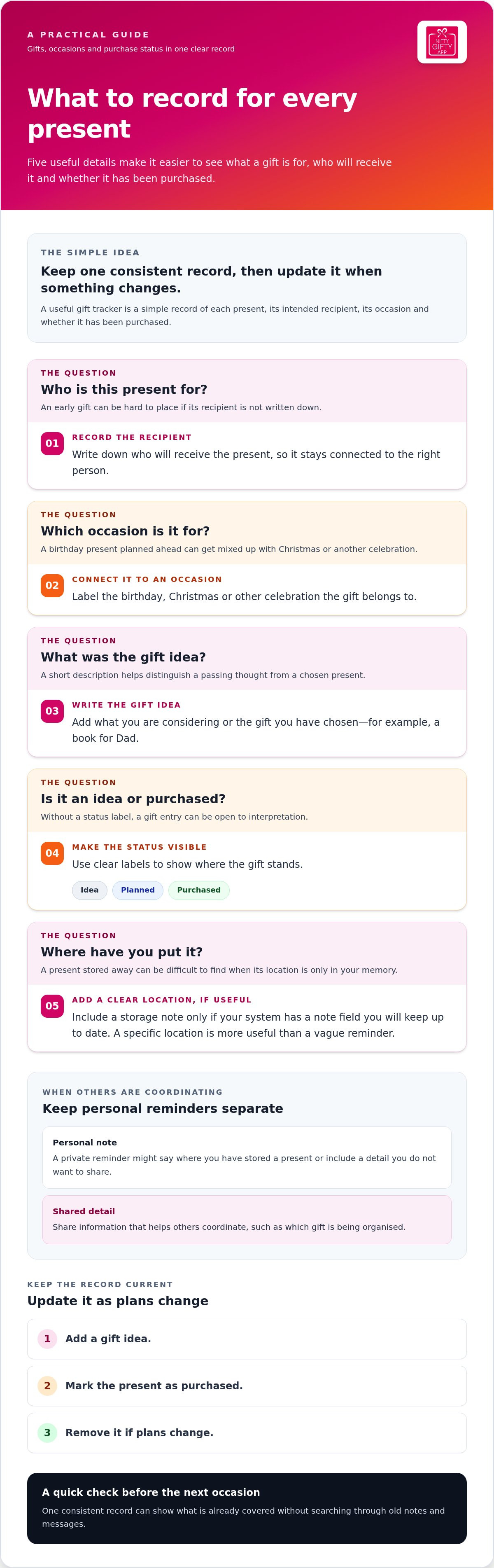
A gift tracker is a simple record of each present, its intended recipient, the occasion and whether it has been purchased. It gives you one place to check as plans move from idea to present in hand. An app to track gifts bought should make that check easier, not ask you to manage a complicated inventory.
What details are useful to record for each present?
Start with the details that help you act: the recipient, the occasion, the gift idea and its purchase status. That’s enough to distinguish “perhaps a book for Dad” from “book for Dad, purchased for his birthday”. Add a storage location only if your chosen system has a note field you’ll keep up to date. “Hall cupboard, top shelf” is useful; a vague note you won’t remember to revisit isn’t.
Recipient: Who will receive the present?
Occasion: Is it for a birthday, Christmas or another celebration?
Gift idea: What are you considering, or what have you chosen?
Status: Is it still an idea, or has it been purchased?
Location: Where have you put it, if you can record that clearly?
Keep personal reminders separate from gifts being coordinated with other contributors. A private note might include where you’ve stored a present or a detail you don’t want to share. Shared information should focus on what helps others coordinate, such as which gift is being organised. Separating the two lets you share useful details without exposing every personal reminder.
Why do gifts disappear from memory between occasions?
Timing is part of it. A present purchased well ahead of an event can sit out of sight while school dates, work, family plans and the next celebration take your attention. Later, you may remember the shop but not the item, or recall the present without knowing which occasion you had in mind.
Details are also harder to retrieve when they’re scattered across a phone note, a message to a relative and a reminder you meant to update. Gift-giving has a long history and takes many forms across cultures and occasions, as described in this overview of the history and cultural significance of gift-giving. Your own tracking system doesn’t need to cover all of that. It just needs to fit the occasions you organise.
Choose one consistent record and update it when something changes: add an idea, mark a present as purchased, or remove it if plans change. Before the next occasion, a quick check can show what’s already covered, without sending you back through old notes and messages. Keep the record easy to maintain. If an entry takes too much effort, simplify it.
What a useful gift tracking app needs to do
A gift list is only helpful if you can tell what each entry means at a glance. Look for clear details, simple updates and a way to keep your own reminders separate from information you share. An app to track gifts bought should make it easy to see what’s planned, what’s purchased and what still needs attention.
A useful gift tracker brings together recipient, occasion, gift details and purchase status, with straightforward updates and sharing controls. Use that as your checklist when comparing tools.
Recipient: Make it clear who the present is intended for.
Occasion: Connect each gift to the right birthday, Christmas or other celebration.
Purchase status: Distinguish an idea from a gift that’s been purchased.
Easy updates: Make changing a status or detail quick enough to do as plans change.
Sharing options: Keep personal notes private while sharing only the details guests or contributors need.
Status labels help remove guesswork. Without them, “headphones for Alex” could be a passing idea or a present already tucked away. Labels such as “idea”, “planned” and “purchased” make the difference visible. Keep private organiser notes, such as where a present is stored, separate from shared list details. That way, others can coordinate without needing access to every personal reminder.
Can you track gifts across different occasions?
Check whether the app lets you organise gifts by occasion, rather than leaving every entry in one long list. A birthday present planned months ahead should be easy to find without getting tangled up with Christmas gifts or another family celebration. Year-round organisation is useful if you plan early, manage several relatives’ dates or want to revisit ideas as the next occasion approaches. You don’t need elaborate planning tools; you need a clear way to move between occasions.
Can other people check or claim a gift without extra steps?
A private record works well when one person manages the list. If family members are coordinating, a shareable list can let guests see which gifts are available to claim, rather than relying on separate messages to keep everyone informed. Check whether a claim updates for everyone in real time. That shared view can help people coordinate their choices.
Keep the roles clear: a guest claims a gift to indicate they intend to give it. The recipient receives the present; they don’t claim it. For example, a relative can claim a listed board game, while the family member celebrating their birthday receives it. With Nifty Gifty App, guests can claim gifts through a secure link or QR code without downloading an app or creating an account, and claims update in real time.
Organise occasion gift lists with Nifty Gifty App, and give guests a clear way to claim gifts.
Gift tracking apps, notes and spreadsheets: how the options compare
The right setup depends on how many occasions you manage and who needs to see the list. A phone note may be plenty for one organiser. A spreadsheet offers more room to sort details. A dedicated app can bring wishlists and occasion planning together in a tool made for gifting. Compare the day-to-day tasks, not just the number of features.
The comparison highlights the trade-off: familiar tools are easy to begin with, while a dedicated tool may bring more of the gifting process together. An app to track gifts bought is useful only if its routine feels simpler than the one you have now.
When can notes or a spreadsheet be enough?
A simple list can suit one organiser tracking a handful of presents for a small number of occasions. Add a recipient, occasion and status, then return to the same note or sheet each time. Consistency matters: if new ideas go into messages while purchased gifts live in a note, you’re back to checking multiple places. Keep the format plain enough to update as you go.
When does a dedicated gift tracking app make more sense?
A purpose-built mobile tool may suit you when you’re organising gifts across several occasions or coordinating with family. Occasion lists and shareable gift claims can help others see what’s available, with claims updating in real time. Organisers create and manage lists in the Nifty Gifty App mobile app for iOS and Android. For broader selection criteria, see Gift List Organiser App: Choose One That Fits Your Gifting.
Keep the decision practical. If a note or spreadsheet is easy to maintain and only you need it, there may be no reason to change. If updates get scattered or other people need a clear view of gift plans, a dedicated app can reduce the back-and-forth. Choose the system your family will actually keep up to date.
How to choose a gift tracker that fits your family’s routine
A tracker should take a little work off your plate, not become another job to keep up with. Start with the way your family already handles presents, then choose a system that fits the people, occasions and details you need to manage.
Look at your current record. Do you use phone notes, messages, a spreadsheet or a mix? Notice where you add ideas, mark presents as purchased and check what’s ready. That shows what a new system needs to make easier.
Count the moving parts. Think about how many recipients and occasions you organise through the year. A short list for a few birthdays may need little structure. More people and celebrations may call for a way to sort gift plans by occasion.
Decide who needs access. If you’re the sole organiser, a private record may be enough. If relatives are helping, consider what details they need to see and whether they should be able to coordinate gift choices. Keep personal reminders separate from shared plans.
Separate the details. Gift status answers whether a present has been purchased. A budget helps you keep track of spending plans. If you organise a shared present, decide what information about the group arrangement you need to keep handy.
Check the upkeep. Could you update the list during an ordinary week, after choosing or purchasing a present? If the process feels fiddly, simplify it or choose a format you’ll return to.
Match the tracking method to your gifting habits
Be realistic about the load you carry. One organiser handling a few recipients may find a simple record is enough. Several occasions, early planning or relatives sharing decisions can make a dedicated tool more useful. Decide whether the record should stay private or be shared with guests, then choose a system you can update as plans change.
Check guest access and group contribution features
If other people are involved, consider how they’ll take part and which details they need to see. For a shared gift, it may help to keep the group arrangement easy to revisit alongside the occasion plan. Focus on the information you’ll use, rather than adding features that create extra upkeep.
If tracking spending is part of your plan, the guide Gift Budget Tracker: Stop Guessing What You’ve Spent, Occasion by Occasion looks at that task separately. Nifty Gifty App helps you organise family gift lists and occasion budgets in one place. Explore Nifty Gifty App to organise your next occasion.
How Nifty Gifty App helps organise gifts across occasions
A dedicated gift tracker can be useful when you’re planning for several celebrations or coordinating presents with family. Nifty Gifty App brings wishlists and occasion details together, giving organisers a place to manage plans as they take shape. It’s designed for people who want gift planning alongside the other details they keep for each celebration.
Keep occasion lists and gift coordination together
Organisers create and manage lists in the Nifty Gifty App mobile app for iOS or Android. Create wishlists for birthdays, Christmas and other occasions, and keep occasion budgets and spending in view as you plan. Grouping these details by celebration makes it easier to return to a list later and see what still needs attention.
For families sharing the organising, a gift list gives everyone a common reference point for plans. Guests can claim gifts through a secure link or QR code, without downloading the app or creating an account. Claims update in real time, helping family members coordinate their choices. All your gifting, beautifully organised.
Track group contributions without confusing them with payments
Group gifts can involve several contributors, so it helps to keep the present plan and contribution information connected to the occasion. Nifty Gifty App lets organisers track group contributions with a live running total. The app does not collect or process payments, so contributors arrange payment separately while the organiser uses the total to follow the group’s progress.
Nifty Gifty App brings occasion lists, budgets and group contribution tracking together in its mobile app. Explore Nifty Gifty App and organise your next occasion in one place.
Make your next occasion easier to organise
Choose a tracking habit you can keep. Start with one upcoming occasion, add the gifts you’re considering and update each entry when plans change. A quick check-in as you organise can keep your record useful without turning it into another chore.
The right app to track gifts bought should fit the way your family shares the organising. Maybe you manage the list yourself. Maybe relatives help choose presents or contribute to a group gift. Decide what you want to keep in view, then use a system that makes those details easy to revisit. Small, steady updates can make planning feel more considered, while leaving room to enjoy the celebration itself.
Ready to put your next occasion in one place? Explore Nifty Gifty App to organise wishlists, occasion budgets and group contributions. Nifty Gifty App is available on the App Store and Google Play, with a 14-day free trial, then $7.99 a year.
Frequently Asked Questions
Can an app keep track of gifts I have already purchased?
Yes. Use a gift record to note a present once you’ve purchased it, then check the record before choosing something else for the same recipient. Add a brief detail that helps you recognise the item later, such as its colour or style. Keep entries current when plans change. That small habit makes the record more useful than relying on memory when a celebration is approaching.
Is a gift tracking app better than using phone notes?
Not necessarily. Phone notes can suit a short list managed by one person, while an app may be more convenient if you organise across several celebrations or want dedicated gift-list features. Consider how you search, sort and update information on your phone. If notes are already working, keep using them. If you’re regularly rewriting or hunting for details, a more structured option may suit you better.
Can guests claim a gift without downloading an app?
Yes. Guests can claim gifts through a secure link or QR code without installing an app or creating an account. That’s handy when relatives use different phones or prefer not to add another app. Claims update in real time, giving the organiser a clearer view of which gifts have been claimed. The guest is the person arranging to give the gift; the recipient is the person celebrating and receiving it.
How does an app help a family avoid duplicate gifts?
A shared list gives relatives a place to check before choosing a present, which can help avoid duplicates. It’s especially useful when family members are planning separately or live in different places. Encourage everyone involved to check the list before making their choice and to update it if their plans change. A tracker can support coordination, but the family still needs to keep its information current.
Can a gift tracking app track group contributions without taking payments?
Yes. Gift tracking and payment processing are separate functions, so an organiser can keep contribution information without the app handling transactions. Nifty Gifty App tracks group contributions with a live running total, while contributors arrange payments separately. Use the tracker as an organising reference, not as a record of completed payments.
Does Nifty Gifty App work on iPhone and Android?
Yes. Organisers can use Nifty Gifty App on iOS and Android. Guests can claim gifts using a secure link or QR code, so they don’t need to download the app or create an account. This lets organisers manage lists in the mobile app while guests take part through the shared list.
How much does Nifty Gifty App cost after the trial?
Nifty Gifty App has a 14-day free trial, then costs $7.99 a year. Organisers can use the app to build wishlists, manage occasion budgets and track group contributions. Consider how you organise gifts across the year and which of those features fit your household’s routine.


Comments