
How to Organise a Group Gift Without Endless Messages

How many times can one gift idea get buried under replies, side conversations and “who’s handling this?” A group gift without endless messages starts with one clear plan, not another round of follow-ups. Group chats are handy for getting things moving, but they’re not always the easiest place to keep gift details, roles and replies together.
You can make organising simpler. Give everyone one place to check the gift details, spell out who’s doing what and make the next step obvious. That means fewer repeated updates for the organiser and more room to focus on celebrating the recipient.
Nifty Gifty App gives organisers a shared reference point for gift lists, claims and updates. Organisers use the iOS or Android app, while guests can claim a gift through a secure link or QR code without downloading the app or creating an account. Claims update in real time, and the app tracks group contributions with a live running total. Payments are arranged separately. Here’s a straightforward way to set up the plan, share it and keep everyone informed.
Table of Contents
Why a group gift can create an endless stream of messages
A birthday present, new baby gift or family milestone can quickly spark questions across a group chat, side thread and private messages. Someone suggests an idea. Another person asks who’s collecting replies. A relative checks whether a date has been set. Each message makes sense on its own, but together they leave the organiser repeating details and piecing decisions back together.
A group gift is one coordinated present chosen or arranged by several contributors. The shared gesture is thoughtful; the coordination needs a little structure. Gift-giving has social and psychological aspects, so the conversation matters. The aim isn’t to make people say less or care less. It’s to keep useful discussion distinct from repeated status checks.
Messages tend to multiply when three things are undecided: who’s coordinating, what the group is giving and when people need to respond. If no one is keeping track, several people may try to move things along. If the gift direction is still open, every new suggestion can restart the discussion. Without a decision date, someone has to ask whether the group is ready to move on.
Which group gift questions keep coming back?
Usually, it’s the practical questions: “Who’s organising this?”, “Have we settled on a gift?” and “When do we need to decide?” When people are checking messages at different times, a helpful answer can slide out of view beneath newer replies. The next person may ask again, even if the information was already shared. The issue is often where the details sit, not whether people are paying attention.
A lively chat is still useful for sharing ideas and hearing what matters to the group. Repeated messages start when conversation becomes the only record of decisions. A quick “That sounds good” may be clear in the moment, but later readers might not know which gift was agreed on or whether the suggestion was just one option. Keep discussion for input, and make settled details easy to find.
What does the organiser need to make clear?
Before inviting contributions, name the recipient, explain the purpose of the gift and say who is coordinating the next steps. People can then see who the plan is for, what the group is trying to do and where practical questions should go. Unclear expectations create repeat questions; that doesn’t mean participants are being difficult. They may simply have joined the conversation at different times.
Recipient: Who is the group celebrating?
Purpose: Is the group choosing one shared present for a particular occasion?
Coordinator: Who will gather ideas, share decisions and keep the plan moving?
Once those basics are clear, it’s easier to tell the difference between a useful question and a status check. That small distinction helps you plan a group gift without endless messages while keeping the warmth and thought behind it. Next, set the gift direction and a clear response date before sending the invitation.
Plan the group gift before you message everyone
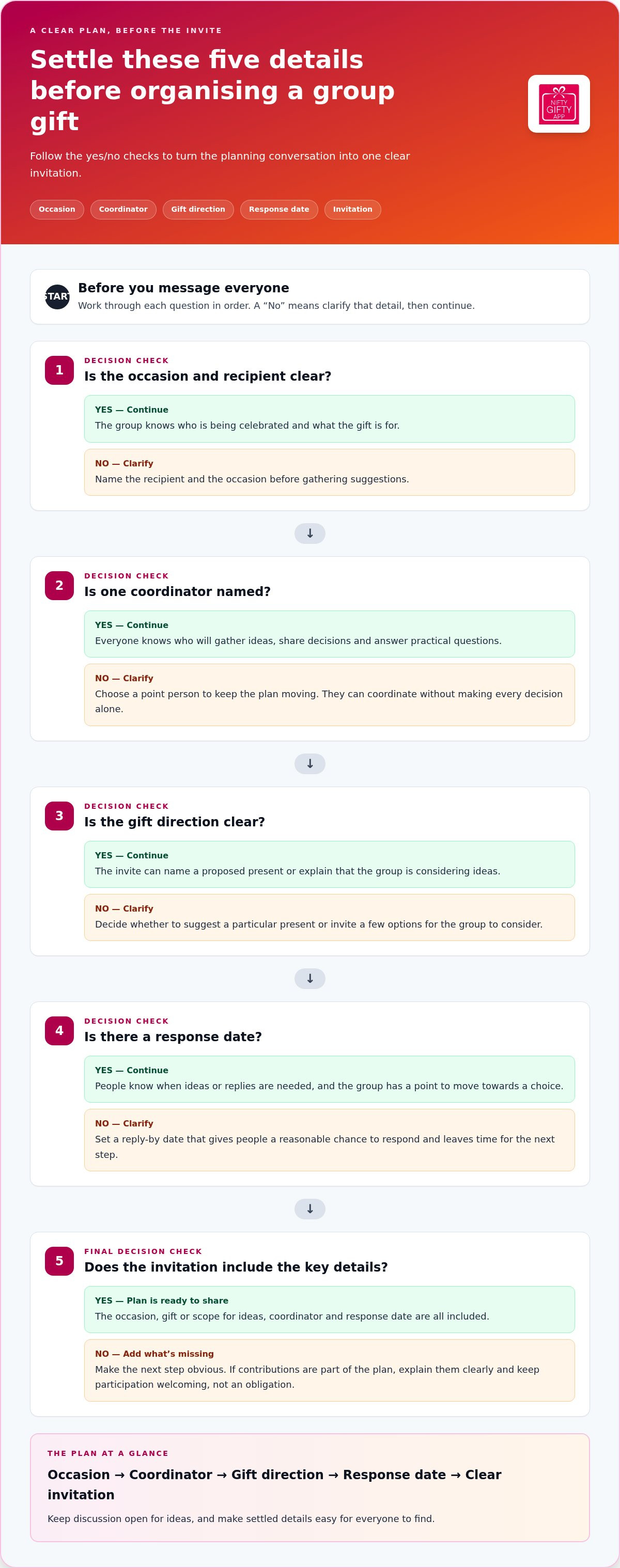
A little preparation makes the invitation easier to answer. Before you open the family chat, decide what the group needs to settle, who’ll coordinate the next steps and when you need replies. The invitation can then start with a clear direction, rather than an open-ended “Any ideas?” that keeps the discussion looping.
Use this sequence: confirm the occasion, choose a coordinator, agree on the gift direction, set a response date, then invite everyone. A clear decision point gives people room to offer ideas while showing when the group will move from discussion to a choice. It’s a practical way to plan a group gift without endless messages or shutting down thoughtful suggestions.
Set the gift scope and one coordinator
First, decide whether you’re proposing a particular present or inviting the group to suggest options. You might have a gift in mind that suits the recipient, or you may want to gather a few ideas before choosing. Keep the occasion and the recipient’s preferences at the centre. A retirement gift, for instance, may call for a different feel from a present for a new baby.
Then name one person to keep the plan moving. The coordinator can gather suggestions, share what the group has agreed and answer practical questions. That doesn’t mean they make every decision alone. Invite people to contribute ideas, then explain how those ideas will be considered and when the group will settle on a direction. One point person helps keep the plan clear, while everyone can still have a say.
Choose a response date and write one clear invite
Set a reply-by date that gives people a reasonable chance to respond and leaves time for the next step. A date answers the unspoken question, “When do we need to decide?” Without one, people may keep adding suggestions because they don’t know whether the choice is settled or still open.
Keep the invitation warm and straightforward. Include the occasion, the proposed gift or scope for ideas, the coordinator and the response date. If contributions are part of the plan, explain the next step clearly and make participation welcoming, not an obligation. For example:
“We’re organising a group gift for Priya’s birthday. I’m coordinating, and we’re considering a cookbook she mentioned. Please share any suggestions by 12 May so we can settle on the gift. You’re welcome to join in if it suits you. I’ll share the next update once we’ve made a decision.”
That message gives people something specific to respond to, a clear person to contact and a point when ideas will be reviewed. If you want a shared place to organise gift details alongside the invitation, a shared gift list can make the plan easy to refer back to.
Before you send the invitation, decide the occasion, coordinator, gift direction and reply date. The plan can still change if someone raises a useful point. You’re simply giving the conversation a path, so the group can focus on choosing a thoughtful present rather than working out what happens next.
Choose one shared place for group gift decisions and updates
Once the plan is under way, give everyone one agreed place to check the current details. A group chat, email thread and shared gift list can all help, but they do different jobs. The aim isn’t to stop people talking. It’s to avoid keeping competing versions of the plan across different places.
Group chat: Handy for quick questions and suggestions. Replies can push the agreed gift or latest update out of view.
Email: Useful for a longer message people may want to refer back to. New replies can split the conversation across a thread, and updates may not be obvious to everyone.
Shared gift list: Gives the group a specific place to check gift details and claims. It can make the current plan easier to find than scrolling through conversation.
Choose one source for the current gift plan, then tell the group where it is. Use messages to discuss ideas or point people to an update, rather than copying every settled detail into multiple chats and emails. That simple boundary makes it easier to organise a group gift without endless messages, while leaving room for warm, useful conversation.
When does a group chat help, and when does it get hard to follow?
Chats are familiar and convenient for a quick “Would she like this?” or a new suggestion. Keep using them for discussion. The challenge comes when several people reply at different times: a practical question, a photo and a side conversation can all appear before someone sees the latest decision. Rather than asking everyone to abandon messaging, use the chat to share the agreed reference point and direct people there for current details.
What should the shared reference point contain?
Keep the key information together and current. At a glance, people should be able to see:
The recipient and occasion
The agreed gift direction, or a note that ideas are still being gathered
The coordinator and response date
Relevant updates, such as a change to the plan or a decision that’s been made
When these details live in one place, the organiser can share an update without re-explaining the whole plan each time. Keep payment instructions separate from gift claims. A gift-list tool can help show which gifts have been claimed, but it doesn’t collect or process group payments.
Nifty Gifty App gives organisers a shared reference point for gift lists and claims. Organisers manage the list in the mobile app, then guests can claim gifts through a secure link or QR code without downloading the app or creating an account. Claims update in real time, so the current status is easier to check than a string of separate replies. Learn more about gift tracking and real-time claims, and keep gift information together with chat for the conversation around it.
Agree on the reference point before you send the invitation. That way, people know where to look when they want to check the plan, and the organiser has one clear place to update.
Keep group gift follow-ups brief, friendly and useful
Once the plan is clear and everyone knows where to find it, follow-ups can stay short. A useful rhythm is simple: send the invitation, share an update when something changes or a decision is made, then send a final practical reminder if needed. Each message has a purpose. You’re keeping people informed, not replaying the whole conversation.
For a group gift without endless messages, make every update answer three things: what’s decided, what still needs attention and the relevant date. If there’s no new information, you may not need another message. A reminder should make the next step easier to see, not make someone feel watched.
What makes a follow-up message useful?
Keep each message focused on one action or decision. Thank people for their input, state what’s happening next and include the date if it matters. Avoid guilt or guesses about why someone hasn’t replied. They may be busy, may have missed the notification or may simply need more time to decide.
For example: “Thanks for the suggestions. We’ve agreed on the photo book, and I’m confirming the details by Friday. Please let me know by Thursday if you spot anything we should consider.” That’s warm, specific and easy to act on. A final reminder could be even shorter: “A quick note that we’re confirming the gift tomorrow. Thanks to everyone who’s shared an idea.”
How should you handle changes to the gift plan?
Share what’s changed and the practical reason, then say whether the group needs to make a fresh decision. If a suggested present is no longer suitable, explain that and invite a replacement idea by a clear date. If the choice is settled and only a small detail has changed, let everyone know it’s an update rather than reopening the decision.
For instance: “The original option is no longer available, so we’re looking at a similar alternative. Please share any other suggestions by Wednesday.” Or: “We’ve confirmed the new collection date. The gift choice hasn’t changed.” This makes it clear whether people need to respond or simply take note.
After sending an update, add the change to the shared reference point too. That way, someone who checks later can see the current plan without searching through every reply. If a question comes up about a settled choice, answer briefly and point back to the current details. Reopen the discussion only if the question raises something that genuinely affects the decision.
Keep payment details distinct from gift-plan reminders. If the group is contributing money, state the relevant arrangements plainly, but don’t suggest a gift-list tool collects payments. The message can focus on the next step without mixing up gift claims and payment arrangements.
For a shared place to keep gift details together between updates, see how Nifty Gifty App keeps gift details together.
Use Nifty Gifty App to keep group gift claims and contributions visible
A shared plan helps, but someone still needs to keep track of which gifts are claimed and how group contributions are adding up. Nifty Gifty App gives organisers a gift list they can manage in the mobile app, with a secure way to share it with guests. It can support a group gift without endless messages by giving people a place to check gift claims instead of relying on chat replies as the record.
How organisers and guests use Nifty Gifty App
The organiser creates and manages the gift list in Nifty Gifty App for iOS or Android, then shares it with the group. Guests can use a secure link or QR code to claim a gift. They don’t need to download the app or create an account to do so.
When a guest claims a gift, the list updates in real time. That gives the group a current view of gift claims, which can help people choose without asking the organiser to confirm every update. The recipient is the person being celebrated and receives the gifts; guests claim gifts from the list.
Keep the shared list as the place to check claims, and use your usual messages for conversation or a useful update. If a guest asks whether a gift is still available, the current claim information is easier to refer to than a reply buried in a long thread. It’s a practical way to keep coordination clear while everyone stays focused on choosing something thoughtful.
What contribution tracking does and does not do
For a group gift that involves chipping in, Nifty Gifty App tracks logged contributions and shows a live running total. Organisers can refer to that total when sharing progress, rather than manually repeating separate updates about what has been recorded.
There’s an important distinction: Nifty Gifty App tracks contributions, but it doesn’t collect or process payments. The group arranges how contributors send their share separately. Keeping that clear helps everyone understand what the app records and what the organiser needs to handle outside it.
You can use the plan in this guide with a group chat and a simple shared reference point, or add Nifty Gifty App to your organising routine. Either way, decide where the current gift details live and make that clear to everyone. Read more about Nifty Gifty App for your next occasion.
Make the next occasion easier to organise
A thoughtful group gift doesn’t need a perfect plan. It needs a clear starting point and a coordinator who can keep the focus on the person you’re celebrating. When the arrangements are easy to follow, people can spend less energy working out what’s happening and more time adding their own care to the gesture.
For your next occasion, choose one simple organising habit to carry forward: make the current plan easy for everyone to find. That small choice can help your group gift without endless messages feel more considered and less like another task on the family to-do list. Keep the process suited to your group, and leave room for the fun part: choosing something the recipient will appreciate.
Bring gift details, claims and contribution tracking together with Nifty Gifty App. Organisers can manage their list in the mobile app, while guests use a secure link or QR code to claim gifts. Start organising your next occasion with Nifty Gifty App.
Frequently Asked Questions
How many messages should I send when organising a group gift?
There’s no fixed number, but each message should have a clear reason. For a group gift without endless messages, send an invitation, then update people when a decision or important detail changes. A final reminder can help if a response is still needed. If nothing has changed, skip the check-in. That keeps the group informed without asking everyone to follow a running commentary.
What should I do if people disagree about the group gift?
Bring the discussion back to what the recipient would appreciate and what suits the occasion. If people are split between a practical present and a sentimental one, ask the group to choose between those clear options rather than adding more possibilities. Set a decision point, then share the outcome and the reason briefly. People can have different preferences while still supporting a thoughtful choice.
Can a group gift still feel personal when several people contribute?
Yes. Personal meaning comes from the thought behind the choice, not from whether one person or a group gives it. Invite people to share a detail that reflects the recipient, such as a favourite hobby or a fond memory. The organiser can use those ideas to shape the gift or include a short message from the group, so the recipient sees the care behind it.
How do I make contributing to a group gift feel optional?
Say directly that people are welcome to join in if it suits them, and don’t ask anyone to explain their choice. Keep practical information available to the group without singling out people who haven’t responded. If you’re tracking contributions, describe that accurately as a record of what has been logged, not as a way to judge who has or hasn’t taken part.
Can a group gift work when family members live in different places?
Yes. Give everyone a way to see the same gift details, even if relatives are checking in at different times. With Nifty Gifty App, guests can use a secure link or QR code to access the shared list without downloading the app or creating an account. That can suit relatives coordinating across different schedules, while each person responds when it fits their day.
What happens if someone has already chosen a gift before the group decides?
Ask the person what they’ve selected before anyone else makes a purchase. If the group still wants to contribute, consider a different gift that complements it, such as an accessory or a shared experience suited to the recipient. If the original choice already covers the occasion, the group can decide whether to add a card or leave that gift as a personal gesture.



Comments