
Gift-Giving Organiser for Busy Parents: Swap Five Notes Apps for One Gift List

What if the gift idea you saved last month was still attached to the right person when their birthday came around? For busy parents, ideas can end up in messages, notes and memory while birthdays, holidays and family milestones compete for attention. A gift giving organizer for busy parents brings those plans together, so you can keep track without turning every occasion into another big job.
Thoughtful gifting takes a little planning. The tricky part is remembering who wants what, what’s coming up and which gifts are already purchased, especially when you’re fitting it all around family life.
This guide shows you how to build a repeatable gifting routine in short pockets of time. Connect ideas to people and occasions, keep spending and purchased gifts in view, and share lists with family without asking guests to download an app or create an account. Nifty Gifty App brings gift lists, occasions and budgets together in one mobile app for iOS and Android. Guests can claim gifts through a secure link or QR code, and claims update in real time. One organised list, ready for the next occasion.
Table of Contents
Why a gift-giving organiser helps busy parents stay ahead of family occasions
A birthday invitation lands beside a note about a school celebration, and a family milestone is coming up too. Each occasion calls for a little thought: who needs a gift, what might suit them and whether something has already been purchased. For the parent keeping all those details in mind, even joyful plans can start to feel like another job.
Gift-giving helps people mark relationships and shared moments. The cultural and social role of gift-giving is one reason families celebrate with thoughtful presents. Staying ahead doesn’t require elaborate event planning. A gift-giving organiser for busy parents is simply one place to record people, occasions, gift ideas and spending, supported by a routine you can repeat.
With one visible plan, you can check what’s coming up and what you’ve already decided instead of searching old messages or relying on memory. Use a spare few minutes to add an idea or review an upcoming occasion, rather than leaving every decision until the last minute.
Which gifting tasks take up parents’ time?
The work often comes in small, repeated jobs: keeping track of dates, noting gift ideas when someone mentions a favourite, and remembering what’s already been purchased. A child might mention something they’d like, a relative might share an idea in a family chat, and a friend’s celebration can appear on the calendar around the same time.
When those details are spread across messages, notes and conversations, it takes extra effort to find them again. You don’t need a complicated system. You need a dependable place to capture useful details as they come up.
What should a family gift organiser keep together?
A family gift organiser keeps four practical details connected: people to remember, occasions and dates, ideas for each recipient, and spending plans. A useful list records what you need without requiring a detailed profile for every person.
People: children, relatives, friends and others you celebrate.
Occasions: birthdays, school events and family milestones.
Ideas: gift suggestions linked to the person they’re for.
Spending: an amount or limit to guide planning for an occasion.
Keep the routine light: add details when they come to mind, then return to the list when you’re planning the next occasion. The aim isn’t to manage every celebration like a production. It’s to make thoughtful gifting easier to fit around family life.
How to Build an Easy Family Gift-Giving Organiser
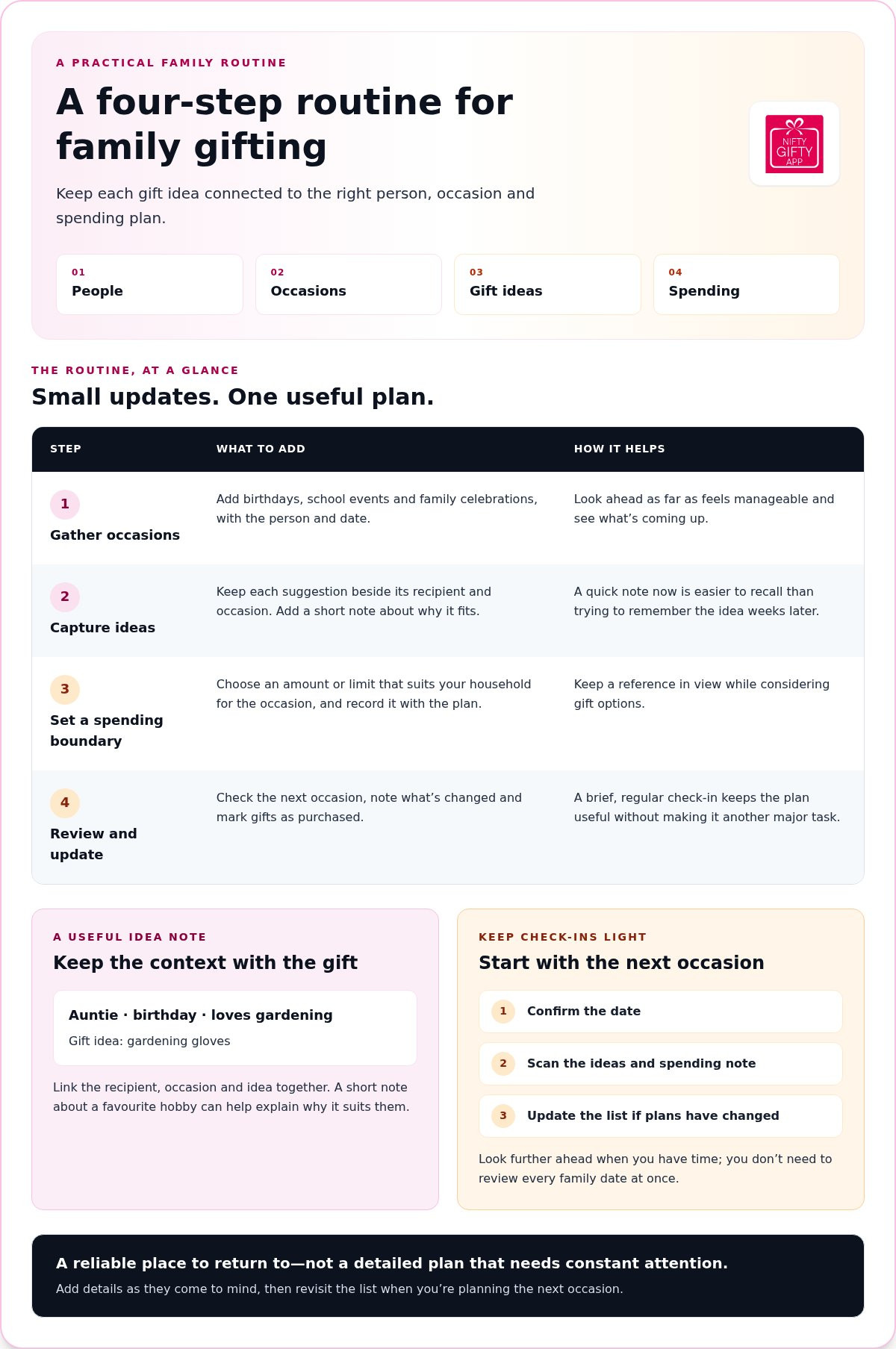
A useful system doesn’t need a long setup session or a perfect plan. Choose one main place for gift details, then follow the same steps whenever a new date or idea comes up. This gift giving organizer for busy parents works best when it’s easy to update in the moment and simple to revisit later.
Gather upcoming occasions. Add the birthdays, school events and family celebrations you’re responsible for remembering. Include the person and date, then look ahead as far as feels manageable.
Capture gift ideas as they arise. Keep each suggestion beside the recipient and occasion it relates to. A quick note now is easier than trying to recall it weeks later.
Set a spending boundary. Choose an amount that suits your household for the occasion and record it with the plan. It gives you a reference as you consider gift options.
Review and update your list. Check the next occasion, note what’s changed and mark gifts as purchased. A brief regular check-in keeps the plan useful without making it another major task.
How do you capture gift ideas before they disappear?
Write down the recipient, occasion and idea together. “Auntie, birthday, loves gardening” gives you context; “gardening gloves” on its own may not. Add a short note about why the idea fits, such as a favourite hobby or something they mentioned needing.
Make capturing ideas a small habit. After a conversation, outing or everyday observation, add the note to your chosen list while it’s fresh. If your child spots something they like or a relative mentions a favourite pastime, record it there rather than leaving it buried in a message thread.
How can you keep occasion planning realistic?
Start each check-in with the next occasion. Confirm the date, scan the ideas and spending note, and update the list if plans have changed. Look further ahead when you have time, but you don’t need to review every family date at once to stay organised.
Keep the routine flexible. A new idea may suit someone better, family plans can shift, and a gift may already have been purchased. Adjust the list and move on. The aim is a reliable place to return to, not a detailed plan that needs constant attention.
If you’d rather keep occasions, gift ideas and budgets together, Nifty Gifty App gift lists can support that routine on your mobile.
How to share gift lists and coordinate family contributions
Sharing a gift list can help relatives coordinate a present for a birthday or family celebration. Instead of sending separate messages to ask what everyone has in mind, family members can check the same list and see which ideas have been claimed. This can help avoid duplicate purchases, although a list can’t ensure every gift will be different.
Private family notes can work when one person manages the plan, but relatives won’t see updates unless you send them. A shareable list gives guests a place to view ideas and lets claims update in real time. That makes coordination easier, especially when family members live in different places or can’t catch up in person.
How can relatives claim gifts without extra setup?
With Nifty Gifty App, organisers can share a list using a secure link or QR code. Send the link in a family message or show the QR code in person. Guests can open the list and claim a gift without downloading the app or creating an account. When a gift is claimed, the list updates in real time so other guests can see its status.
The roles stay clear: the recipient receives the gift, while guests claim gifts to let others know what they plan to give. That small step gives relatives useful information without a long round of “Has anyone got this yet?” messages. A gift giving organizer for busy parents should make it easy for family to join in, not add another setup task.
How can families track group gift contributions?
For a shared present, contributors can chip in while one person keeps track of the plan. A live running total brings contributions together, helping the organiser see how the group gift is progressing. It also gives family members a clear reference instead of leaving the coordinator to piece together updates from separate conversations.
Nifty Gifty App tracks group contributions with a live running total, but it doesn’t collect or process payments. Contributors arrange payment separately. Keep the conversation simple and considerate: share the plan, explain how contributions will be tracked, and leave room for people to participate in a way that suits them. The aim is to make giving together easier to coordinate, not to put anyone under pressure.
A shared list works best when it answers practical questions at a glance: what’s available, what’s claimed and how the group gift is progressing. Relatives can then help while the organiser keeps the occasion moving.
How to keep gift spending and purchased presents in view
Gift plans are easier to review when each idea and purchase sits beside the right person and occasion. A simple record helps you see what’s still under consideration, what’s already purchased and how your plans compare with the spending limit you set for the celebration.
Before adding gift ideas or browsing, decide what feels comfortable for your household to spend on the occasion. That boundary gives you a reference point as you make choices. It isn’t a rule about what a gift should cost; it’s a way to keep the plan clear and personal.
How can parents set simple occasion spending limits?
Start with the occasion, then record the limit in whichever way suits your household. For a birthday, you might note one total for the celebration or keep separate figures for gifts and other plans. There’s no prescribed amount. Choose an approach that feels clear and easy to update.
If relatives are contributing to one shared present, record those contributions separately from gifts you’re planning yourself. That keeps the occasion view useful without blending the group gift with your household’s other presents. For seasonal planning, use the same approach for Christmas: keep ideas, occasions and spending notes together instead of relying on scattered seasonal notes.
What should you record after a gift is purchased?
Make a quick update while the detail is fresh. Note the item, recipient and occasion, then mark it as purchased. Adjust your spending record using your chosen method, whether that means updating the occasion total or noting the amount beside the gift. This small habit gives you and any family members viewing the plan a clearer picture of what’s covered.
A list or spreadsheet can both hold gift details. The practical difference is how you prefer to update and review them. If you’re weighing those formats, see our guide to gift-list apps versus spreadsheets for help choosing a tracking style that fits your routine.
Nifty Gifty App brings gift lists, occasions and budgets together in its iOS and Android mobile app for organisers. Keep the occasion plan in view as ideas become purchased gifts. Organise your family gift lists with Nifty Gifty App.
How Nifty Gifty App can support a busy parent’s gifting routine
A family gifting routine needs a reliable place for occasions, ideas and spending notes. Nifty Gifty App brings those details together in a gift list on a mobile app for iOS and Android. Organisers use the app on their phone, so they can update the list as plans take shape.
Which parts of the routine can Nifty Gifty App handle?
Create gift lists for birthdays, Christmas, weddings and baby showers, then keep ideas connected to the person and occasion. Occasion budgets and spending records help you see what you’ve planned and what’s been purchased, using the approach that suits your household. They help you organise gifting without telling you what to spend.
For a shared present, contributors can chip in while the organiser keeps an eye on the live running total. Nifty Gifty App tracks group contributions, but it doesn’t collect or process payments. Contributions are arranged separately.
Sharing is straightforward, too. Send family members a secure link or show them a QR code. Guests can claim gifts without downloading an app or creating an account, and claims update in real time. The recipient receives the gift; guests claim items to let others know what they’re planning.
How can parents start using a shared gift list?
Keep the first step small. Add the next occasion, then note a few gift ideas beside the people they’re for. Build out the list as more dates and ideas come to mind. When relatives want to coordinate, share the secure link or QR code so they can view the list and claim an idea.
If you’re comparing ways to organise lists, the guide Gift List Organiser App: Choose One That Fits Your Gifting offers a related perspective. Choose a routine you’ll return to, whether you’re planning a birthday or keeping track of several family occasions.
A gift giving organizer for busy parents should make planning easier to pick up and keep going. Explore Nifty Gifty App to bring your family’s gift lists, occasion budgets and gift tracking together.
Make your next occasion easier to organise
A family gifting routine doesn’t need to be elaborate. Keep people, occasions, ideas and spending in one place, then update the list when plans change or a gift is purchased. That simple habit helps you see what’s ahead without piecing details together from old notes and messages.
A gift giving organizer for busy parents should also make it easy for relatives to join in. With Nifty Gifty App, guests can claim gifts through a secure link or QR code without downloading the app or creating an account. Claims update in real time, and group contributions appear as a live running total. Payments are arranged separately.
Start with the next occasion and a few gift ideas. Add more as they come to mind, and let your list support the routine you’ve built. Explore Nifty Gifty App and organise your next occasion. A little planning can leave more room to enjoy the celebrations.
Frequently Asked Questions
How do busy parents organise gifts for multiple family occasions?
Use one gift list to connect people, occasions, ideas and spending notes. Add birthdays, Christmas, school celebrations or family milestones, then check the next occasion when you have a spare moment. Record ideas beside the person they suit and update the list when a gift is purchased. This gives a gift giving organizer for busy parents a practical purpose: keeping plans together without requiring a detailed schedule for every celebration.
What should a family gift list include?
Include the recipient, occasion and date, gift ideas, and a spending note if you use one. You can also add a short detail explaining why an idea fits, such as a favourite hobby or something the person mentioned wanting. Keep the record brief enough to update easily. For each occasion, note which gifts are still ideas and which are purchased, so you can see what’s planned at a glance.
Can relatives claim a gift without downloading an app?
Yes. With Nifty Gifty App, organisers can share a gift list through a secure link or QR code. Guests can open the shared list and claim gifts without downloading the app or creating an account. Claims update in real time, so other guests can see what has been claimed and choose from the remaining ideas. The recipient receives the gift; guests claim items to coordinate their plans.
How can parents help avoid duplicate gifts?
Share a list with relatives who are choosing gifts, and encourage guests to claim the item they plan to give. Claims update in real time, giving others a current view of what’s spoken for. This can help avoid duplicate gifts, although a list can’t ensure every present will be different. Keep gift ideas attached to the right recipient and occasion, and update the list if plans change or a gift is purchased.
How do you keep track of gifts purchased for family members?
Record each gift beside the recipient and occasion, then mark it as purchased when you’ve chosen it. Add or update a spending note using the approach that works for your household. For example, a birthday entry might show the recipient, a couple of gift ideas and which one is purchased. Keeping these details together makes it easier to check your plan without searching old messages or notes.
Can a gift organiser track group contributions without collecting payments?
Yes. Nifty Gifty App tracks group contributions with a live running total, so organisers can see contributions together while coordinating a shared gift. The app doesn’t collect or process payments. Contributors arrange payment separately. Keep the conversation straightforward and considerate: share what the group is planning, explain how contributions will be tracked, and let relatives decide whether they’d like to chip in.
Is Nifty Gifty App available on iPhone and Android?
Yes. Nifty Gifty App is available as a mobile app for iOS and Android through the App Store and Google Play. Organisers use the mobile app to manage gift lists, occasions, budgets and spending. Guests don’t need to install it or create an account to claim gifts from a shared list. They can use the secure link or QR code provided by the organiser.


Comments