
Gift Budget Tracker: Stop Guessing What You've Spent, Occasion by Occasion

You’ve got a birthday present tucked away, a Christmas idea in your notes and a group gift taking shape in the family chat. Your budget says one thing, but small purchases across several occasions tell another story. A gift budget tracker brings the plan, recipients and spending into one clear view.
It’s easy to lose track when gift ideas sit in one place and spending records in another. Add shared gifts, and keeping track of contributions can mean another round of follow-up. The right method makes the plan easier to review without adding unnecessary admin.
This guide compares what matters in a gift budget tracker, from a simple list or spreadsheet to an app that keeps occasion budgets and gift lists together. You’ll find practical ways to track planned and actual spending, organise gifts for birthdays and Christmas, and coordinate group contributions. Nifty Gifty App lets organisers manage gift lists and occasion budgets in its iOS and Android app. Guests can claim gifts through a secure link or QR code without downloading the app or creating an account. Use the steps below to get organised for your next occasion.
Table of Contents
What a gift budget tracker helps you keep in view
You can remember the main present and still lose track of the smaller ones. A card, a book and a last-minute extra may each seem easy to recall, until gifts for several people and occasions start overlapping.
A gift budget tracker records planned gift spending by occasion and recipient, then gives you a place to update what you’ve purchased and spent. General expense tracking covers everyday outgoings. Gift tracking links a planned amount to the people and presents it’s meant to cover. That makes it easier to see what’s still an idea, what’s been purchased and how the occasion budget is shaping up.
It doesn’t need to become a full household budget. Keep your gift budget separate from costs such as food, travel, decorations or venue hire. It’s one small part of personal finance principles: giving a specific type of spending a clear place to be planned and reviewed.
What belongs in a gift budget?
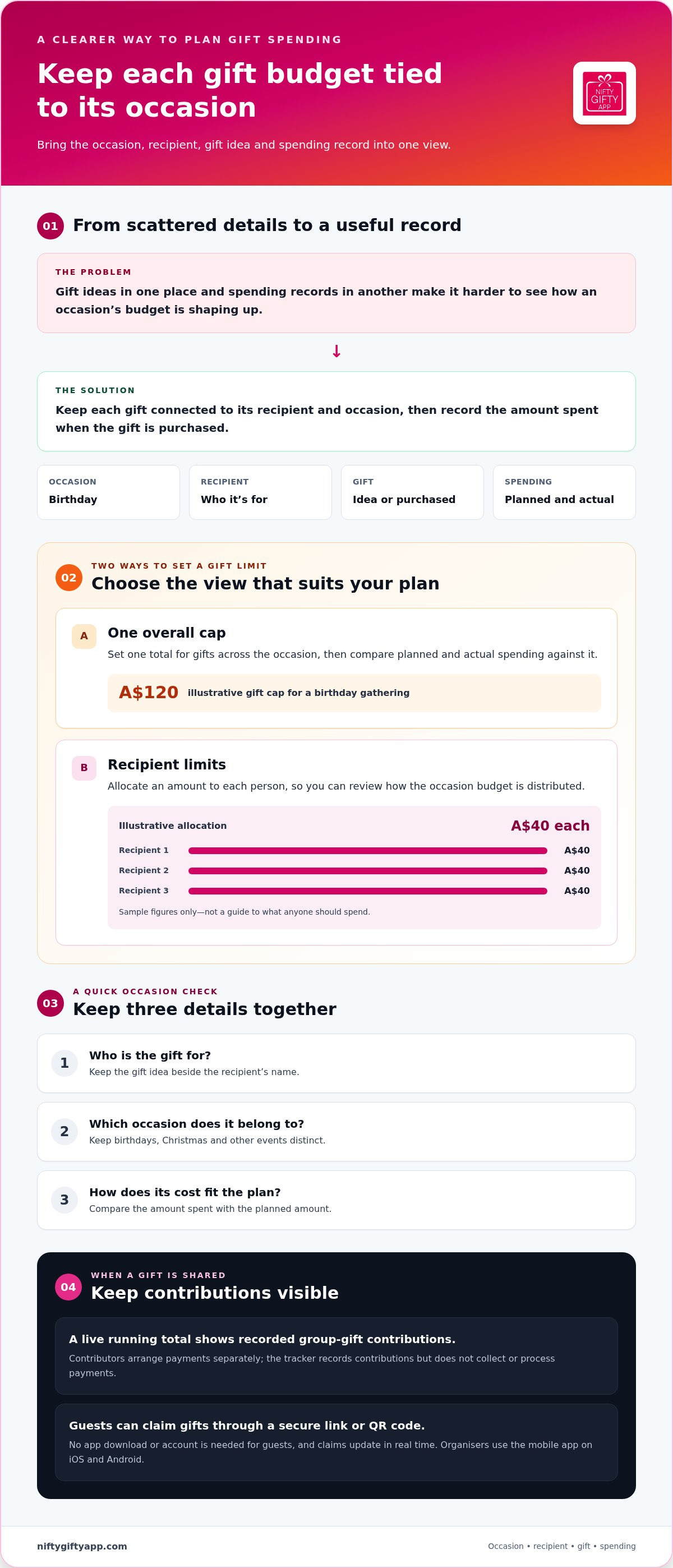
Start with the amount you’re setting aside for gifts, rather than every cost attached to the occasion. Then choose a limit that suits the way you want to manage it:
One overall cap: Set a total for gifts across the occasion, then compare planned and actual spending against it.
Recipient limits: Set an amount for each person so you can see how the budget is allocated across your list.
For example, for a birthday gathering, you might set an illustrative A$120 gift cap and allocate A$40 each to three recipients. Those figures are just a sample, not a guide to what anyone should spend. If one gift idea changes, the tracker helps you review the remaining allocations before making another purchase.
Why track spending by occasion and recipient?
Grouping gifts by occasion turns a vague total into something you can review. A birthday list shows what’s planned for that birthday; a Christmas list shows its own gifts and spending. The same approach works for weddings and baby showers, keeping each celebration distinct instead of folding everything into one running figure.
When you purchase a gift, update your record with the amount spent. That simple habit takes pressure off your memory. You can check the recipient’s entry, see what’s already covered and compare actual spending with the plan, rather than trying to reconstruct it from notes, receipts and bank activity.
A gift budget tracker is most useful when it answers three quick questions: who is the gift for, which occasion does it belong to, and how does its cost fit the plan? Keep those details together and each occasion becomes easier to assess on its own.
Which gift budget tracker features are worth comparing?
A tracker earns its place by making each update simpler. If you have to copy gift details into one list, costs into another and occasion totals somewhere else, keeping everything current can become another job. Start with the essentials: occasion budgets, spending records and gift-list organisation. Extra features matter only if they suit the way you plan.
A practical gift budget tracker connects each occasion’s budget with its recipients, gift ideas and spending updates, so you can review the plan without maintaining duplicate records. Use this checklist to compare options:
Occasion budgets: Can you keep birthdays, Christmas and other events separate, with a clear view of the amount set aside for each?
Gift details: Can you connect an idea to both a recipient and the occasion it’s for?
Spending updates: Can you record what you’ve spent and compare it with the plan without entering the same information twice?
List organisation: Is it easy to tell which gifts are still ideas and which have been purchased?
Sharing: Can relatives or contributors access the information they need without creating more follow-up for the organiser?
Budget views, gift details and spending updates
Check how the tool connects the details. A gift idea for your niece’s birthday should sit with her name and that birthday, rather than disappearing into a general list. When you purchase the gift, the amount spent should be easy to record. Then you can compare planned spending with the recorded amount and see where an adjustment may be needed.
A clear view matters more than a long feature list. A calendar, reminder or colour label may suit your habits, but it’s an optional extra if you won’t use it. For seasonal planning, holiday spending plan strategies can offer broader ideas for separating gift plans from other festive costs. Keep your tracker focused on details you’ll actually maintain. That helps prevent a useful record from turning into duplicate admin.
Sharing and group-gift visibility
If you coordinate with family or friends, think about what they need to see and how they’ll access it. A shared gift list makes ideas visible; clear gift status helps others see whether an item is still available to claim. For a group gift, a live running total shows recorded contributions. Keep contribution tracking distinct from payment collection, as recording amounts doesn’t mean the tracker handles or transfers money.
With Nifty Gifty App, organisers share gift lists through a secure link or QR code. Guests can claim a gift without downloading the app or creating an account, and claims update in real time. For group gifts, the app shows a live running contribution total. Contributors arrange payments separately. Nifty Gifty App brings occasion budgets and gift lists together in its iOS and Android app. See Nifty Gifty App’s gift-list and budget tools.
Gift budget tracker options: choose a format that fits your habits
The right format is the one you’ll keep up to date. A short list may be enough when you’re coordinating a few gifts for one occasion. More recipients, recurring celebrations or shared planning call for a clearer view. Compare formats by setup effort, ease of updating and how well they keep each occasion’s budget visible.
These are broad comparisons, as lists, worksheets and apps can work in different ways. The useful question is whether a format suits your routine and the number of people involved. If you’re tracking a handful of presents on your own, a lightweight record can do the job. If several relatives are involved across birthdays and Christmas, keeping details separate and easy to share may matter more.
When a simple list or worksheet may be enough
A basic list or worksheet suits an organiser who wants to note a few recipients, gift ideas and costs for one upcoming occasion. It’s quick to start and doesn’t require learning a new tool. The trade-off is upkeep: you’ll need to record each change yourself. If you miss updates or leave them until later, the record can fall behind what you’ve actually purchased.
A spreadsheet or template gives you more room to organise occasion details than a short note, while leaving you in charge of the layout. Keep it familiar and straightforward. If updating it feels like a separate task, a simpler record may be easier to maintain.
When a dedicated app may suit the organiser
A dedicated app suits organisers who want occasion budgets and gift lists in one mobile workflow, especially when other people are involved. Nifty Gifty App lets organisers manage occasion budgets and gift lists in its iOS and Android app. The mobile format fits planning and updates from your phone. Organisers who prefer to manage everything on a computer will need a different format.
Sharing needs can also shape your choice. A personal budget note may be enough when you’re working alone. If relatives need to see gift ideas or you’re coordinating contributions for a shared present, choose a format that makes those details visible without creating a second record to maintain. For more on organising shared gift lists, the gift list organiser app guide is a related read.
How to set up a gift budget tracker for the next occasion
Keep the setup focused on one upcoming occasion. You don’t need to map every birthday and celebration for the year. Start with the event in front of you, then make small updates as gift plans take shape. A quick check when you add an idea or purchase a present is easier to maintain than a big catch-up later.
Name the occasion. Give the record a clear label, such as “Mum’s birthday” or “June wedding”. A specific name makes it easier to distinguish this plan from other events.
List the recipients. Add everyone you’re planning a gift for. If you’re coordinating a shared gift, note the recipient and mark it as a group present so it’s distinct from gifts you’re organising individually.
Set the gift limit. Choose one overall amount for gifts, or split the budget into amounts for each recipient. Keep other event costs, such as travel or food, outside this gift total so the figure stays useful.
Add ideas as they come up. Attach each idea to its recipient straight away. If you’re considering a book for your cousin, record it against their name rather than leaving it in general notes. Ideas can change, so make sure the record is easy to update.
Record purchased gifts. Update your record with the amount spent at the time. That small habit keeps the figures current and saves you piecing purchases together from memory later.
Review before adding another gift. Compare what you planned with the recorded spending. Check the occasion total and each recipient’s allocation, then decide whether there’s room for another idea or whether to adjust the plan.
Fit updates into something you already do. Add an idea when you write it down, record the cost after a purchase, and glance over the totals before making another gifting decision. These quick checks keep the tracker relevant without turning gift planning into its own project.
For Christmas, use the same steps to shape a seasonal plan: name the occasion, list recipients and review gifts against the amount you’ve set aside. A Christmas gift budget guide can help you think through that occasion in particular, while this setup also works for birthdays, weddings and baby showers.
Nifty Gifty App brings occasion budgets and gift lists together in its iOS and Android app. Explore Nifty Gifty App to organise your next occasion and keep gift plans and spending in view.
How Nifty Gifty App brings gift budgets and lists together
Choosing a gift budget tracker is easier when you can see how the budget fits into your gift-planning routine. Nifty Gifty App brings occasion budgets, spending and gift lists together for organisers, so the people and gift ideas behind an occasion sit alongside the budget you’re tracking. Organisers use the mobile app on iOS and Android.
Track occasion budgets alongside gift lists
Create wishlists for an occasion, add gift ideas and recipients, then keep occasion budgets and spending close to those plans. Instead of checking a list in one place and trying to recall the budget from somewhere else, you can refer to the occasion’s gift details and spending as you organise. The list and budget stay connected, making it easier to review the occasion as a whole.
This works for organising one birthday or keeping plans for several occasions. Each gift idea has a person and an event attached, while the budget gives you context for spending. As plans change, review the list and spending together instead of rebuilding the picture from separate notes.
All your gifting, beautifully organised. Nifty Gifty App is designed for the organiser’s mobile workflow, not a desktop or web app. It keeps planning centred on gift lists and occasions, while you choose and purchase the gifts.
Coordinate claims and group contributions
Share the list so relatives can coordinate without installing the app. Guests claim gifts through a secure link or QR code, with no app download or account needed. Claims update in real time, so you can see when a gift has been claimed. Guests claim gifts; recipients receive them.
For a group gift, Nifty Gifty App tracks contributions with a live running total. This gives the organiser a visible record of contributions towards the shared gift. It’s contribution tracking, not payment processing: the app doesn’t collect or process payments, so contributors arrange payment separately.
The distinction matters. A gift list shows what’s planned or claimed; the running total helps you follow group contributions. Together with occasion budgets and spending, these details make coordination easier to follow while keeping the joy of choosing a gift at the centre.
Start with the 14-day free trial, then $7.99 a year.
Make room for the thought behind each gift
A gift budget tracker should support the generous part of giving, not turn every occasion into a tally. A clear spending plan helps you focus on what suits each person, whether it’s a small personal gesture or a shared present from the family. The amount spent isn’t a measure of how much someone matters.
Keep your approach flexible. Some occasions need little planning; others involve more people and moving parts. The useful measure is whether your chosen method gives you enough clarity to make thoughtful decisions without taking over the enjoyment of choosing a gift. Adjust your system as plans change, and keep the people you’re celebrating at the centre.
Ready to bring your next occasion’s gift planning into one place? Start organising with Nifty Gifty App and keep gift lists, occasion budgets and spending together.
Frequently Asked Questions
What should a gift budget include?
Decide what counts as a gift expense in your records and apply that choice consistently. For example, you might track a gift separately from its card or wrapping, or group those costs together if that’s more useful for your planning. The important thing is to use the same approach across the occasion, so the total means what you expect when you review it.
How often should I update a gift budget tracker?
Update your gift budget tracker when a change could affect a decision, rather than setting a daily task. A new idea, a changed price or a gift you’ve decided against are useful prompts. If you prefer a routine, pair a quick review with something you already do, such as checking your calendar for upcoming celebrations. That keeps the record useful without turning it into another admin job.
Can one gift budget tracker cover birthdays and Christmas?
Yes. Label each celebration clearly so recurring birthdays don’t get confused with Christmas plans, especially when the same relatives appear on both lists. Including a date or short occasion description can make older entries easier to recognise later. If you use a paper record, leave space to add future occasions; with a digital format, use names that are easy to distinguish at a glance.
What happens if I go over my planned gift budget?
Record the actual amount and pause before adding another gift. Review what’s still undecided, then choose whether to change a remaining idea, adjust your plan or accept the higher total. The record helps you see the effect of that choice; it doesn’t need to become a reason for guilt. Leaving the purchase out would make the picture less useful when you review the occasion.
Is a gift budget tracker useful for organising a group present?
It can be, particularly if the group agrees early on who is coordinating and what the shared gift is. The organiser can keep a clear record of the plan and reduce uncertainty about who is handling the next step. It also helps to agree how contributors will communicate changes, such as someone deciding not to take part. Clear expectations make coordination easier for relatives near and far.
Can guests claim a gift without downloading a gift budget app?
Yes. Guests can claim through a secure link or QR code without downloading Nifty Gifty App or creating an account. That’s handy for relatives who only need to take part in one occasion, while the organiser manages the list in the mobile app. A guest claims a gift for themselves or on behalf of a group; the recipient receives it.


Comments