
Compare analogue, digital and hybrid gift planning

A notebook is a handy place to jot down gift ideas. But when family or friends need to share a shortlist and avoid choosing the same present, a digital list is easier to keep up to date. That’s why a gift app is better than a notebook for coordinating shared gift plans, even if paper still suits your personal notes.
Both methods have their place. A notebook is simple, screen-free and ready for a quick note; a gift app makes it easier to gather ideas and share them. The key is choosing what suits the way you plan, narrow down options and involve the people giving gifts.
This comparison covers paper, digital and hybrid planning, including where each approach helps and where it can fall short. You’ll see how to keep personal brainstorming flexible while making shared gift lists easier to follow, so you can choose a method that works for your next occasion.
Table of Contents
1. Choosing between analogue, digital and hybrid methods
A notebook suits quick sketches, private thoughts and ideas you want to keep on paper. A digital list suits plans that need updating or sharing, such as a family shortlist for one occasion. A hybrid approach lets you jot ideas on paper, then move the agreed options into a shared list.
Handwriting can help you select and summarise ideas, while typing makes it easy to add detail. For gifting, write down possibilities for your niece, then move the strongest options into a digital list. You can brainstorm freely without making the final shortlist difficult to share.
Paper notes stay in one physical place, while digital notes can be available across devices. For example, record a recipient’s favourite colours in a notebook or save those details in a digital document you can access while planning. Sharing is easier online, but personal details still deserve care. Save only what’s useful for choosing a gift, secure your device with a passcode and review who can access shared files.
How does a gift app work offline compared with a notebook? A notebook works without a device or internet connection. A gift app relies on a mobile device, and sharing or updating a list may require internet access. Don’t assume offline changes have reached other people.
Digital learning offers a useful comparison. In an online class, paper notes let you look away from the screen, while typing makes details easier to capture and edit. Gift planning involves a similar trade-off: handwriting can help you sketch an idea, while a digital note is easier to revise when plans change.
Digital note-taking accessibility depends on the person and their tools. Someone who finds handwriting tiring may prefer typing; someone who wants to draw a gift idea may find paper simpler. A digital whiteboard or mind map can connect a recipient’s hobbies, useful gifts and group-gift options. A notebook can do the same with arrows and sketches.
How do you choose between a gift app and a notebook for organising gifts? Choose paper for private, screen-free brainstorming; choose an app when people need to share or update a shortlist. Combine them if you like writing ideas by hand but want the final plan in one shared place.
What are the privacy and security risks of storing personal details in a gift app? Someone with access to the device or account may see digital notes about preferences or sizes. Keep details limited to what’s useful for gifting, secure the device and share a list only with people who need access.
Why a gift app is better than a notebook depends on the task. For a solo list, paper may be enough. For a shared plan, a digital list makes it easier for everyone to see the same options and updates.
2. Gift selection and decision fatigue
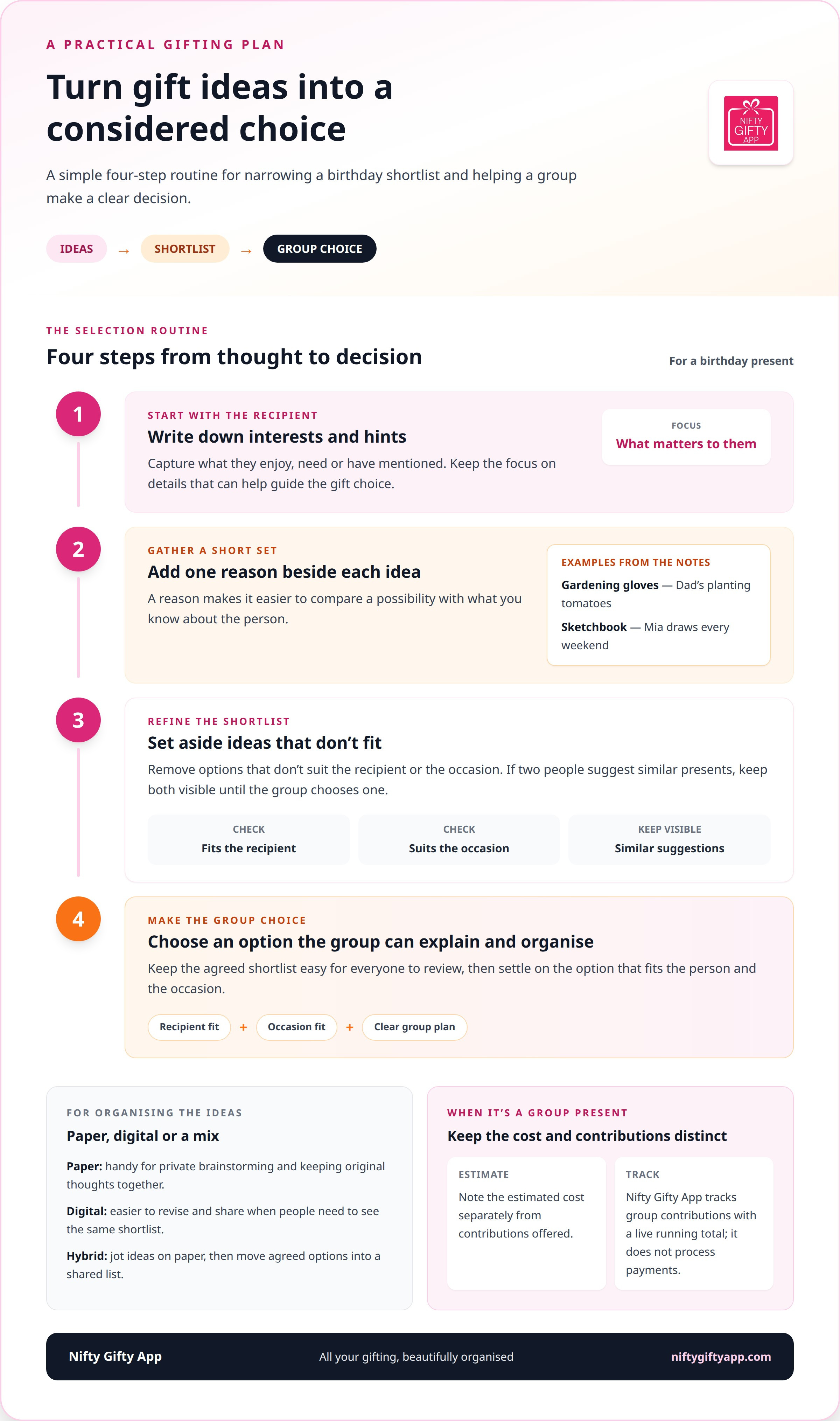
Gift planning gets tiring when every idea stays in the running. A handwritten page might list a cookbook, headphones, a plant and a restaurant voucher for one person, without showing which suits them. To narrow the options, ask: does this gift reflect something they enjoy, need or have mentioned?
Use notes to distinguish possibilities from decisions. Add a reason beside each idea, such as “gardening gloves, because Dad’s planting tomatoes” or “a sketchbook, because Mia draws every weekend”. This helps you compare ideas with what you know about the recipient, rather than adding another option whenever one comes to mind.
Next, sort the shortlist into useful groups. For a housewarming, you might separate practical items, shared experiences and personal touches. Remove options that don’t suit the recipient or occasion. If two people suggest similar presents, keep both visible until the group chooses one. A digital list makes edits easier to follow; a notebook keeps the original brainstorming together.
What do gift-planning apps in Australia cost, and what do paid versions include? There’s no single Australian price for gift-planning apps; each app sets its own plans, trial terms and fees. Compare the stated cost and renewal conditions for the app you’re considering, rather than assuming every plan works the same way.
Can gift apps track gift budgets and spending? Nifty Gifty App lets organisers set an occasion budget, monitor spending and record group-gift contributions. A written budget beside each idea can also help a family weigh options, but a list alone won’t show what has actually been spent.
For a group present, distinguish the estimated cost from contributions already offered. Nifty Gifty App tracks contributions with a live running total, so the organiser can see what’s still needed. The app doesn’t process payments: contributors pay the organiser directly, keeping contribution tracking separate from payment.
Try this selection routine for a birthday present:
Write down the recipient’s interests and any hints they’ve shared.
Collect a short set of ideas, with one reason for each.
Set aside options that don’t fit the occasion or the recipient.
Choose the option the group can explain and organise clearly.
A notebook can make early brainstorming feel personal; a digital list makes comparing and revising ideas easier to share. Use both if that suits your process: keep handwritten thoughts private, then move the agreed shortlist into a shared plan. The aim is a considered choice, not an endless catalogue of possibilities.
Abbreviations and selective notes can make paper planning quick. Keep the page focused on the recipient’s interests, suitable options and why each one fits. Use consistent shorthand for details that come up often, and leave out ideas that don’t help the group decide. This keeps the process clear without recording every passing thought. Whether you choose paper or a digital list, make the shortlist easy to review and act on.
3. Sharing and collaboration
A notebook gives one person a clear place to collect ideas. It becomes harder to coordinate when cousins in Perth, Melbourne and Brisbane each suggest a different present. A shared digital list gives the group one place to review options, add context and see what has changed. That’s useful when family members are planning from different cities or countries.
Start with a list for one recipient and one occasion. Add each suggestion with a short note, such as “portable speaker, for camping trips” or “family photo book, for Nan”. The context helps relatives understand the idea and suggest alternatives without restarting the discussion in separate message threads.
How do gift apps help avoid duplicate gifts? A shared list can show which gift someone has claimed, so others can choose a different idea. Nifty Gifty App updates claims in real time through a shared link or QR code. Everyone still needs to use the list and update their choices.
Imagine three siblings planning a birthday gift. One suggests a board game, another adds a cooking class, and the third prefers a group present. A shared list lets everyone review the options before deciding. With a notebook, the organiser has to copy updates and tell everyone what changed, which can be easy to miss if someone is travelling.
Clear roles make group planning easier. The organiser gathers suggestions and maintains the list; claimants select gifts; recipients receive them. For a group present, contributors can chip in while the organiser tracks the running total. Nifty Gifty App tracks contributions but doesn’t collect or process payments, so contributors pay the organiser directly.
A shared digital list is especially useful when several people are involved. A notebook can still help the organiser sketch a theme or keep private reminders. Move agreed ideas into the shared plan so everyone can refer to the same details. This hybrid approach keeps personal brainstorming while making coordination visible.
To make the list easy for relatives to use, include practical details rather than long descriptions:
Add the recipient’s name and the occasion.
Write one clear title for each gift idea.
Include a brief reason or note when it helps the group choose.
Update the list when someone claims an option or the group agrees on a present.
For example, “gardening tools” is broad, while “pruning shears, for Aunty Jo’s garden” gives the family a clearer starting point. A short, current list helps relatives suggest thoughtful options and decide without asking the organiser to repeat every update.
4. What features do gift-planning apps offer compared with a paper notebook?
A paper notebook gives you a page, a pen and room to write. A gift-planning app adds structure, making it easier to organise separate lists for a wedding, a new baby or a teacher’s thank-you gift. The useful difference isn’t simply paper versus screen. It’s whether your method helps you find, update and share the details you need.
Start with list organisation. A notebook can separate plans with tabs or headings, such as “housewarming” and “work farewell”. In Nifty Gifty App, create separate occasions to keep plans organised. Add a clear recipient name and occasion to each list so you can find the right one when it’s time to plan.
Search and editing help when plans change. If a friend mentions a preference after you’ve written down gift ideas, a notebook needs a new note or a crossed-out line. With Nifty Gifty App, you can edit the list and keep the updated version in place. Search can also help locate details, such as “likes native plants”, across your notes.
A notebook generally needs to be passed around or copied, while a gift app can make sharing and claiming gifts simpler. For a group farewell present, Nifty Gifty App lets people view the list through a shared link or QR code and claim gifts in real time. Guests don’t need to download the app or sign up.
Separate lists: Keep a wedding list apart from a birthday plan.
Editable entries: Update a gift idea when the recipient shares a new preference.
Shared access: Let relatives contribute ideas to one group plan.
Gift status: Record which suggestion someone has selected, where the app supports it.
Paper notes: Sketch a handmade card or jot down a spontaneous idea without opening a device.
Think about the information you need. A parent organising a class gift might want a list of suggestions and a clear record of the group’s choice. Someone keeping a private list for a partner may prefer a notebook with personal notes. Extra features help only when they suit the way you plan.
Consider where and how you’ll use the list. A notebook works without a charged device, while a phone can keep a digital list close at hand when an idea comes up. If you plan with relatives, shared access may matter more than handwriting space. If you enjoy sketches or keepsake notes, paper may still have a place in your routine.
Choose features to match the task: capture ideas, sort options, share decisions or track a selection. A notebook handles personal writing well; an app makes updates and shared lists easier to manage. Combining both lets you draft freely on paper, then organise the agreed plan digitally.
5. Do gift apps provide birthday and occasion reminders?
A reminder is useful only when it suits your planning routine and the date is correct. Nifty Gifty App includes an occasion countdown to help organisers keep the event in view. You can also use a phone calendar for separate prompts about birthdays, anniversaries or family celebrations.
For example, add Aunty Jo’s birthday to your calendar, then note when you want to start planning. A notebook can hold the same dates, but you need to open it and notice the entry. A phone calendar can send alerts even if your gift list doesn’t include reminders. The tools can work side by side.
Separate the occasion date from your preparation date. If a birthday falls during a busy week, an earlier prompt gives you time to collect ideas, ask relatives and settle on a present. A second prompt can remind the organiser to check whether the group has chosen an option. Avoid adding alerts that don’t lead to a clear action.
Before choosing a digital planner, consider what each reminder covers:
Date prompt: Flags the birthday or occasion itself.
Planning prompt: Reminds you to begin gathering gift ideas.
Group prompt: Helps the organiser follow up on suggestions or a shared decision.
List update: Keeps the gift plan current when details change.
A paper planner gives you a visible record when it’s open on your desk. A digital calendar can send an alert while you’re travelling or handling school pick-up. For a parent managing several family birthdays, one calendar view may make upcoming dates easier to scan. In a handwritten planner, colour-coded tabs can separate family, friends and work occasions.
Keep personal details proportionate. A reminder can say “Mum’s birthday, review gift ideas” without storing information the organiser doesn’t need. If relatives share a digital calendar, limit entries to details that help them plan. A notebook kept at home may feel more private, but it won’t automatically alert family members elsewhere.
Try a simple routine: record the occasion, choose a planning date, then add the next action. For example, “Dad’s birthday, ask siblings about a shared present” is more useful than a date with no context. Review upcoming entries when you plan the week, and remove alerts that no longer apply.
Reminders help with timing; they don’t choose a gift or organise a group by themselves. Pair a calendar alert with a clear list, and each prompt has a practical next step. A notebook remains useful for handwritten thoughts, while digital reminders bring an occasion back to your attention.
Nifty Gifty App
Nifty Gifty App suits organisers who want a shared gift plan for family or group occasions. In the mobile app for iOS and Android, organisers can build wishlists, save gift ideas, set budgets and track spending.
Guests can claim gifts through a secure link or QR code without downloading the app or creating an account. Claims update in real time, helping everyone see which gifts are available, claimed or purchased. For a group present, contributors can chip in and the app tracks contributions with a live running total. It doesn’t collect or process payments; contributors pay the organiser directly.
Choose a notebook if you prefer a private, handwritten list. Choose a shared app when coordinating ideas and gift claims matters more. To organise your next occasion with Nifty Gifty App, get in touch.
Make your next occasion easier to organise
Choose a planning method that fits the people involved, not just the way you like to write things down. A quiet personal celebration may call for a private list. A family occasion with relatives contributing ideas calls for a plan everyone can follow. You can also change methods as your plans grow, starting with handwritten thoughts and moving to a shared list when coordination matters.
Understanding why a gift app is better than a notebook comes down to the task. Paper gives you space to think; digital planning helps when several people need to keep plans aligned. Decide how you want family and friends to take part, then choose a method that makes it straightforward.
If a shared gift plan would suit your next occasion, contact Nifty Gifty App and explore a more organised way to bring everyone’s ideas together.
Frequently Asked Questions
Can a gift app store recipient preferences, sizes, and gift ideas?
Nifty Gifty App lets organisers create wishlists and save gift ideas, such as a cookbook or gardening tools. It isn’t a dedicated record of someone’s personal profile, so keep shared details focused on choosing a present. If a size matters for a particular gift, include it only where it fits the gift entry, and avoid adding sensitive information that contributors don’t need.
Can you share gift lists with family or friends?
Yes, a shared gift list can help relatives coordinate ideas, even when they live in different households. Agree who will maintain the list, then give each gift a clear name and any useful context. Before choosing a present, family members can review the current entries and tell the organiser which option they’re considering. That simple routine makes shared planning easier to follow.



Comments