
Christmas Gift List Notes App Alternative: Organise Your Holiday List

A Notes app is handy for collecting Christmas gift ideas, but a private list can’t show the whole family what’s already been claimed. If you’re weighing up a christmas gift list notes app alternative, consider how many people need to see and update the list, and whether you need to track gift claims.
For a few ideas you’re keeping to yourself, Notes may be enough. But when ideas get buried, updates need repeating in family chats, or two people have the same present in mind, a shared list can make planning easier. Nifty Gifty App lets organisers manage a list in the iOS or Android mobile app, then share it by secure link or QR code. Guests can claim gifts without downloading the app or creating an account, and claims update in real time.
This guide explains when Notes does the job, what a dedicated Christmas gift list adds, and how to share current plans with less back-and-forth. You’ll also see how live claims can help family members avoid duplicate purchases, with budget tracking as an extra.
Table of Contents
When does a Christmas gift list outgrow your Notes app?
A book idea goes into one note. A toy suggestion arrives in the family chat. Then someone mentions a present over the phone, and you’re relying on memory to add it later. Christmas gift ideas can end up scattered across notes, messages and conversations before the list has even taken shape.
A gift list app gives present ideas a dedicated place to be organised and shared. That can help when several people are planning gifts together. The tradition of exchanging presents is part of what makes Christmas meaningful, and the practice of giving gifts can involve plenty of small details to keep straight. The useful question is whether your current list makes those details easier to manage.
What does a Notes app handle well at Christmas?
A private note is quick to start and simple for one person to update. If you’re keeping a short list of ideas for your children and managing the purchases yourself, a few lines in Notes may be all you need. Add an idea when it comes to mind, remove it when plans change, and keep the list close at hand.
That simplicity has limits. A note records ideas, but it doesn’t automatically show whether someone else has claimed a gift. You’d need to track that separately or check in with the other people involved.
What changes when several people share gift ideas?
Coordination adds another job. You might send the list to one relative, update it after a new suggestion, then remember to forward the changes to someone else. Meanwhile, a useful idea can disappear between photos, catch-ups and messages in the family chat. Everyone may be trying to help, but keeping everyone up to date can take more effort than adding the gift itself.
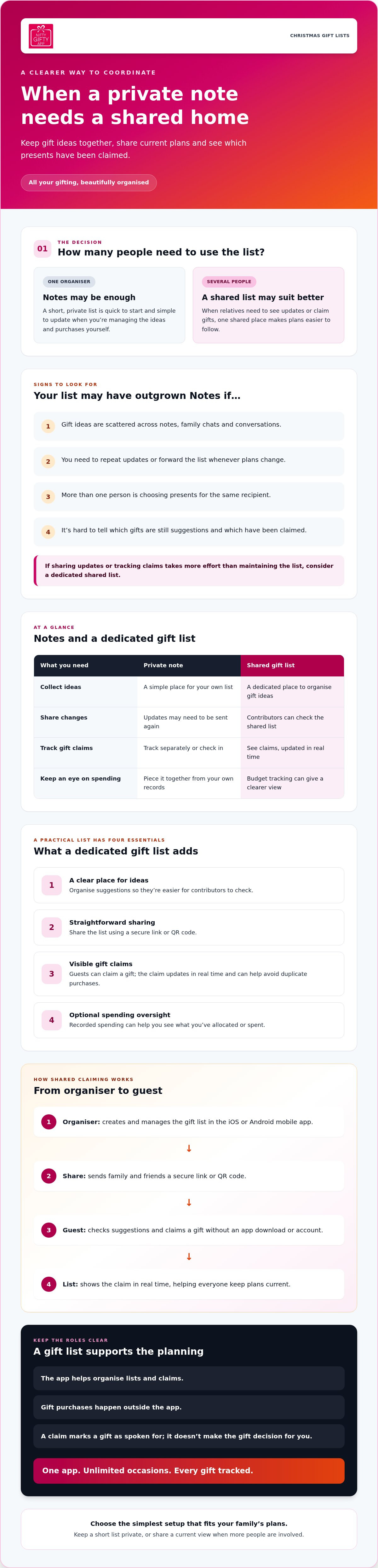
A private note stores your ideas. A shared, claimable list lets others check the suggestions and mark gifts as claimed.
That distinction matters when relatives are planning from different places, or when several people are choosing presents for the same recipient. A shared list gives contributors a current view, while claims help them see what someone else has picked. It won’t make the gift decisions for you, but it can make coordination clearer.
Consider switching to a christmas gift list notes app alternative when sharing updates or tracking claims takes more effort than maintaining the list. If it’s still one short note for one organiser, stick with Notes. If more people need to act on it, a dedicated list may suit your plans better.
What should a Christmas gift list app add beyond Notes?
A dedicated gift list should make Christmas planning easier to follow, not add features you won’t use. Look for four practical things: a clear place to organise gift ideas, straightforward sharing, a way to see which gifts have been claimed, and optional spending oversight. Those basics matter more than an impressive-sounding feature list.
Nifty Gifty App gives organisers a place to create and manage gift lists in its iOS and Android mobile app. Share a list using a secure link or QR code, so family and friends can check the suggestions without relying on forwarded screenshots or copied messages.
Want to see how that works in practice? See how Nifty Gifty App organises shared gift lists.
Which sharing features make family coordination easier?
With a note, sharing often means sending the list, then repeating the process whenever something changes. A shared list gives contributors one place to check, rather than asking the organiser to relay every update. Guests can claim gifts from the list, and those claims update in real time. This helps the family see what’s already been claimed and can help avoid duplicate purchases.
Guests don’t need to download Nifty Gifty App or create an account to claim a gift. They use the secure link or QR code shared by the organiser. That’s useful if some relatives prefer not to install another app.
When is spending tracking useful on a Christmas list?
Budget tracking is useful if you’re keeping an eye on gifts across several recipients. Recorded spending can help you see what you’ve allocated or spent, instead of piecing it together from receipts and memory. It won’t make decisions for you, but it can give you a clearer view as your list grows.
Choose a christmas gift list notes app alternative for the coordination it genuinely adds. If your main challenge is keeping family members up to date, prioritise simple sharing and visible gift claims. If you also want to track spending, look for that as a supporting feature. A long menu of extras matters less than a list people will use.
Notes app vs Christmas gift list app: which suits your plans?
The choice comes down to what your list needs to do. A short list for your own reference can stay in Notes. If several people are choosing gifts, a dedicated list may make it easier to see what’s suggested and what someone has claimed.
When is Notes enough for Christmas gift planning?
Stick with Notes if it’s a brief list that only you need to see. For example, you might jot down a few ideas for your nieces and nephews while you’re out, then use the note as a reminder when you’re ready to choose. There’s no need to add another tool if one private list does the job.
The key is keeping it current. Pick a format you’ll actually update, and mark ideas clearly as plans change or gifts are purchased.
When might a dedicated gift list be worth using?
Consider a dedicated list if several people are contributing, relatives keep asking what’s still available, or you’re unsure whether someone has already claimed an item. Nifty Gifty App lets organisers share a list, while guests claim gifts through a secure link or QR code. Claims update in real time, which can help family members avoid duplicate purchases.
Choose based on coordination needs, not feature count. If you’re comparing a christmas gift list notes app alternative, look for one you and your family will keep updated. A simple private note can be just right; a claimable shared list can help when more people need to coordinate.
How to move Christmas gift ideas from Notes into a shared list
Moving ideas across is a good chance to tidy your plans before family members start choosing gifts. Review what you’ve saved, group it by recipient, then share one current list instead of sending another round of updates. If you’re choosing a christmas gift list notes app alternative, keep the process simple:
Gather your ideas. Check your Notes app and relevant family messages. Bring useful suggestions into one review list so you can look at everything together.
Sort by recipient. Group ideas under each person’s name. Remove duplicates and set aside suggestions that no longer suit them.
Separate purchased gifts from open ideas. Review what’s already purchased before sharing. Keep those items distinct in your own planning, so family members can see which suggestions are still open.
Create the shared list. Organisers use Nifty Gifty App on iOS or Android to organise gift ideas in a dedicated list. Add the suggestions you want family and friends to consider.
Share one current version. Send the secure list link or show its QR code to the people helping with gifts. Ask them to check the shared list for updates, rather than relying on an older message or screenshot.
That review step is worth the few minutes. A suggestion from an old conversation may no longer fit, and two notes might describe the same present in different words. Sorting first gives you a clearer list to share.
Guests can claim gifts through the secure link or QR code without downloading Nifty Gifty App or creating an account. Claims update in real time, helping contributors see what’s been claimed and helping the family avoid duplicate purchases. When plans change, the organiser can point everyone back to the same place.
Prefer to get started with a shared list? Organise your Christmas gift list with Nifty Gifty App.
Is Nifty Gifty App a practical Notes app alternative for Christmas?
If you’re the person keeping gift ideas moving between family and friends, Nifty Gifty App may suit your Christmas plans. Organisers use the mobile app on iOS or Android to keep lists in one place and share them with guests. Guests can view the list through a secure link or QR code and claim gifts, with claims updating in real time.
It’s a practical option when a private note needs to become a shared list. It isn’t a place to purchase presents: Nifty Gifty App doesn’t sell gifts or process payments. The app supports the organisation around gifting, while you and your family choose and purchase presents separately.
What can organisers keep together in Nifty Gifty App?
Organisers can manage wishlists, track occasion budgets and spending, and coordinate group gift contributions. For a family Christmas list, gift ideas and spending records can sit alongside the planning, rather than being split between notes and messages.
If family members are chipping in towards a group gift, Nifty Gifty App tracks contributions with a live running total. It doesn’t collect or process payments. Contributors arrange payment separately; the app helps keep track of the amounts shared.
Who may prefer to keep using Notes?
A short, private list managed by one person may not need a dedicated app. If you’re noting a few ideas for your own reference and don’t need family members to coordinate, choose the tool you’ll keep updated. There’s no need to add another step just for the sake of it.
Think about how many people need to act on the list. If it’s just you, Notes may be enough. If relatives or friends need to check suggestions and claim gifts, a shared list can make coordination clearer. Organisers access Nifty Gifty App through its mobile app, not a desktop or web app, so consider whether that setup suits the person managing the list.
A christmas gift list notes app alternative is useful when it fits the way your family plans, not simply because it has more features. If shared gift ideas and claims would help, explore Nifty Gifty App for your Christmas list.
Keep your Christmas gift plans easy to share
Notes can be all you need for a short, private list managed by one person. Once family and friends need to coordinate, a shared gift list can make suggestions easier to find and claims easier to track. Choose a christmas gift list notes app alternative based on how your family plans, not on how many features it offers.
Nifty Gifty App is a mobile app for iOS and Android organisers. Share gift lists by secure link or QR code, and guests can claim gifts without downloading the app or creating an account. Claims update in real time. For group gifts, the app tracks contributions with a live running total, but doesn’t process payments.
If a shared list would make Christmas planning simpler for your family, Explore Nifty Gifty App for your Christmas list. Keep the coordination clear, then enjoy the thoughtful part: choosing gifts for the people you love.
Frequently Asked Questions
Is a Notes app enough for a Christmas gift list?
Yes, a Notes app can be enough when your list is short and only you need to manage it. If you’re recording a few ideas for your children, for example, a private note may be all you need. If family members are coordinating, consider a christmas gift list notes app alternative when repeating updates or checking what’s been claimed starts taking more effort than maintaining the list.
Can I share a Christmas gift list without asking everyone to download an app?
Yes, provided the list tool supports sharing by link or QR code. With Nifty Gifty App, organisers manage the list in the iOS or Android mobile app and share it using a secure link or QR code. Guests can view and claim gifts without downloading the app or creating an account. Claims update in real time, so contributors can check the shared list for current gift availability.
How can a shared gift list help avoid duplicate Christmas presents?
A shared list lets contributors check which gifts have been claimed before purchasing an item. With Nifty Gifty App, claims update in real time, helping family members see the current status instead of relying on separate notes or older messages. Ask everyone to use the same list and keep it up to date. Visible claims can help avoid duplicate purchases, though no list can guarantee that duplicates won’t happen.
Is a dedicated Christmas gift list app worth using instead of Notes?
It may be worthwhile if several people need to coordinate gift choices or check claims. Notes can be simpler for a short, private list managed by one person. Compare the steps you take now: are you forwarding updates, answering repeated questions or checking whether someone has claimed an idea? Choose the tool that fits your plans and that you’ll keep current, rather than adding features your family won’t use.
Can a gift list app help me track Christmas spending?
Some gift list apps include budget and spending tools. Nifty Gifty App lets organisers track occasion budgets and spending alongside gift lists. For group gifts, it also records contributions with a live running total, but doesn’t collect or process payments. Contributors arrange payments separately. These features can help you keep a record of planned budgets and spending; they’re organisational tools, not a promise of a particular spending outcome.
What is a simple way to move Christmas gift ideas out of Notes?
Review your notes and messages, then gather the ideas you still want to consider in one place. Group them by recipient, remove repeated suggestions and set aside ideas that no longer fit. Mark gifts already purchased so they’re distinct from open suggestions. Add the remaining ideas to your chosen list and share it with the people helping. A quick sort gives everyone a clearer starting point for choosing gifts.


Comments