
Choose a wishlist app for easy gift coordination
A gift list can work without a group chat. A wishlist app without group chat can help relatives coordinate by letting them claim items, which reduces the chance of duplicate presents. Choose an app that also fits how your family shares lists and shops.
It’s easy to assume everyone needs to join the same conversation. But a flurry of messages can make it harder to track who plans to give what. A clear list and a simple way to claim gifts can make coordination easier.
This guide compares wishlist apps by store flexibility, guest access, gift claims, occasion features, account requirements and plan limits. You’ll see what to consider for your family, including how sharing and claim statuses can keep gift plans organised without another group chat.
Table of Contents
How can families avoid duplicate gifts without spoiling the surprise?
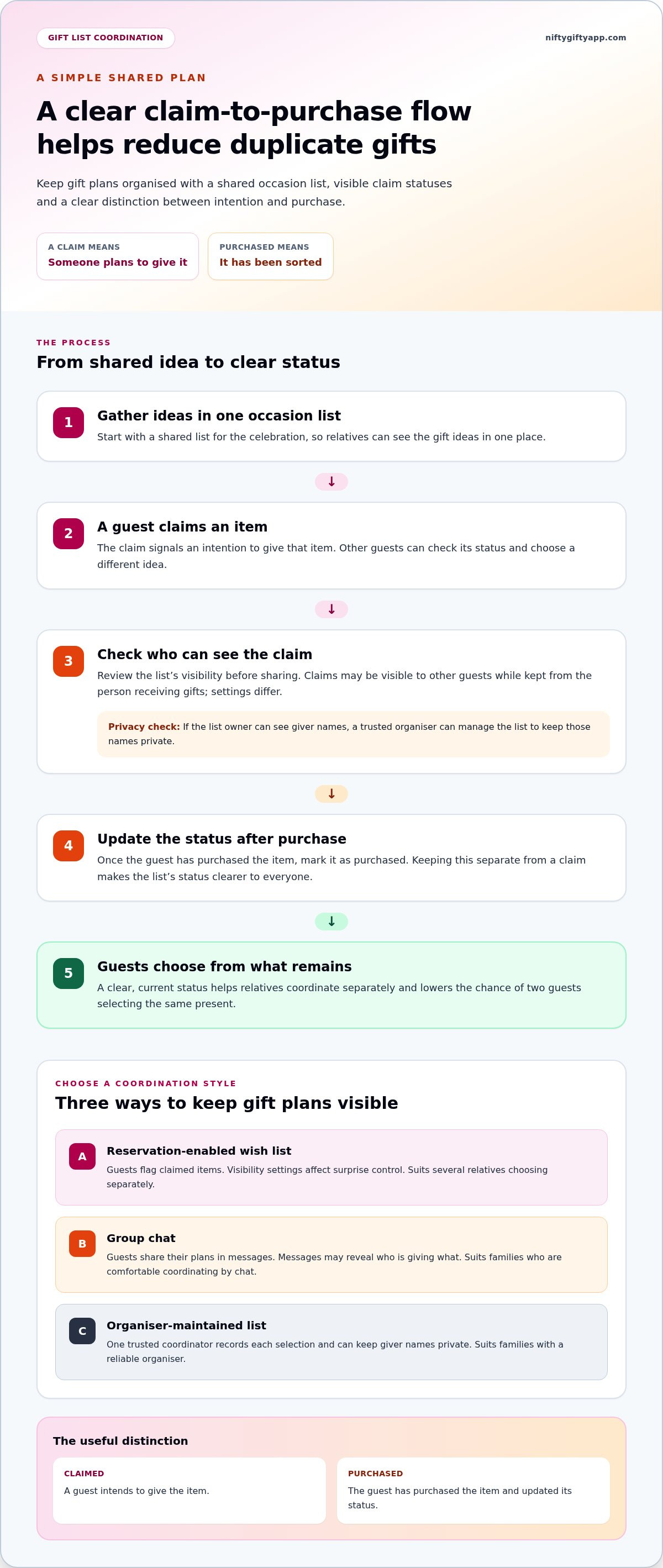
Two relatives might spot the same wish-list item and choose it independently. Gift claims give guests a shared way to flag an item before buying it, helping families avoid duplicates without turning every decision into a group chat. The key is a clear status that updates for everyone using the list.
Start with one shared wish list for the occasion. A relative chooses an item and claims it, then follows through with the purchase. Other guests can see that it’s claimed and pick something else. This works for individual presents and group gifts, where several people contribute towards one larger gift.
Surprises depend on who can see each claim. Before sharing a list, check whether guests can see an item’s status without revealing the giver to the recipient. Some arrangements show claims to other guests while keeping them hidden from the person receiving gifts. If the list owner can see names, a trusted organiser can manage the list instead.
Keep “claimed” and “purchased” distinct. A claim signals an intention, while marking an item as purchased tells other guests it’s been sorted. If an app offers only one status, agree on what it means before the family starts claiming gifts. For example, an aunt can claim a book, then mark it purchased after buying it. That small step helps prevent another relative choosing the same title.
For a family using a wishlist app without group chat, choose one that makes gift claims easy to spot and privacy easy to understand. Check who can claim gifts, who sees each claim, and whether statuses update promptly. This helps you decide whether the app suits your family’s approach to surprises and shared planning.
Choose a reservation-enabled list if guests need to coordinate directly; use an organiser-maintained list when keeping giver names private matters most.
Choosing a Wish List App for You?
Some wishlist tools offer free plans and don’t require a group chat. Their list, guest and privacy features vary, so compare what each plan includes before inviting relatives.
Individual and event-based lists
A personal list suits ongoing ideas, while an occasion-based list brings suggestions together for one event. For example, keep a personal list of kitchen items, then create a separate birthday list for guests. Check whether you can share each list with a different group, so a colleague can see the birthday ideas without accessing the family’s other lists.
Lists for celebrations
Occasion lists give each event its own focus. A wedding list might include homewares, while a baby shower list covers items for a new arrival. For Christmas, relatives may prefer one list for several family members. Look for a way to label each occasion clearly and update its contents as plans change, instead of relying on one long list that mixes recipients.
Consider how guests will open a list. If a friend doesn’t want another app, check whether they can view shared ideas in a browser. A family using different devices may prefer a link that opens without extra setup. Preview the guest view before sharing it, so you can spot confusing labels or missing item details.
Think about privacy, too. A private list can suit personal gift ideas; a shared list works when several relatives need to coordinate. Check whether access can be limited to selected guests or whether anyone with the link can view it. The right setting depends on who the list is for and whether the recipient should see its contents.
Store choice is another deciding factor. A list tied to Amazon may suit guests who prefer that retailer. A universal list may be more useful if ideas come from several shops. Check how the app handles outside links and whether product details remain clear when guests open them.
For one person: Look for separate lists for ongoing ideas and specific events.
For a family: Check whether different guests can access different lists.
For varied shopping habits: See whether the list accepts links from multiple retailers.
For guests who avoid downloads: Check whether a browser link opens the list.
Choose the sharing style that fits your guests: separate lists for different groups, or an occasion list for a celebration everyone is helping with.
Can I create one wishlist with items from different stores?
Often, yes, but the method depends on the app. Support for Australian retailers varies: some apps connect with selected stores, while others let you add a product link yourself. Before building a list, check whether your app accepts links from shops such as Amazon and Australian retailers.
A universal wishlist brings gift ideas from different shops together. For example, you might add a book from one retailer, a serving bowl from another and a garden tool from a third. Guests can browse one list instead of searching through separate store registries or messages.
Adding an item usually starts on the retailer’s product page. Copy its web address, open your list app, then use the option to add a link or item. Review the saved entry before sharing: a useful title, clear product image and working link help friends find the right version.
Some list apps offer a browser button or store connections instead. These can make adding products quicker, but check which shops they support. If your favourite Australian store isn’t included, adding a link manually may be an option. A universal list is useful only if guests can open and understand its entries.
An Amazon-only list may suit a household that wants gift ideas in one retailer’s catalogue. It can be less flexible if your wish list includes items from Australian shops, local makers or stores that aren’t connected. A universal list app can suit mixed shopping habits, provided it accepts outside product links and keeps them easy to use.
A registry and a universal wishlist aren’t always the same. A registry may be tied to one retailer or event, while a general list can collect links from several shops. Before adding gifts, decide whether guests should browse one store or choose where to buy each item.
Use this quick check before you share wish ideas:
Test a link: Add one product from an Australian retailer, then open it from the list.
Check the details: Make sure the saved title and image match the intended item.
Try another shop: Add an Amazon product or a link from a different retailer.
Preview as a guest: Confirm friends can reach the product page without extra steps.
For gift coordination across several shops, choose a list app that accepts outside links and keeps each item clear. If your family prefers one retailer, a store-specific registry may be simpler. The deciding factor is how guests will browse the list and buy each gift.
Support varies by app: some connect with selected stores, while others let you add product links from Amazon and Australian retailers.
Free plans and wishlist limits
A free wishlist plan can cover occasional gifting, but its limits matter once you add family members or celebrations. Compare the number of lists, items and guests allowed before building a wedding list or sharing ideas with relatives. A limit that seems generous for one birthday may feel tight when several occasions overlap.
Paid wishlist apps in Australia don’t have one standard price. Costs depend on the app’s plan, billing period and included features, so compare the Australian-dollar price with the limits you’ll actually use.
Check what happens when a plan limit is reached. An app might restrict adding another list, sharing with more guests or using a particular coordination feature. For example, a family planning a wedding and a baby shower could need separate lists, even if each has only a few gift ideas. Read the plan details before inviting guests.
Include privacy controls in your comparison. Look for options to keep a list hidden, share it with selected people or make it visible through a link. Then check whether those controls are included in the plan. A private family list may suit close relatives, while a link shared with wedding guests may be easier for a larger group.
Claim features can also affect a plan’s value. If relatives need to coordinate gifts, check whether guests can mark an item as claimed and whether others can see that status. A clear claim process can help avoid duplicate gifts. Understand how it works before relying on it for a shared celebration list.
Compare plans against your actual needs, not a long feature list. Are you organising one occasion or keeping lists for the whole family? Consider whether guests need accounts, whether you’ll share several lists and whether you want items from different stores. These practical details matter more than features you won’t use.
List limits: Count the separate lists you’ll need for occasions such as birthdays and weddings.
Sharing limits: Check how guests access a list and whether private sharing is available.
Item limits: Estimate the gift ideas each person may add, including updates over time.
Coordination tools: Review whether claims, reservations or hidden items are part of the plan.
Before choosing, write down your must-haves and compare them with each plan’s limits. A simple list for one occasion may need little beyond sharing; a family coordinating gifts across several events may value more flexibility and privacy controls.
Comparing wishlist apps by use case
Wishlist apps vary in device access and privacy controls. Some support iPhone and Android apps, while others also offer browser access. Check organiser access separately from guest viewing, since friends may use different devices.
Personal data and shopping activity depend on each app’s settings and policies. Review who can see a list, what account details are requested and which permissions the app seeks. A private family list, for example, should have access controls that match the people you intend to invite.
Start with five comparison points: adding items from multiple stores, guest access, claim coordination, occasion features and account requirements. Then match each to your event. A family sharing birthday lists has different needs from friends organising a gift exchange or relatives coordinating across several celebrations.
A wishlist app without group chat suits people who want a shared list and clear claims without ongoing conversation. For a family, check whether guests can open the list directly and understand which items are still available. For a one-off exchange, occasion features may matter more than managing lists throughout the year.
Device access can shape your choice. If an organiser prefers an iPhone app, confirm it supports the tasks they need. If a relative uses Android or a computer, check how they view the list and claim an item. Guest access in a browser doesn’t necessarily mean organisers can manage lists on the web.
Check privacy before sharing. Preview the list as a guest, review its visibility settings and avoid adding personal details that aren’t needed for gifting. For shopping activity, distinguish between seeing a gift idea and seeing who plans to buy it. Those settings affect both privacy and surprise.
Choose based on your main occasion: prioritise event tools for a single exchange, or separate lists and flexible access for family groups coordinating gifts throughout the year.
Nifty Gifty App
Nifty Gifty App helps family organisers coordinate gift lists for birthdays, weddings and other occasions without relying on group chat. Organisers use the mobile app on iOS or Android, then share a secure link or QR code with guests. Guests can claim gifts without downloading the app or creating an account, and claims update in real time to help families avoid duplicates.
For group gifts, contributors can chip in while the app tracks a live running total. It doesn’t collect or process payments, so contributions are arranged separately. Recipients receive the gifts; they don’t claim them. This suits organisers who want clear claims and contribution tracking rather than a store-linked registry.
Visit niftygiftyapp.com to explore Nifty Gifty App for your next occasion.
Make your next occasion easier to organise
Choose an upcoming celebration and agree on a simple habit: add gift ideas as they come to mind, then share the list with the people helping coordinate. A wishlist app without group chat can keep planning in one place while leaving everyone free to choose how they take part. The test is whether the routine feels easy enough for your family to keep using.
Keep the list focused on the recipient, without making every decision for them. A few thoughtful ideas can guide relatives while leaving room for personal touches. As the occasion approaches, update the list together and remove ideas that no longer fit.
If you’d like a dedicated place to organise family gifting, Nifty Gifty App is ready to explore. See how the app can fit your gifting plans, then choose a routine that feels right for your family. Here’s to making more room for the joyful part: celebrating together.
Frequently Asked Questions
What should I look for in a family wishlist app?
Look for a family wishlist app that handles different recipients, occasions and guest access clearly. If you’re planning Mum’s birthday and a child’s school milestone, separate occasion lists help keep requests and guests organised. Check how the app distinguishes recipients from people claiming gifts, whether relatives can open lists on their devices and how old lists are handled after an event. Clear roles make it easier to invite the right people.
Can I make a collaborative wishlist?
Yes, if “collaborative” means guests can coordinate around a list, rather than everyone editing it. Nifty Gifty App lets an organiser create gift lists and invite claimants or contributors, depending on the occasion. For a group gift, contributors can chip in while the app tracks the running total. The recipient receives the gift; they aren’t the person who claims it. Decide who will organise the list before sharing it.
How do I prevent my friends from buying the same gift?
Use an app that shows gift status to guests, and ask friends to check it before choosing an item. For example, if two relatives are considering the same board game, one can see whether it’s already claimed or marked purchased. Nifty Gifty App updates gift status in real time. For items with different sizes or colours, add the exact version so friends can distinguish the intended gift from similar options.
How do these apps compare for sharing with friends?
Compare the steps a friend must take to view and use a list. Some services may require an account, while others offer a shareable link. Consider whether guests can open it on a phone or computer, and whether the organiser can limit who receives it. For friends living interstate, a link can be easier to share than asking everyone to join a new family group.
What are suitable wishlist apps that work without group chat?
The right fit depends on how your family coordinates, not on one feature. Prioritise easy guest access if relatives don’t want another account, or list privacy if you’re sharing ideas with a smaller group. A wishlist app without group chat can suit organisers who want a shared list and straightforward gift claims, without ongoing conversation. Compare the setup with how your family actually plans occasions.
Which wishlist apps let users share lists without messaging features?
List sharing and messaging are separate functions, so check each app’s features. Nifty Gifty App supports sharing through a secure link or QR code and includes in-app messaging for reminders and updates. Guests don’t need to use messaging to claim a gift. If you specifically want a wishlist app without group chat, consider that requirement separately from guest access.
Do wishlist apps support private lists and shareable links?
Some apps offer both, but privacy controls vary. Check whether a list can be limited to invited people, shared through a link or made visible more broadly. A secure link provides a way to share access, but it isn’t automatically the same as a private-list setting. Nifty Gifty App provides secure links and QR codes for guests, so choose carefully who receives each one.
How do you create and share a wishlist without starting a group chat?
Use a list app to organise the occasion, add gift ideas and give guests a direct way to view the list. With Nifty Gifty App, the organiser creates a list in the iOS or Android mobile app, then shares its secure link or QR code. Guests can claim gifts in a browser without downloading the app. Send the link to the people involved and keep the occasion details with the list.