
App to Organise Christmas Presents: Compare Your Options in 2026

What if the best way to organise Christmas presents isn’t another family group chat? Gift ideas can get buried in old messages, two people can plan the same present, and keeping track of spending can become a job of its own. The right app to organise christmas presents should make the plan clearer without asking every guest to download an app.
You have a few options. A notes app may suit a personal list, while a shared spreadsheet can help relatives coordinate. A dedicated gift-list app can bring ideas, gift claims and budgets together. The right fit depends on how many people are organising, what they need to see and how much updating the list requires.
This comparison looks at practical organising methods and how they handle shared lists, gift claims, guest access and spending. Nifty Gifty App gives organisers a mobile app for iOS and Android to manage Christmas lists and budgets. Guests can claim gifts through a secure link or QR code, without an app or account, and claims update in real time. Organisers can also track group contributions with a live running total. Choose an approach that makes gifting easier to enjoy and simpler to coordinate.
Table of Contents
Why an app to organise Christmas presents can make gift coordination easier
Gift ideas can start anywhere: a note on your phone, a message from a relative or a conversation after dinner. Then come the follow-up questions. Has anyone organised a present for Nan? Who is keeping track of the group gift? An app to organise christmas presents can bring those moving parts into view. The point is to make coordination simpler, not to add another task to your Christmas list.
A Christmas gift organiser brings recipient lists, gift ideas, spending and shared contributions into one clear plan. A personal list helps you remember what you’d like to give. A shared plan helps family and friends see who is organising each present, which gifts have been claimed and how a group gift is progressing.
Which Christmas gift tasks need organising?
Start by separating the work into four practical areas:
Gift ideas: Record suggestions while they’re fresh, with the recipient they’re for.
Recipient lists: Keep names together so the organiser can see who still needs a present planned.
Spending: Note planned and actual spending to keep an eye on the overall budget.
Shared contributions: Track who is chipping in and the running total for a group present.
These jobs can sit with one person in a household. They need more coordination when relatives are spread across different places and can’t easily compare notes in person. A clear list gives everyone the same reference point, while named roles make it easier to know who is maintaining it and who is contributing. Recipients receive gifts; organisers coordinate the lists, and contributors chip in when a present is shared.
Gift-giving also carries social expectations, from choosing something thoughtful to agreeing how a group present will work. The concept of a gift economy offers useful context for the customs around giving. In practice, clear coordination helps everyone focus on the gesture rather than chasing details.
When does a dedicated app make sense?
A dedicated app can help when one list turns into several, plans are spread across conversations or people keep asking whether a present has already been organised. The sign that your current system needs support is that it takes too much effort to keep everyone up to date.
A shared, current list lets family members check what’s been claimed before choosing a gift, which helps avoid duplicates. It can also give the organiser one place to review ideas, spending and group contributions instead of piecing together updates from separate notes and chats. Choose an approach that fits the people involved: a simple personal list may be enough for one household, while shared planning can help when several relatives are coordinating. Keep the process useful and light. The aim is to make thoughtful giving easier to organise, not to turn Christmas into a project.
What to compare in an app to organise Christmas presents
Start by identifying which tasks you want the tool to take off your plate. An app to organise christmas presents should suit the way your family plans, not simply offer a long feature list. Compare how it handles everyday tasks, how much upkeep it needs and whether everyone involved can follow the same plan.
List creation: Can you make separate lists for recipients and keep gift ideas easy to sort and update?
Sharing: Is it clear who can view or edit each list, and how they get access?
Claims: Can participants see which gifts have been claimed, and is the status straightforward to check?
Spending: Can you record planned and actual spending in a way that’s easy to review across recipients?
Group gifts: Can the organiser see contribution progress without relying on separate notes?
Also consider who will maintain the lists. A tool may be quick to set up but still need frequent reminders or manual updates. Assigning a clear owner to each list helps keep information current and shows relatives where to add an idea or check a detail. Think about how many people are involved, too. What works for one household may not suit relatives coordinating across several households.
Does the app make sharing and claiming straightforward?
Compare how people access a list and what they need to do before they can view it or claim an item. Clear, simple steps make it easier for relatives to join in. Check whether claim status is visible to the people coordinating and whether updates are easy to spot. A shared view can help avoid duplicate choices without turning every gift decision into another round of messages.
Look at how the organiser can separate lists by recipient and keep details readable. If guests are choosing presents for several family members, clear labels make it easier to find the right information. The organiser should be able to see what needs attention without searching through unrelated conversations.
Can it keep budgets and group gifts visible?
Look for budget records that let you compare planned and actual spending across Christmas recipients. Records should be straightforward to update when plans change, rather than becoming another set of figures to maintain elsewhere. For group gifts, see whether contribution progress is visible to the organiser and whether the running total is easy to follow.
If spending is a key part of your planning, compare how each option handles budgets and records. Nifty Gifty App brings occasion budgets, spending records and group-contribution tracking together. Explore Nifty Gifty App gift-list features to see how its tools fit into your Christmas plans.
Christmas gift organiser options compared: lists, shared tools and an app
The right setup depends on how many people need to coordinate and how much of the organising you want to keep together. A personal list gives one organiser a place to plan. Shared tools give more people access to common information. A dedicated gift-list app can bring related planning tasks together. Compare the options by setup, collaboration and ongoing upkeep.
Option | Setup and collaboration | Planning visibility
Personal list | Quick for one organiser to start and maintain, with limited shared visibility. | Ideas and spending can be recorded privately; sharing updates takes extra effort.
Shared digital tool | Gives participants a common place to refer to, though access and upkeep depend on the tool. | Claiming, budget records and contribution tracking vary, so some tasks may need separate notes.
Dedicated gift-list app | Built around gift-list organising, with tools for sharing responsibilities. | Nifty Gifty App brings lists and occasion tracking together, with guest claims and group contributions as part of the setup.
Personal lists versus shared gift-organising tools
A personal list can be enough when one person is planning for a small household and is happy to keep others updated. Its limitation is that relatives don’t automatically see the same information. Shared tools give participants a common reference point, but the features vary. Decide which details your group needs to see and who will keep them current.
What a dedicated Christmas gift-list app brings together
A dedicated app can suit an organiser who wants gift planning and related tracking grouped in one place. Nifty Gifty App is a dedicated option for organisers using iOS and Android. Its shared-list features let guests check the current plan without the organiser relaying every update individually.
Think about your family’s habits. If relatives prefer to send ideas directly to one person, a personal list may be simpler. If several people need to coordinate, a shared tool or dedicated app can reduce repeated admin. The key is whether everyone can find the information they need while the organiser can keep the list up to date without excessive effort. Explore Nifty Gifty App gift-list features as you compare approaches.
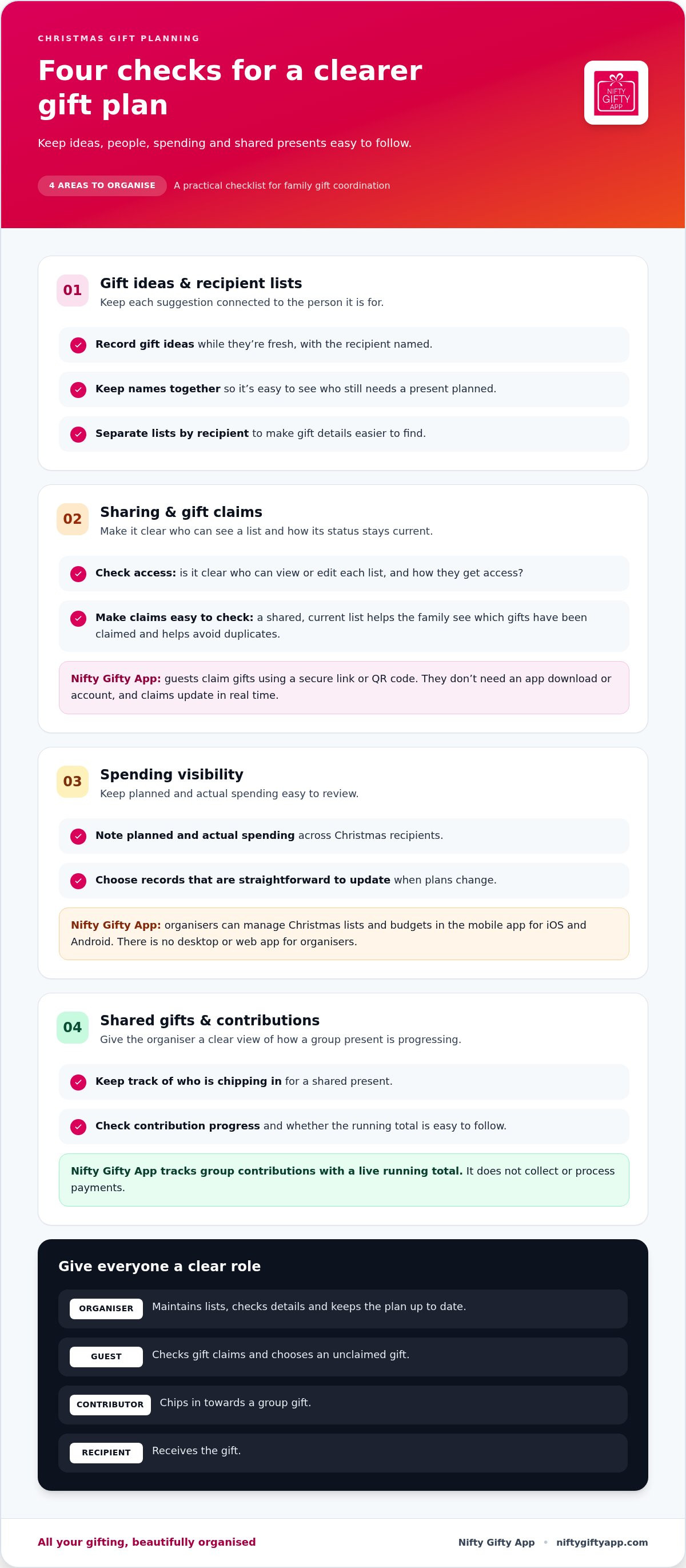
How to organise Christmas presents with shared lists and clear roles
A shared list is easier to use when people know what belongs there and who is responsible for keeping it current. Decide who maintains each recipient’s list, where relatives should add suggestions and how the organiser will review changes. That simple agreement gives everyone a routine and a clear place to find updates.
Set up a Christmas list people can use
Begin with the recipients, then add gift ideas under the right names. Make each entry specific enough to help someone act on it, and remove suggestions that are no longer relevant. If several relatives are organising gifts, assign one person to maintain each list. Updates then have a clear home, and the main organiser won’t need to reconcile competing versions.
Share the lists with the people taking part, and explain what you’d like them to do. For example, ask relatives to add suggestions beside the intended recipient instead of sending them in separate messages. Agree on a simple way to flag a gift they plan to organise, then check the list before choosing another. Guests claim gifts; recipients receive them.
Keep group gifts and spending visible
For a shared present, choose one coordinator to keep the group informed. That person can record who intends to contribute and keep the updates together. Contributors arrange their payments separately. Keeping the roles clear helps make follow-ups easier: the coordinator maintains the record, while each contributor handles their own part.
Set a regular time to review the occasion budget and update spending records as gifts are purchased. A quick check helps the organiser see which recipient lists need attention and whether recorded spending reflects current plans. Keep it practical. The aim is to have a useful overview, not to make every gift decision feel like a financial exercise.
Use this simple sequence to get everyone organised:
1. Set recipients: Make a list of the people the group is planning for, and assign a list owner where needed.
2. Collect ideas: Add suggestions under the right recipient and keep useful details together.
3. Share lists: Give participants access and explain where to add updates or note that they’re organising a gift.
4. Review plans: Check what’s already being organised before taking on another present.
5. Check spending: Update records after purchases and review the occasion budget at an agreed time.
Choose an update rhythm that suits your family, such as reviewing the lists when new ideas come in or before a group planning chat. It keeps responsibilities clear without adding unnecessary admin. If you’d like a dedicated place to coordinate your Christmas lists, see how Nifty Gifty App organises gifting.
Nifty Gifty App: Christmas lists and tracking in one place
After comparing personal lists, shared tools and dedicated gift-list apps, consider which option brings together the tasks you need. Nifty Gifty App helps organisers manage Christmas wishlists, keep occasion budgets and spending records in view, and track contributions for group gifts. Guests can take part through a secure link or QR code without installing the app.
For a family organiser, gift ideas and recipient lists sit alongside the practical details that are easy to lose track of. Add wishlist ideas as they come up, review what’s been purchased and keep spending records together. For a shared present, contributors can chip in while the organiser follows the live running total. The app tracks contributions, but doesn’t process payments. Contributors arrange payments separately.
Who may find Nifty Gifty App useful at Christmas?
Nifty Gifty App is useful for the relative coordinating presents for several family members, busy parents balancing multiple lists and families organising gifts across different locations. Guests can claim gifts from a secure link or QR code without downloading the app or creating an account. Claims update in real time, so organisers can see which presents have been claimed and guests can check the current list before choosing.
That shared view can help avoid duplicate presents, especially when several people are choosing for the same recipient. The app doesn’t make gift decisions for you. Instead, it gives the people coordinating a current reference point. Recipients receive their gifts; organisers maintain the lists, and contributors chip in when a present is shared.
If you’re choosing an app to organise christmas presents, consider who will maintain the lists and whether guests can take part without another download. Nifty Gifty App connects list-making, spending records and group-contribution tracking for organisers, with a simple way for guests to claim a gift.
What to know before getting started
Organisers use the Nifty Gifty App mobile app on iOS and Android. The organiser manages lists on a supported mobile device. Guests have a separate way to take part: they can open a secure link or scan a QR code to claim a gift without downloading the app or making an account. This lets one person keep the planning together while relatives have a straightforward way to join in.
The app records group contributions and displays a live running total, but it doesn’t collect or process payments. Keep those steps distinct: use the total to follow contributions, then arrange payment separately with the group. Pricing is a 14-day free trial, then $7.99 a year. Organise Christmas gifting with Nifty Gifty App.
Make your Christmas list easy to act on
Before plans gather pace, choose one person to maintain the gift list and agree how relatives will share updates. That small decision gives everyone a clear place to add ideas and check the plan, rather than relying on scattered messages. The right app to organise christmas presents should fit the way your family coordinates, not turn gifting into a project.
Think about what would make the next step easier for your group. Perhaps it’s keeping gift planning together, helping relatives take part from a distance or having a clearer view of shared arrangements. Start with the need that causes the most follow-up, then choose an approach that leaves more room to enjoy the thought behind each present.
Nifty Gifty App gives organisers a place to bring Christmas gifting together, with guest access designed to keep participation straightforward. Ready to put your lists in order? Organise Christmas gifting with Nifty Gifty App, and make space for the fun part: choosing thoughtful presents for the people you love.
Frequently Asked Questions
How much does Nifty Gifty App cost?
Nifty Gifty App includes a 14-day free trial, then $7.99 a year. Organisers can explore the gift-list and tracking features during the trial period before the annual subscription begins. For example, set up a Christmas list, add ideas as they come to mind and see how the app works for coordinating gifts.
Is Nifty Gifty App available on iPhone and Android?
Yes. Organisers use Nifty Gifty App on iOS and Android mobile devices. List creation and upkeep happen in the mobile app. Guests have a separate way to take part: they can open a secure link or scan a QR code to claim a gift without downloading the app or making an account. This makes it straightforward for relatives to join in from different locations.
Can I use Nifty Gifty App beyond Christmas?
Yes. Nifty Gifty App supports gifting for every occasion, including birthdays, weddings and baby showers. You can keep occasion lists and budgets for different celebrations rather than setting up a Christmas-only routine. That’s useful if you organise family gifts throughout the year and want to return to the same app for the next occasion. One app. Unlimited occasions. Every gift tracked.
Does Nifty Gifty App sell Christmas presents?
No. Nifty Gifty App helps you organise gift ideas and lists; it doesn’t sell gifts or gift cards. It isn’t a marketplace or a store-linked registry, and it doesn’t arrange wrapping, delivery or shipping. You choose and purchase presents separately. For example, add a gift idea for a relative to the relevant list, then arrange the purchase through the place you choose.
Does Nifty Gifty App collect money for group gifts?
No. Nifty Gifty App tracks group gift contributions and shows a live running total, but it doesn’t collect or process payments. Contributors arrange payment separately. The total records contributions; it isn’t money held in the app. For a shared present, the organiser can keep the record current while the group handles payment outside the app.
Can Nifty Gifty App recommend presents for my family?
No. Nifty Gifty App doesn’t provide AI gift recommendations or personal shopping. It helps organisers record and manage gift ideas, lists, budgets and group-contribution tracking. The people choosing and purchasing gifts decide what to give. For instance, if someone mentions a book they’d enjoy, the organiser can add that idea to the relevant list for the family to refer to.
Do guests need an account to claim a Christmas present?
No. Guests can open a secure list link or scan a QR code to claim a gift without downloading Nifty Gifty App or creating an account. Claims update in real time, so other guests can see that an item has been claimed when they check the list. The guest claims the present on the list; the intended recipient receives the gift.


Comments