
Annual Gift Planner Tools for Budgets and Purchase Tracking
An annual gift planner works better when it covers the whole year, not just the next birthday. List the occasions you celebrate, set a spending limit for each person or event, then record ideas, purchases and costs in one place. You’ll see what’s coming and what you’ve already organised.
Family birthdays, holidays and group gifts can easily get scattered across calendars and message threads. A simple plan brings the details together without taking the joy out of giving.
Learn how to set a realistic gift budget, organise your list by recipient and occasion, and track purchases throughout the year. You’ll also compare paper planners, spreadsheets, calendar reminders and apps to find a setup that suits you. The goal is practical: fewer last-minute decisions, a clearer picture of your spending and thoughtful gifts ready for every occasion.
Table of Contents
Gift budgets
A gift budget works best when it starts with the occasions you actually celebrate. List birthdays, Christmas, weddings, new babies and family milestones. Then set a limit for each occasion or recipient before choosing presents. This helps stop one special event from quietly taking over the rest of the year.
Start with the amount you’re comfortable setting aside for gifts across the year. Divide it among occasions according to your priorities, not a standard formula. For example, you might reserve more for close family birthdays and Christmas, then set aside smaller amounts for colleagues or casual invitations. Record each limit beside the occasion, and update your running total whenever you buy something.
Track the gift itself separately from any related costs you choose to include, such as a card or wrapping. If relatives are contributing to one present, record your share rather than counting the full group gift against your personal budget. A spreadsheet can calculate totals automatically, while a notebook or paper planner suits anyone who prefers to write down each amount.
A dedicated gift planner can bring occasions, ideas and spending limits into one view. Calendar apps are useful for date reminders, while spreadsheets make it easier to total and sort costs. You can combine them, for example, by tracking your budget in a spreadsheet and adding birthdays to your calendar.
How far in advance should I plan and purchase gifts for birthdays, holidays and special occasions? Add each date as soon as you know it, then give yourself enough lead time to find and prepare a suitable present. Katrina says she starts buying Christmas gifts from about July, which can spread decisions across the year rather than leaving them all until December.
Affordable gift ideas depend on the recipient, occasion and amount you’ve set. Choose a useful kitchen item for a new home, a favourite book for a birthday, or a handwritten card and shared meal for a close relative. For children, consider an art activity or outdoor game; for a colleague, a small desk plant or tea selection may suit a modest limit. These are ideas, not fixed prices, so compare each choice with your planned limit.
Before buying, check your list for gifts already chosen and note the item, recipient, occasion and amount spent. If a gift costs more than planned, adjust another occasion only if that still fits your priorities. A clear record makes the trade-off visible while there’s still time to choose another option.
Gift lists and tracking purchases
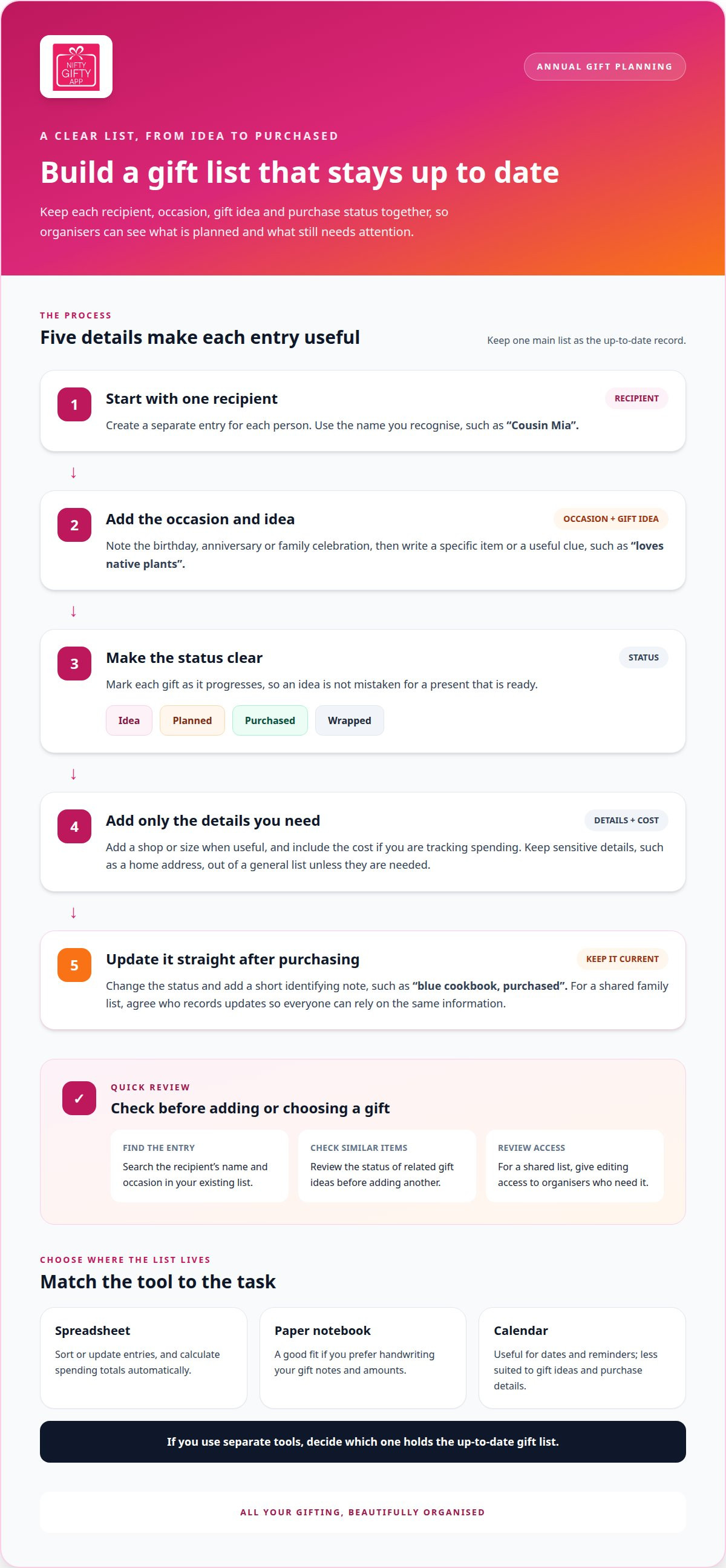
A useful gift list needs more than names and birthdays. Create a separate entry for each recipient, then record the occasion, gift idea, purchase status and any useful notes. For example, “Auntie May, birthday, gardening gloves, idea saved” shows what you’re considering without suggesting it’s already purchased. Update the status as the plan progresses.
Choose one main place to keep your list. Google Sheets and Apple Numbers suit organisers who want columns they can sort or update. A paper notebook works well if you prefer handwriting. Google Calendar or Apple Calendar can hold dates and reminders, but they’re less suited to tracking gift ideas and purchase details. If you use separate tools, decide which one holds the up-to-date list.
Keep entries consistent so your list is easy to scan:
Recipient: Use the name you recognise, such as “Cousin Mia”.
Occasion: Add the birthday, anniversary or family celebration.
Gift idea: Note a specific item or a clue, such as “loves native plants”.
Status: Mark it as an idea, planned, purchased or wrapped.
Details: Record the shop or size only when useful, and add the cost if you’re tracking spending.
After buying a gift, update its status straight away. Add a short identifying note, such as “blue cookbook, purchased”, so another organiser can see what’s covered. For a shared family list, agree on who updates it. Having one person record changes can prevent relatives from acting on old information.
What are common gift-planning mistakes, privacy risks and ways to avoid duplicate gifts? Common slips include leaving ideas without a status, keeping separate lists and forgetting to record a purchase. Use one shared list, update it promptly and limit access to people organising gifts. Keep sensitive details, such as a home address, out of a general gift list unless they’re needed.
Shared spreadsheets are handy for coordinating relatives in different cities, but check who can view or edit the file. Give editing access only to organisers who need it, and avoid putting private notes beside a recipient’s name. For a surprise, use neutral labels such as “birthday idea” rather than details that reveal the present.
Before adding an idea, search for the recipient’s name and occasion in your existing list. Then check the status of similar items. If Dad already has a coffee grinder marked “purchased”, add a different idea instead of relying on memory. A quick review before family catch-ups also helps organisers spot gaps and coordinate without a long message thread.
Conducting a regular review helps catch forgotten entries while there is still time to adjust plans. The annual gift planner bundle includes a handy daily tracker to streamline your routine. Use a daily check-in to review upcoming occasions, mark purchases and note anything that still needs wrapping or collection. Keep the tracker aligned with your main gift list, rather than treating it as a second place to store competing details. If plans change, update both records at once, or remove the extra tracker from the process so organisers know which version to trust.
Gift-planning apps, templates and tools
The right tool depends on whether you need date reminders, purchase tracking or a paper record. A printed planner, spreadsheet or mobile app can each support a different part of gift organising. Choose one main place for gift details, then add calendar reminders if dates need extra visibility. That way, you won’t have to rely on scattered notes as an occasion approaches.
Paper gift planner: A printed planner suits people who like handwriting ideas and seeing upcoming occasions on a page. The Gift Planner is described as a 6x9 planner, with birthday planning estimated to cover 3-5 years at minimum. Check that its layout has room for recipients, dates, gift ideas and purchase status. It’s also easy to keep beside a family calendar.
Calendar apps: Google Calendar and Apple Calendar are useful for birthdays, anniversaries and reminders. Gift reminders can be scheduled a week before, a day before and on the morning of an occasion. Use each alert to prompt a specific action, such as reviewing a gift idea or checking whether a present is ready.
Spreadsheet templates: Google Sheets and Apple Numbers suit organisers who want to sort details by recipient, date or status. Add columns for ideas, purchase progress and notes. A template can be adapted to family routines, but it needs regular updates to remain accurate. Use consistent status labels so entries are easy to scan.
Notes apps: Apple Notes and Google Keep work well for short lists, such as ideas gathered during a family conversation. They’re quick to update on a phone. A long list can be harder to sort by date or status, so keep separate notes for distinct occasions or recipients.
Gift-planning apps: A dedicated app may bring occasions, ideas and progress into one place. Look for clear fields that match your routine and reminders that prompt useful actions. If relatives share the organising, consider whether updates are easy to follow and whether the list suits everyone involved.
For a straightforward setup, pair one planning tool with one reminder tool. For example, keep recipient details in a spreadsheet and use Apple Calendar for important dates. If you prefer paper, write ideas in a planner and set phone alerts for occasions that need preparation.
Test your choice with an upcoming birthday. Add the recipient, date, gift idea and status, then see how easily you can find each detail later. The right setup should make the next step clear, whether you’re comparing ideas, preparing a present or reviewing what’s already organised.
How do I create an annual gift planner step by step?
Set aside one session to build your gift plan, then review it at the start of each month. Use a notebook, Google Sheets or Apple Numbers for the main record. Keep the format practical so you can add an occasion or update an idea as soon as it comes to mind.
Choose your main tool. Pick paper if handwriting helps you keep track, or a spreadsheet if you want to sort details. Save the file somewhere you can reach from the device you use most. Keep gift notes out of scattered screenshots and message threads.
Gather the dates. Review your calendar, family messages and existing notes for birthdays, anniversaries, weddings and celebrations. Ask relatives for dates you don’t know. Add the recipient’s name beside each occasion so you can tell similar events apart.
Arrange occasions by month. Scan January through December and place each entry in its month. If your family celebrates across Christmas Eve, Christmas Day and Boxing Day, record them separately. A month-by-month view makes it easier to see when several events sit close together.
Add useful recipient notes. Record interests, preferred colours or other clues that could guide a future choice. For example, “Aunty Jo enjoys native plants” gives you a starting point without deciding the exact present. Keep personal details off shared pages unless other organisers need them.
Write down ideas and progress. Add possible gifts beside each occasion, then label each idea as planned, purchased or ready to give. Katrina says she starts buying Christmas gifts from about July. Use that example to choose when you want to begin preparing for your own holiday plans.
Set reminders for preparation. Use Google Calendar or Apple Calendar to prompt an action before an event. For example, create a reminder to review present ideas or prepare a card. A short note such as “check gift plans for Mia” makes the alert useful at a glance.
Review the plan monthly. At the beginning of each month, look ahead at upcoming occasions and update changed details. Remove ideas you’ve ruled out, record new dates and mark presents that are ready. This regular check keeps your list current without making it a daily task.
Treat the plan as a working record, not a fixed schedule. A date may stay the same while an idea or family arrangement changes. Update details when you learn something new, so the next action remains clear.
What are important Australian occasions and dates to include in an annual gift planner?
Start with the dates your household celebrates, then add Australian occasions that matter to your family. Birthdays and anniversaries are personal dates; Christmas and community celebrations bring their own planning needs. For each event, record the recipient, date, gift idea and any preparation notes.
Use this checklist as a starting point, not a rulebook. Your family’s traditions, faiths and friendships determine which occasions belong in the calendar.
Birthdays and anniversaries: Record each person’s date, including relatives who live interstate or overseas. Add wedding anniversaries and milestone birthdays if your family marks them with a present.
Christmas: Keep Christmas Eve, Christmas Day and Boxing Day as separate calendar entries. That makes it easier to plan family gifts, host gifts and any celebrations spread across several gatherings.
Mother’s Day and Father’s Day: Add these occasions if your family celebrates them. Include step-parents, grandparents or other important carers where appropriate, and note who is coordinating each gift.
Easter: Include Easter if it’s part of your family’s gift-giving traditions. A note for children’s gifts, a shared meal or a host present can make the purpose of each entry clear.
Weddings, engagements and new babies: Add an entry as soon as an invitation or announcement arrives. Record the couple or family, the event date and whether relatives are organising a shared present.
Graduations and personal milestones: A graduation, new job or retirement may call for a card or gift. Add it once plans are known, rather than relying on a social media reminder later.
Community and cultural occasions: Include events such as Diwali, Lunar New Year or Eid when friends or family celebrate them. Use the date relevant to that year, and note whether a greeting, visit or gift is customary for your relationship.
Dates can shift between years for occasions tied to a lunar or annual calendar. Add each entry using the date for the year you’re planning, then review it during your yearly calendar check. Google Calendar can flag upcoming dates, while a paper planner gives you a month-by-month view. A spreadsheet can group occasions by recipient or type.
For Australia-wide events, don’t assume every household celebrates the same way. Australia Day and ANZAC Day may be meaningful dates for some families, but they aren’t automatically gift-giving occasions. Add them only if your household marks them with a card, visit or present.
Finally, scan each month for clusters of occasions. If several birthdays fall near Christmas, note which gifts need earlier planning. That quick calendar check helps you keep the right people and dates in view.
Nifty Gifty App
Nifty Gifty App brings gift lists and group gifting together in one place. It helps organisers manage shared presents, including when relatives live far apart. Use the mobile app on iOS or Android to set up occasions and gifts. Guests can claim gifts through a secure link or QR code, without downloading the app or creating an account, and claims update in real time.
For a group present, contributors can contribute while the app tracks the running total. Payments are arranged separately: the app doesn’t collect or process them. Use it alongside your budget and calendar to keep gift coordination in one place.
Visit Nifty Gifty App to organise your gifting in one place.
Make your next occasion more personal
After an occasion, capture small details that could make future gifts more thoughtful. Note a recipient’s new hobby, a colour they’ve started wearing or something they’ve mentioned wanting to try. Add these clues while they’re fresh, so next year’s annual gift planner starts with ideas that feel personal rather than generic.
You can also use the moment to refine how your household shares the organising. If one relative handles cards while another coordinates a family present, record that preference for next time. Clear roles make it easier to include everyone without asking the same questions again.
Keep the process light. A brief note after a birthday or family gathering is enough to build a useful record over time. When the next occasion comes around, you can focus on the person and celebration instead of reconstructing details from memory.
Ready to bring gift coordination into one place? Explore Nifty Gifty App and find a simple way to organise your next occasion.
Frequently Asked Questions
What is an annual gift planner and what should it include?
An annual gift planner is a year-round record of the occasions and gifts you want to organise. Alongside dates and recipient names, note who’s coordinating each occasion and when you’ll review the plan. For example, if siblings share family responsibilities, assign one person to organise a parent’s celebration. This makes the plan useful across a household, not just as a personal reminder list.
How can I set a yearly gift budget and track spending?
Choose a total you’re comfortable setting aside, then divide it among the people and occasions that matter to you. Track planned and actual spending separately to see which commitments have changed. After an occasion, compare the recorded cost with the planned amount and adjust future allocations if needed. Keep receipts or order confirmations until you’ve entered the final cost, especially when a gift involves several purchases.
How can I organise gift ideas, sizes, preferences, and past gifts for each person?
Create a private note for each person and distinguish confirmed details from ideas. Record a clothing size only if you know it’s current; label a guess as something to check in a natural conversation. Add past gifts with the occasion and year, then note whether the recipient used or enjoyed them. For example, “received a gardening book at Christmas” is more useful for planning future presents than a bare title.